What Is a Seed Phrase? How the 12 to 24 Words Work
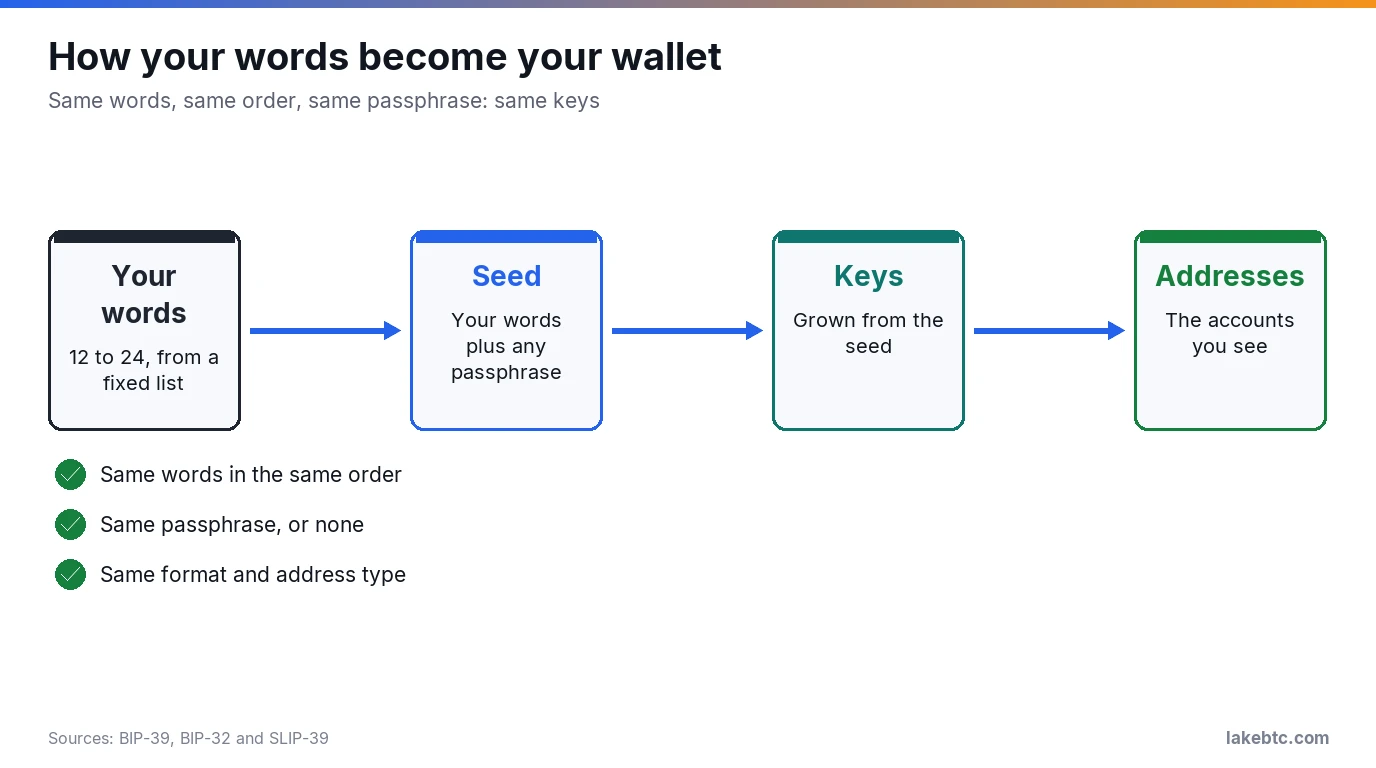
A seed phrase is the 12 to 24 words your wallet shows you at setup. Those words rebuild every key your wallet made from them, so whoever holds them holds the coins.
The list of words your wallet made you write down at setup is your seed phrase, also called a recovery phrase or, in MetaMask, a Secret Recovery Phrase. It isn’t a password you can reset. It’s the wallet itself, in a form you can write on paper.
Lose your phone and the words bring everything back on a new device. Hand them to someone else and they can do the same thing, from anywhere, and empty the wallet before you notice.
So the first job is simple. Copy the words by hand, in order, and keep them offline.
Before you close the setup screen
- 🟢 Write the words by hand, numbered, in the exact order shown.
- 🔴 Never type them into a website, chat or support form. Anyone who has them can take your coins.
- 🟡 No photos, no cloud notes, no password manager.
- 🟢 Added a passphrase? Store it apart from the words. Without it, the words open a different wallet.
In this article
- What the words actually do
- Why the order and every word matter
- 12, 20 or 24 words: which phrase do you have?
- The optional passphrase
- How to write it down and store it
- Restoring a wallet from your phrase
- The scam that asks for your words
- Seed phrase, private key and password
- Lost your phrase, or someone saw it?
- Frequently Asked Questions
- What to do next
What the words actually do
The widely used standard for these words is BIP-39. The wallet starts with a large random number and turns it into words. Each word stands for a number from 0 to 2047, so the words come from a fixed list of 2,048. BIP-39 strongly advises wallets to stick to the English list.
When you restore, the process runs the other way. Your words, plus an optional passphrase, are stretched into a 512-bit seed. From that seed the wallet grows a whole tree of key pairs, and from those keys it derives your addresses. Nothing else is stored in the phrase. Your balances live on the blockchain, and the keys are rebuilt from the words every time.
That’s why the phrase is so powerful. It doesn’t unlock one account or one coin. It unlocks every account the wallet ever created from it, on every network that wallet supports.
The list itself is built to be hard to get wrong. The first four letters of each word identify it, and look-alike pairs were avoided on purpose: “build” is on the list, “built” isn’t. If your handwriting is messy, those first four letters are what count.
Why the order and every word matter
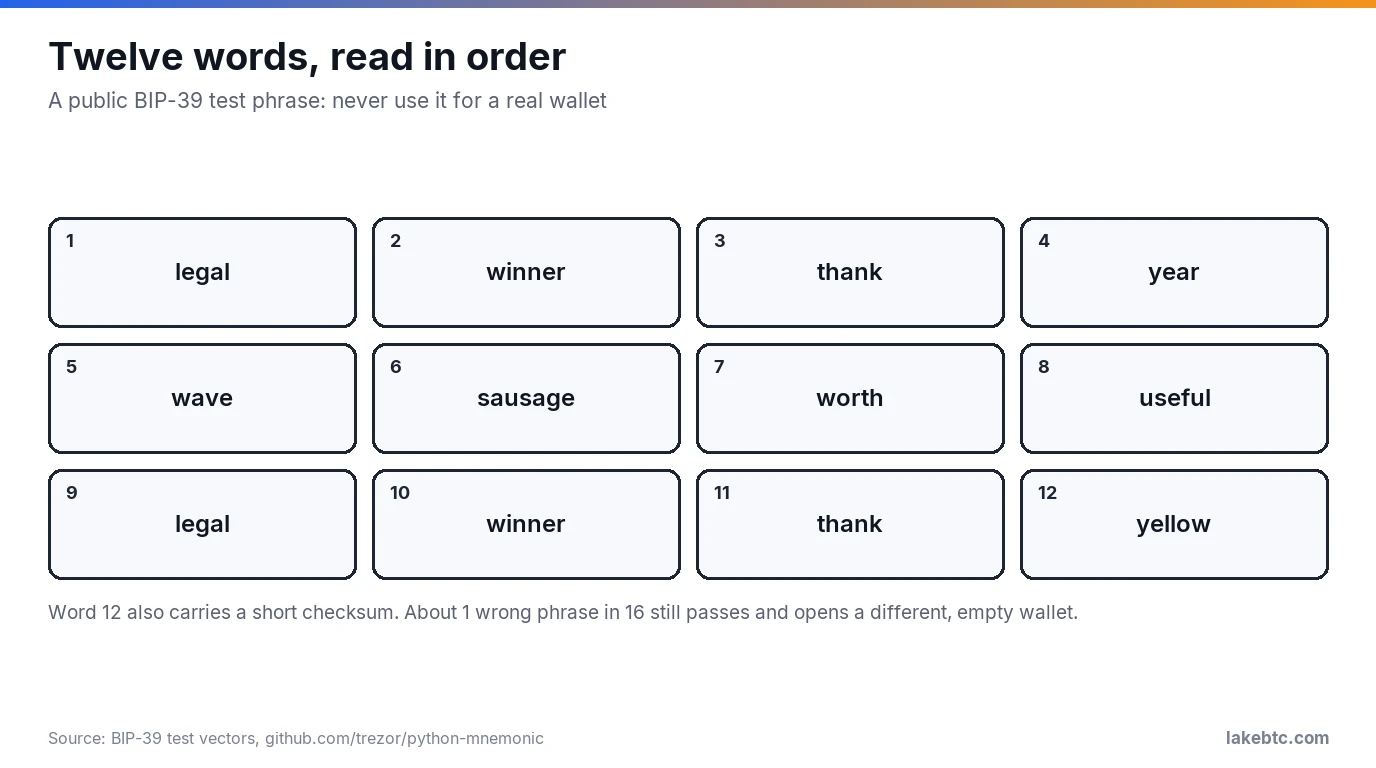
The words are read in sequence, like digits in a long number. Swap two of them and you get a different number. The last word also carries a checksum, and BIP-39 tells wallet software to warn you when that checksum fails. That warning is the “invalid phrase” message people run into.
Don’t count on that warning, though. The checksum is short. On a 12-word phrase it’s 4 bits, so about 1 wrong phrase in 16 still passes, and the wallet opens a different, empty wallet instead of showing an error. On 24 words it’s 8 bits, which still lets about 1 error in 256 through.
The card above uses a public test phrase from the BIP-39 reference code. Never fund it. Real phrases look just like it, though: ordinary words, sometimes repeated, in no sentence you’d recognize.
An order mistake can make a good phrase look broken. In one forum thread, a wallet rejected a 24-word phrase even though every word was on the list. The replies pointed to two causes: the wallet had shown the words in columns, and a wrong word can still be a valid word, such as “iron” for “lion.” Number every word as you write it, and copy the numbers too.
12, 20 or 24 words: which phrase do you have?
BIP-39 allows 12, 15, 18, 21 or 24 words. MetaMask creates 12 words, Ledger devices create 24, and some other wallets use 18. Trezor adds a second standard, SLIP39, with 20-word backups. Here’s how to tell what you’re holding.
| Your backup | Standard | Where you’ll see it | Restores in |
|---|---|---|---|
| 12 words | BIP-39 | MetaMask’s default; Trezor Model T and Safe 3 bought before June 2024 | Most BIP-39 wallets |
| 24 words | BIP-39 | Ledger devices; the Trezor Model One default | Most BIP-39 wallets |
| 18 words | BIP-39 | Some other wallets | Most BIP-39 wallets |
| 20 words, one card | SLIP39 single-share | The default on Trezor Safe 5, Safe 7 and Safe 3 from June 2024 | Wallets that support SLIP39 |
| Several 20-word cards | SLIP39 multi-share | Trezor, up to 16 shares with a threshold such as 3 of 5 | Wallets that support SLIP39, with enough shares |
| Any other count (15 and 21 are BIP-39 too) | Not a BIP-39 length | Wallet-specific formats | The wallet app that created it |
Not every 12-word phrase is BIP-39, though. Electrum makes its own 12-word seeds that aren’t BIP-39, even though they use the same word list. Restore an Electrum seed in Electrum.
Is a longer phrase safer? In practice, no. Trezor’s backup guide says guessing a backup of any length would take longer than the age of the universe, as long as the words are truly random. The real risks are a lost card and a stolen one, not a lucky guess.
One more thing about long phrases. Splitting yours into two halves and storing them in two places feels clever, but each half still narrows an attacker’s search. If you want a backup split across places, SLIP39 multi-share is built for that.
The optional passphrase
BIP-39 lets you add a passphrase on top of the words. Without one, the wallet quietly uses an empty passphrase. With one, the same words open a completely different wallet.
That’s both the strength and the trap. Every passphrase produces a valid wallet, so a typo doesn’t give you an error. It gives you a new, empty wallet. Trezor’s guide puts it plainly: a mistyped passphrase opens a different wallet, most likely empty, and it can’t be changed, removed or recovered.
On a Trezor the passphrase can be up to 50 characters, and the device doesn’t store it. You type it each time. If you use one, write it down and keep it apart from the words. A thief who finds only the words then gets the wallet without the passphrase, not the one your coins sit in, and you still have a way back if you forget it.
Skip the passphrase if you’re new to self-custody. It protects against a stolen card, but it adds a second thing you can lose.
How to write it down and store it
Do this once, carefully, while the setup screen is still open.
- Write each word by hand on paper, with its number. Don’t screenshot the screen.
- Check the spelling of every word against the screen, then check the order a second time.
- If your wallet has a backup check, run it now. Trezor Suite has a Check backup feature for exactly this, and Ledger has a Recovery Check app.
- Store the paper somewhere offline that only you can reach, and that you’ll still remember in five years.
- If you added a passphrase, store it in a different place from the words.
Keep the phrase out of cloud documents, email, notes apps and password managers. A copy that lives online can be stolen without anyone touching your house. A handwritten one can’t.
Paper burns and fades, which is why some people stamp their words into metal. Whatever you use, the rule doesn’t change: numbered words, correct order, offline.
Restoring a wallet from your phrase
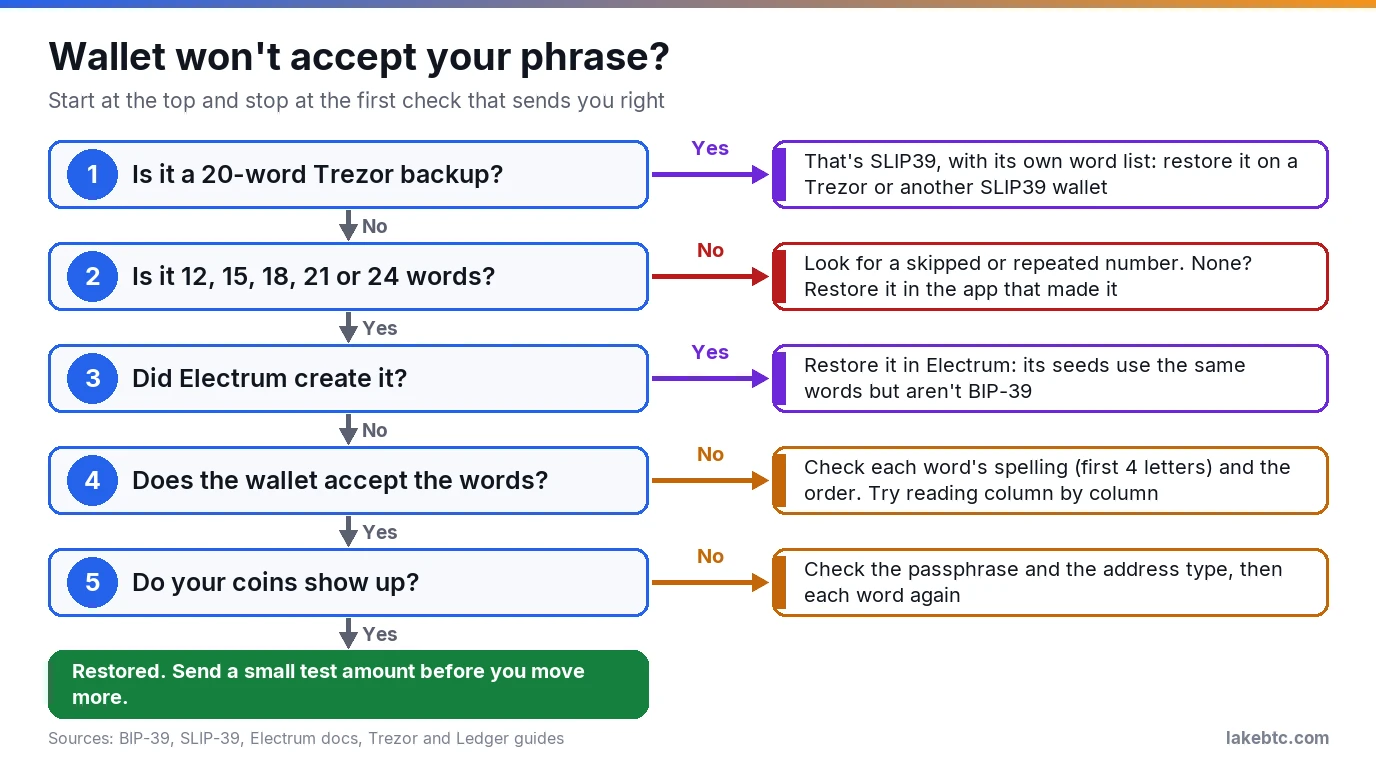
Restoring is the reverse of setup. You choose restore or import on the device or in the wallet’s official app, enter the words in order, and add the passphrase if you used one. The wallet rebuilds the same keys and finds your coins on the blockchain.
BIP-32 was written so wallets can be moved between different apps, so a BIP-39 phrase from one wallet usually works in another.
There’s one catch. The phrase doesn’t record which address type the old wallet used. A new app can rebuild the right keys and still show a zero balance, because it’s looking at a different set of addresses. If that happens, don’t panic and don’t send anything. Look for an address type or account setting in the new app, and match what the old one used.
If nothing matches, check each word again. A wrong word that slips past the checksum also opens a different, empty wallet.
Once the balance shows up, send a small test amount before you move everything. A wrong address or network can’t be undone.
The scam that asks for your words
Seed phrase scams try to get your words typed somewhere a stranger can read them. It can be someone posing as support in a chat, or a message saying your wallet needs to be verified. Our guide to spotting fake Coinbase emails covers the email version.
So keep one rule for where your words may go:
- A hardware wallet that takes the words on its own screen, such as a Ledger or a Trezor Safe: the words go back in only on the device itself, when the device asks for them. On a Ledger, the phrase is never to be entered on a computer or smartphone. The older Trezor Model One works differently: you type its words into Trezor Suite on your computer, in the order the device shows, and only after the device asks.
- A phone or browser wallet, such as MetaMask, Coinbase Wallet or Trust Wallet, or a screenless card such as Arculus: the words go in only in the wallet’s official app, installed from the maker’s own site or its official app-store link. Cloned copies of the MetaMask app are built to record your phrase.
- Nowhere else. Not a website, form, chat or email, and not for anyone who asks, including “support.” MetaMask tells users never to give the phrase to anyone, even someone who says they’re from MetaMask Support, because anyone who has it controls the funds.
A second version of the scam hands you the words instead. A device that arrives with recovery words already printed on a card or filled in is compromised: whoever wrote them down can empty the wallet as soon as you fund it. A genuine Ledger never comes with a recovery phrase or PIN already set, so don’t use one that does. Real backup words appear for the first time on your own device’s screen, during setup.
Seed phrase, private key and password
These three are easy to mix up, and they don’t protect the same thing.
- Seed phrase: rebuilds the wallet and every account made from it, on a new device.
- Private key: controls one account. In MetaMask each account has its own key, derived from the phrase. An account you imported with a separate key isn’t, so your phrase won’t bring it back. Back up that key on its own.
- Wallet password: unlocks the app on one device. In a MetaMask wallet you set up with a phrase, it doesn’t recover anything, and if you forget it, the phrase gets you back in.
Some MetaMask wallets work differently. MetaMask also lets you set up a wallet with a Google, Apple or Telegram login, where the phrase is split into encrypted pieces backed up online. In that setup your password and that login together are the way back in. Lose the password and the wallet is gone, unless you revealed the phrase and wrote it down. So reveal it and back it up anyway.
So in a wallet you set up with a phrase, a forgotten password is an inconvenience. A lost or leaked phrase is not.
Lost your phrase, or someone saw it?
Someone else has seen it. Treat the wallet as theirs. Set up a new wallet with a new phrase on a device you trust, and move everything there before the other person does. If a backup may be compromised, assume it is and move your funds right away. The old phrase is burned for good, so don’t use it again.
You lost it, but the wallet still opens. The coins are still yours, but you’re one lost phone or broken device away from losing them, and whoever finds the paper can take them. Move the funds to a new wallet with a new phrase, then back that one up properly. On a Trezor, that means moving the funds first, then wiping the device and creating a new wallet.
You lost it and the wallet won’t open. Without the phrase, the funds can’t be recovered: not by MetaMask, not by Coinbase, not by Trezor. None of them can rebuild the wallet for you.
Frequently Asked Questions
Can I use my seed phrase in any wallet?
A standard BIP-39 phrase works in most wallets that follow BIP-39, though you may need to pick the same address type the original wallet used. A 20-word Trezor backup needs a wallet with SLIP39 support, and a 12-word Electrum seed goes back into Electrum. If the words back up a hardware wallet, restore them on a hardware wallet. Typed into a phone or computer app, the phrase can be exposed to online threats.
Does Coinbase use a seed phrase?
Not for a Coinbase exchange account. There, Coinbase manages the private keys, and you can recover the account if you forget your password. Coinbase Wallet, the separate self-custody app that was called the Base app until September 2026, is different. A wallet you set up there with a recovery phrase gets 12 words that Coinbase never sees and can’t recover for you. Newer Base smart wallets sign in with a passkey instead.
Can I make up my own seed phrase?
Don’t. BIP-39 says the standard isn’t meant for sentences people invent, which are known as brainwallets. Words a person picks follow patterns, while the wallet’s random words don’t, and that randomness is what makes guessing hopeless.
Is it safe to keep my seed phrase in a password manager?
MetaMask advises against it. Its guide calls cloud storage and password managers vulnerable to hacks and points you to a physical place only you can reach.
Does the passphrase count as part of the seed phrase?
It’s a separate secret that changes the seed. The same words with no passphrase and with a passphrase lead to two different wallets, and each one needs its own backup plan.
What if I write my phrase in a different language?
Translating the words into another language’s wordlist creates a completely different seed under BIP-39, so the translation won’t restore your wallet. Keep the words exactly as the wallet showed them.
Is “recovery phrase” the same thing as a seed phrase?
Yes. Wallets use different names for it: recovery phrase, seed phrase, mnemonic, wallet backup, or MetaMask’s Secret Recovery Phrase. Trezor calls its version a wallet backup.
What to do next
If your phrase is written down and stored, the next step depends on where your coins sit today. Moving them off an exchange? Follow our steps to move crypto from Coinbase to a cold wallet, where you’ll create and back up exactly this kind of phrase.
Comparing hardware wallets first? Our cold wallets for XRP compared, the D’CENT wallet review and the Arculus wallet review cover the devices. Using a phone wallet instead? Read whether Coinbase Wallet is safe before you fund it.
Drafted with AI by the LakeBTC Editorial Team, then edited and fact-checked against the sources linked in the text. How we use AI · Report an error
Update history 1
- Updated the name of Coinbase’s self-custody wallet app: Coinbase renamed it from the Base app back to Coinbase Wallet on September 10, 2026.