Arculus Wallet Review: The Cold Storage Card Explained

Arculus is a metal, card-shaped cold storage wallet that pairs with a mobile app and uses tap-to-sign NFC authentication instead of a screen. It is a solid fit for beginners and NFT holders who want simple, portable self-custody, but power users who insist on verifying transactions on a dedicated hardware screen, or who want fully open-source firmware, will likely be better served by Ledger, Trezor, or a similar device. This review walks through how the Arculus Cold Storage Wallet is built, how its tap-to-sign authentication actually works at the protocol level, what it costs to get started, and where it fits relative to established hardware wallets like Ledger, Trezor, and the card-format Tangem.
In this article
- At a Glance: Arculus Cold Storage Wallet
- What Is Arculus? Company & Product Background
- The Card Form Factor: Arculus’s Signature Angle
- How Arculus Works: Three-Factor Authentication Explained
- Setup Walkthrough
- Supported Assets: What Can You Store on Arculus?
- Multi-Card Strategy: An Angle Competitors Don’t Cover
- Fees & Pricing
- Security Analysis: Is Arculus Safe?
- Arculus vs. Other Cold Wallets
- Pros and Cons
- Who Should (and Shouldn’t) Use Arculus
- Frequently Asked Questions
At a Glance: Arculus Cold Storage Wallet
Snapshot box
- Device type: Hardware cold storage (secure-element card) paired with a companion mobile app
- Form factor: Credit-card-sized metal card, no screen or buttons
- Authentication: Three-factor, biometrics, PIN, and physical NFC tap
- Secure chip: CC EAL6+ certified secure element, according to Arculus’s official product page
- App availability: iOS and Android, downloaded separately from the card
- Custody model: Self-custody, keys are generated and stored on the card’s chip, not held by a third party
- Governing law: The Arculus Card and Wallet Agreement is governed exclusively by New Jersey state law, per the company’s legal notices page
Quick verdict
Arculus suits people who want a straightforward, screenless self-custody option that fits in a physical wallet next to a debit card, particularly beginners and NFT holders who value simplicity over on-device transaction verification. Power users who insist on reading transaction details on a dedicated screen, or who prefer fully open-source firmware, may find Ledger, Trezor, or a similar screen-based device a better match.
What Is Arculus? Company & Product Background
The CompoSecure connection
Arculus is a brand operated by CompoSecure, which since a January 2026 corporate rebrand and business combination with Husky Technologies has operated as a reporting segment of GPGI, Inc. (NYSE: GPGI); CompoSecure’s former standalone ticker, CMPO, was retired as part of that change, according to an SEC filing tied to the rebrand. CompoSecure has a long history manufacturing premium metal payment cards for banks, which explains why Arculus’s cold storage product looks and feels like a metal credit card rather than a typical USB dongle.
What the product actually is
The Arculus Cold Storage Wallet is not a standalone device in the way a Ledger Nano is. It is a system made up of two parts: the physical card, which houses a secure-element chip that generates and stores private keys, and the Arculus mobile app, which handles the user interface, balance display, and transaction construction. Neither piece functions as a wallet on its own; the card has no independent connectivity, and the app alone cannot authorize a transaction without a tap from the card.
How it differs from “app wallet” and “hardware wallet” categories
Software-only wallet apps keep keys on the phone itself, exposed to whatever risks the device’s operating system carries. Traditional hardware wallets isolate keys inside a dedicated chip accessed through USB or Bluetooth, often with an on-device screen for verification. Arculus sits between these models: it isolates the private key inside a certified chip like a traditional hardware wallet, but it relies entirely on the paired phone’s screen for reading transaction details, since the card itself has no display.
The Card Form Factor: Arculus’s Signature Angle
Why a card instead of a USB or Bluetooth device
Most hardware wallets on the market are small plastic or metal sticks meant to be plugged in or paired over Bluetooth. Arculus instead chose a form factor that slides into a standard wallet slot alongside a bank card. This design choice trades some functionality, namely a screen, for portability that mirrors an item people already carry daily.
The CC EAL6+ secure element, explained
Arculus’s card uses a secure-element chip that carries a CC EAL6+ certification, as stated on the company’s official product page. Common Criteria Evaluation Assurance Levels (EAL) are an internationally recognized framework for grading how rigorously a chip’s security design has been tested against tampering and extraction attacks. EAL6+ sits toward the higher end of that scale and is the same general certification class used in some government ID cards and high-security payment chips.
Durability and everyday convenience
Because the card is built from durable card-stock materials rather than plastic housing a circuit board and connector port, it is less prone to the physical wear that affects USB-based wallets over years of use. There is no port to corrode and no cable to lose.
Trade-offs of the card format
The absence of a screen and buttons is the clearest limitation. Screen-based hardware wallets let a user visually confirm the exact recipient address and amount on a display the malware on a connected computer cannot alter. Arculus users instead confirm transaction details on the paired phone’s screen, meaning the phone’s app layer becomes part of the trust chain in a way it would not be with a device that displays its own confirmation screen.
How Arculus Works: Three-Factor Authentication Explained
Factor 1: Biometrics
Opening the Arculus app requires Face ID or Touch ID (or the Android equivalent), which gates access to balances and wallet management before any card interaction occurs.
Factor 2: Six-digit PIN
A PIN set during onboarding authorizes sensitive actions inside the app, adding a knowledge-based factor distinct from the phone’s own biometric lock.
Factor 3: NFC tap-and-hold
The final factor is physical possession of the card itself, confirmed by holding it against the back of the phone to complete an NFC (Near Field Communication) exchange with the app.
NFC deep dive: what actually happens during a tap
NFC is a short-range wireless protocol that lets two devices exchange small amounts of data when held within a few centimeters of each other. When a user taps the Arculus card to sign a transaction, the phone sends the unsigned transaction data to the card over NFC. The card’s secure-element chip performs the cryptographic signing internally and returns only the signed transaction back to the phone, the private key itself never travels over the NFC link and never touches the phone’s memory. This is the same general principle used by hardware wallets connected via USB or Bluetooth: the signing operation happens inside an isolated chip, and only the output of that operation leaves the device.
This design is also at the center of a recurring community debate, visible in threads such as the r/Arculus discussion on whether the product qualifies as cold storage. The nuance raised there is fair: because the card must be tapped against an internet-connected phone to function, the overall system is not air-gapped in the strictest sense a fully offline signing device would be. What remains true is that the private key is generated and stored exclusively inside the card’s secure element and is never exposed to the internet-connected phone in unencrypted form, the phone only ever sees transaction data and signatures, not the key itself. Whether that qualifies as “cold storage” depends on how strictly one defines the term, and reasonable users can weigh that trade-off differently.
Setup Walkthrough
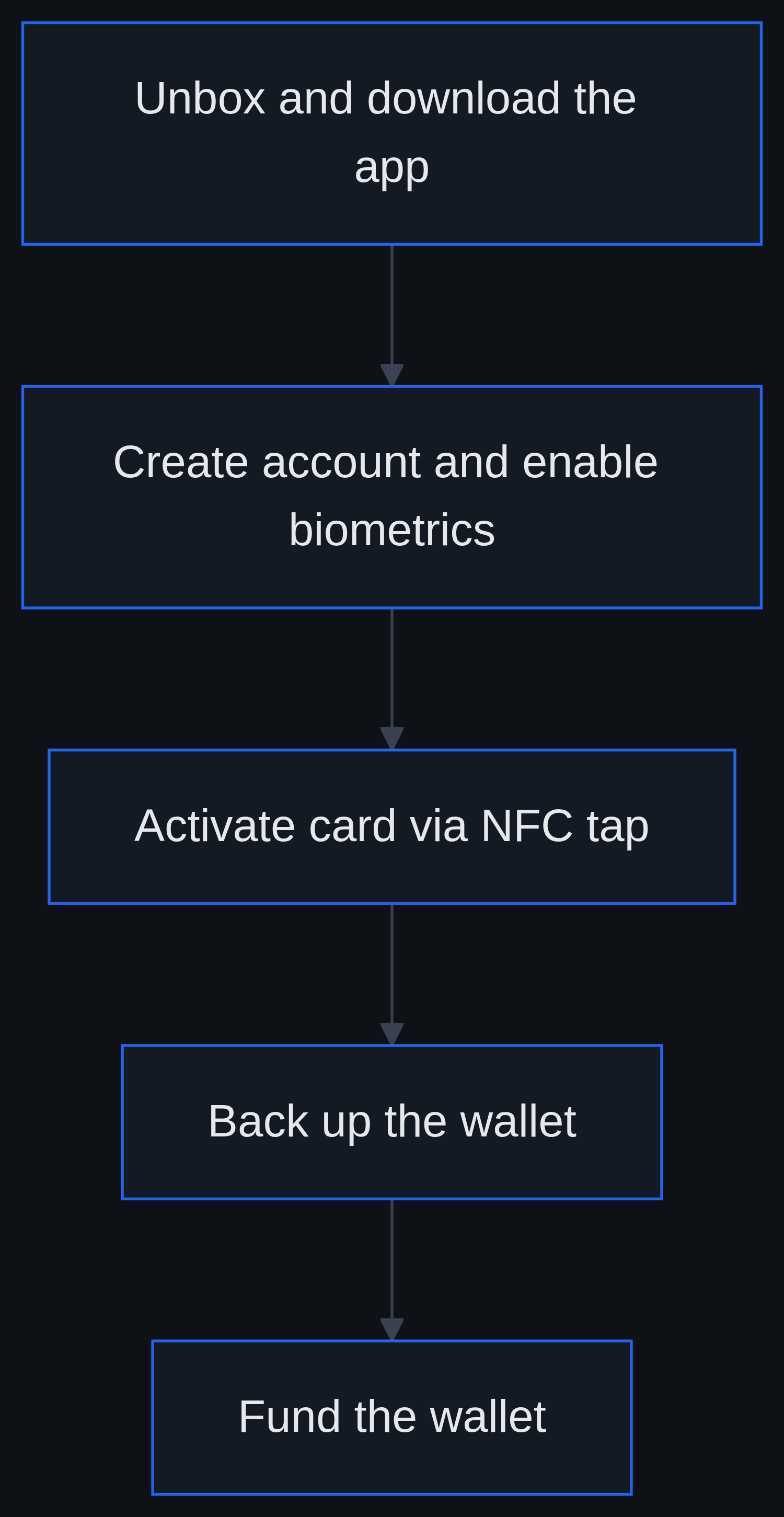
- Unbox and download the app. The Arculus Wallet app is a separate download from the App Store or Google Play; the card itself has no onboard software to install.
- Create an account and enable biometrics. Users set up Face ID/Touch ID and a six-digit PIN during first launch.
- Activate the card. Tapping the new card against the phone triggers on-chip key generation, the keys are created inside the secure element and never leave it in unencrypted form.
- Back up the wallet. Arculus does not display a traditional 12- or 24-word recovery phrase the way many software wallets do; instead, backup relies on the card-based recovery approach the app walks through during setup. Users should follow the in-app backup prompts carefully rather than assuming no recovery step exists simply because no seed phrase is shown on screen.
- Fund the wallet. Once active, the wallet can receive transfers from an exchange or be funded through the app’s buy/swap features. Readers who have not yet purchased crypto can review the guide to buying crypto in the US or compare platforms in the best crypto exchanges roundup before transferring funds to a self-custody wallet.
Common setup pitfalls
- Losing the only card with no backup card purchased. Because recovery is tied to the physical card system rather than a written seed phrase, losing a single card without a second backup card in place can be more disruptive than losing a seed-phrase-based wallet’s paper backup.
- Assuming “no seed phrase shown” means “no recovery method.” The absence of an on-screen 24-word phrase does not mean there is no backup process, it means the recovery approach is structured differently, and users should complete the in-app backup steps rather than skip them.
- Phishing impersonation. As with most self-custody brands, imitators sometimes pose as Arculus support. Users should treat unsolicited requests for PINs, card details, or recovery information as fraudulent.
Supported Assets: What Can You Store on Arculus?
General coverage
Arculus supports a broad range of major cryptocurrencies and tokens through its app, with coverage that has expanded over time as the company has added support for additional networks and tokens.
Does Arculus support XRP?
Yes, Arculus has offered a limited-edition XRP-branded version of its Cold Storage Wallet, announced through the company’s official social channels. The XRP-branded edition signals dedicated marketing around XRP support; whether this branding implies any functional difference from the standard card has not been independently confirmed by Arculus. Readers weighing whether to hold XRP long-term rather than just store it may also want to read Is XRP a Good Investment? for a broader look at the asset itself.
NFT storage
The app also includes NFT viewing and management functionality, letting holders see NFT holdings tied to supported networks within the same interface used for coins and tokens.
Multi-Card Strategy: An Angle Competitors Don’t Cover
Redundancy across cards
Because the card format is inexpensive to duplicate relative to buying multiple full hardware devices, some users choose to activate a second card as a backup tied to the same wallet, reducing the single-point-of-failure risk of relying on one physical card.
Estate planning use case
A second or third card can also be set aside for inheritance planning, giving a trusted family member or executor a physical access path to holdings without needing to transcribe or store a written seed phrase, though any such arrangement should still be paired with clear instructions, since a card alone is not useful without the associated PIN and app access.
Shared or business custody
CompoSecure also markets Arculus-branded authentication products toward business use cases. Firms considering multi-person custody arrangements should treat card-based backup as one layer of a broader access-control policy rather than a complete substitute for formal multi-signature or custodial arrangements.
Fees & Pricing
Arculus is positioned as a one-time hardware purchase rather than a recurring subscription service, based on how the product is marketed on the company’s official store. There is no confirmed recurring fee tied to owning the card itself. Buyers should also budget for standard blockchain network fees charged by the network itself (not by Arculus) when sending transactions, and for the cost of any additional backup cards purchased for redundancy.
Subscription costs versus a one-time purchase
Publicly available marketing describes the wallet as a hardware purchase rather than a subscription product.
Security Analysis: Is Arculus Safe?
Direct answer
Arculus’s core security architecture, a certified secure element that isolates private key generation and signing, reflects the same design principle used by well-regarded hardware wallets. The CC EAL6+ designation on its chip is stated by Arculus on its official product page and reflects a recognized industry framework.
What the certification confirms, and what it doesn’t
An EAL6+ rating, as described by Arculus, speaks to the chip’s resistance to hardware-level tampering and extraction attacks. It does not, on its own, certify the security of the companion mobile app, the backend infrastructure behind buy/swap features, or the user’s own phone environment. Arculus has not published a large body of independently reviewed third-party penetration-test reports in the way some longer-established wallet makers have, which is a relevant consideration for security-conscious buyers.
Known limitations
- Phone dependency: Every signing action routes through the paired smartphone, meaning malware or a compromised app environment on that phone is part of the overall attack surface.
- No on-device screen: Transaction details are confirmed on the phone rather than on the card itself, unlike wallets with dedicated hardware displays.
- Newer market entrant: Arculus has a shorter public track record than some competitors that have operated in the hardware wallet space for close to a decade.
How it compares on “most trusted” claims
Ledger and Trezor are frequently cited in industry discussion as established names with long operating histories in the dedicated hardware wallet category, while Tangem is the closest direct competitor in card form factor. Arculus’s certified secure element puts it in credible technical company, but “most trusted” comes down to track record and transparency as much as chip specification, and readers should weigh each vendor’s own published security documentation before deciding.
Arculus vs. Other Cold Wallets
| Wallet | Form Factor | On-Device Screen | Firmware Approach | Backup Method |
|---|---|---|---|---|
| Arculus | Metal card + app | No | Closed, secure-element based | Card-based recovery system |
| Ledger | USB/Bluetooth device | Yes | Closed-source secure element | Seed phrase |
| Trezor | USB device | Yes | Open-source firmware | Seed phrase |
| Tangem | Card + app | No | Closed, secure-element based | Multi-card backup |
When a card format makes sense, and when a screen is safer
A card-based wallet like Arculus or Tangem suits users prioritizing portability and simplicity in day-to-day self-custody. A screen-equipped device such as Ledger or Trezor may be the more defensible choice for users who specifically want to visually verify transaction details on hardware isolated from the connected phone or computer, since that screen removes the paired device’s display from the trust chain entirely.
Pros and Cons
Pros
- Tap-to-use simplicity with no cables or Bluetooth pairing required
- Credit-card form factor fits into an existing physical wallet
- Three-factor authentication combining biometrics, PIN, and physical possession
- No traditional seed phrase displayed on screen to be photographed or overheard
- CC EAL6+ certified secure-element chip
Cons
- No on-device screen for independent transaction verification
- Full reliance on the paired phone’s app and operating system
- Closed-source elements limit independent code review compared with open-source alternatives
- Shorter public track record than some longer-established hardware wallet brands
Who Should (and Shouldn’t) Use Arculus
Arculus is a reasonable fit for beginners moving off exchange custody for the first time, NFT collectors who want a straightforward mobile-first interface, and anyone who values a slim, wallet-sized backup they will actually carry. It is less suited to power users who want to read transaction data on a dedicated hardware screen isolated from any phone or computer, or to those who prefer fully open-source firmware they, or the wider community, can audit line by line.
Frequently Asked Questions
Is Arculus a safe cold wallet?
Its private-key generation and signing rely on a CC EAL6+ certified secure-element chip, a recognized security standard as described by Arculus. The wallet’s overall safety in practice also depends on the security of the paired phone and app, since transaction verification happens on that phone’s screen rather than on the card itself.
What is the most trusted crypto cold wallet?
There is no single universally agreed answer. Ledger and Trezor are frequently cited for their multi-year operating history and screen-based verification, while Tangem is often compared directly to Arculus as the closest card-format competitor. Trust depends on a combination of certification, transparency, and track record that each buyer should weigh individually.
Is there a monthly fee for Arculus?
Arculus is marketed as a one-time hardware purchase rather than a subscription product, with no confirmed recurring fee tied to owning the card.
Can Arculus hold XRP?
Yes. Arculus has released a limited-edition XRP-branded version of its Cold Storage Wallet through official co-marketing. Whether this branding reflects any functional difference from the standard card has not been independently confirmed by Arculus.
Is Arculus considered cold storage if it uses a smartphone app?
The private key is generated and stored exclusively inside the card’s secure element and is never exposed unencrypted to the connected phone, which is the core principle behind cold storage. Because the card must interact with an internet-connected phone to sign transactions, however, it is not air-gapped in the strictest sense, a nuance frequently discussed in community forums such as r/Arculus. Whether that distinction matters depends on how strictly a given user defines “cold storage.”