Is Coinbase Wallet Safe? What Coinbase Can and Can’t Recover
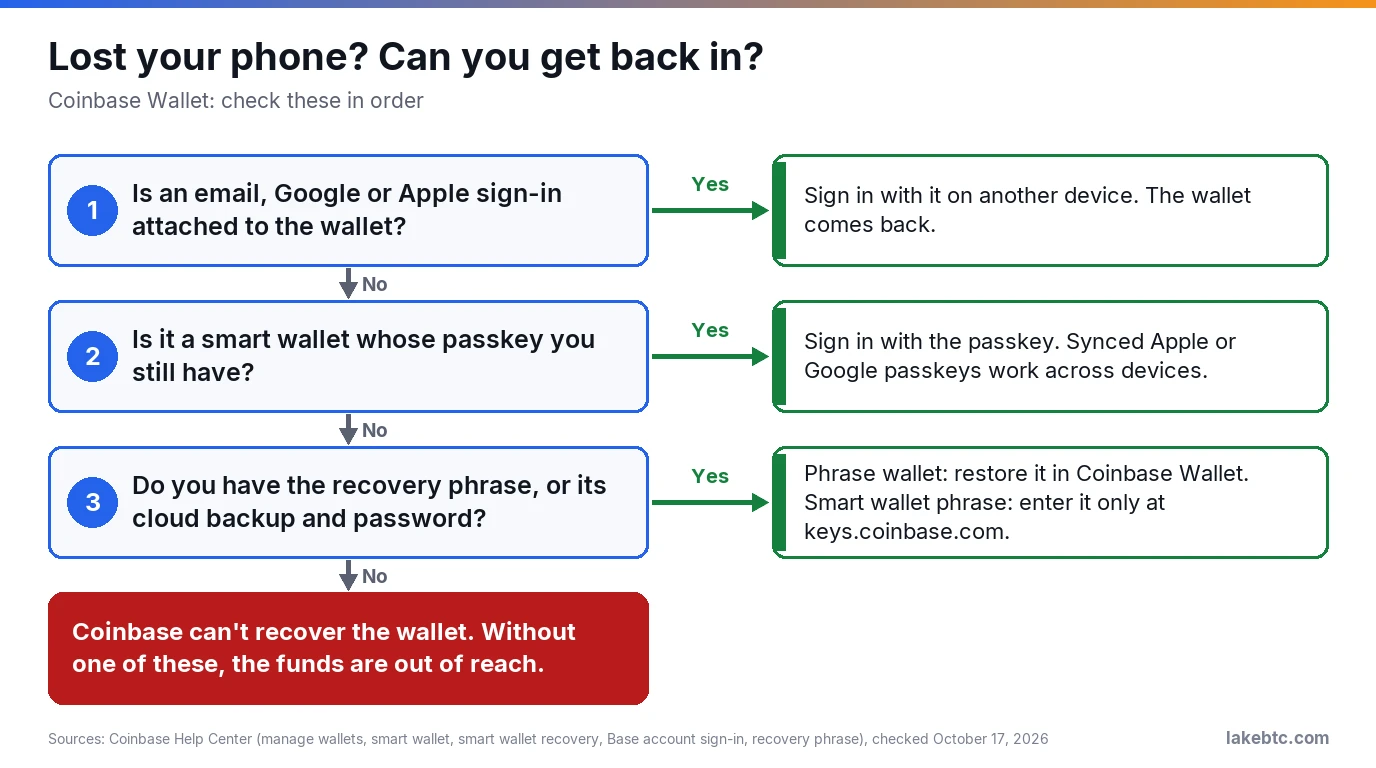
Yes, as self-custody software: Coinbase can’t move your coins or undo a send. The risks are a leaked phrase or login, a lost backup and what you sign.
Coinbase Wallet is self-custody: you control the wallet’s private keys, not Coinbase. Coinbase never holds or moves what’s in it, which also means nobody at Coinbase can fix your mistakes.
If the icon on your phone says Base, it’s the same app. Coinbase renamed Coinbase Wallet the Base app, then switched back to the old name on September 10, 2026, as the app’s App Store release notes show. Some Coinbase pages still say Base, so you’ll see both names for a while.
Your safety comes down to three things: which kind of wallet you set up, where its backup lives, and what you approve. Start with the first. Each wallet’s settings page shows its type, and the type decides what you can get back after a lost phone.
Before you trust it with real money
- 🟢 Coinbase Wallet is self-custody. Coinbase can’t move your coins, and it can’t undo a send to the wrong address.
- 🟡 What Coinbase can recover depends on your wallet type: an email or Google/Apple sign-in, a passkey, or a recovery phrase. Check the type in the wallet’s settings.
- 🔴 Type a recovery phrase only into an official wallet app installed from the maker’s own link, and a smart wallet’s phrase only at keys.coinbase.com. No real support agent will ever ask for it.
- 🟡 An approval lets an app spend your tokens later. Check Token Allowances in settings and revoke the ones you don’t use.
In this article
- Coinbase Wallet vs a Coinbase account: which is safer?
- Your wallet type decides what Coinbase can recover
- What Coinbase can and can’t do for you
- How people actually lose crypto from wallets like this
- How to set up Coinbase Wallet safely
- If your recovery phrase was seen, or you lost it
- Using the old Coinbase Wallet? Here’s what changed in 2026
- How it compares with MetaMask, Trust Wallet and hardware wallets
- Frequently Asked Questions
- What to do next
Coinbase Wallet vs a Coinbase account: which is safer?
They’re two products under one brand. A Coinbase account is an exchange: you sign up with an email and password, verify your identity, and Coinbase manages the private keys. Forget the password and you can recover the account. Coinbase Wallet is self-custody, and you don’t need a Coinbase account to use it.
| Coinbase account (exchange) | Coinbase Wallet (self-custody) | |
|---|---|---|
| Who holds the keys | Coinbase manages them | You control them, not Coinbase |
| Forgot your password | You can recover access to the account | Coinbase can’t recover the extension password. Your recovery phrase, or another way in you set up, gets you back |
| Someone steals your credentials | Coinbase auto-enrolls accounts in two-factor authentication | Anyone with your recovery phrase can take the funds, and nobody can stop them |
| Tax forms | Custodial platforms report sales on Form 1099-DA, starting with 2025 transactions | The 1099-DA rules cover brokers that take possession, and Coinbase doesn’t. You report these trades yourself |
Neither one is safer across the board. The account forgives your mistakes, like a lost password. The wallet takes Coinbase out of the picture, since Coinbase can’t move funds in it on your behalf. Keep your trading money on the exchange and your savings somewhere you’ve backed up properly, and you get both kinds of protection.
Your wallet type decides what Coinbase can recover
Coinbase Wallet holds several kinds of wallet under one account, and each one comes back differently after a lost phone. The chart at the top of this page shows the order to check.
| Wallet type | Signs in with | Works with | If you lose your phone or computer |
|---|---|---|---|
| Email or social wallet (Coinbase calls it a CDP wallet) | A 6-digit code sent to your email, or your Google or Apple account | EVM networks, Solana and Bitcoin | Sign in with the same email or account on another device |
| Smart wallet | A passkey, such as an Apple or Google passkey, or email | EVM networks only | A synced passkey still works. Otherwise you need an attached email or social sign-in, or a recovery phrase you made earlier |
| Recovery phrase wallet | 12 words | EVM networks, Solana and Bitcoin | Only the phrase, or its encrypted cloud backup, brings it back |
| Browser extension | A password on that computer, backed by a recovery phrase | Chrome or Brave browsers | Coinbase can’t recover the password or the phrase |
You can sign back into the email or social wallet from another device, and Coinbase’s App Store listing says it adds multi-factor authentication. Coinbase names it after its developer platform, CDP, and that platform’s docs say CDP wallets’ private keys are created and used inside a sealed enclave in the cloud that even admins can’t log into, so they aren’t stored on your phone.
The trade-off is that your email, Google or Apple account becomes part of the way in. Give that account its own strong sign-in protection, because it now guards your crypto too.
Smart wallets use passkeys instead of words. A passkey synced through iCloud Keychain, Google Password Manager or a password manager like 1Password generally doesn’t need a backup. One tied to a single device, such as a hardware key, a Chrome profile or Windows Hello, can be lost with that device.
You can create a recovery phrase for a smart wallet, but only while you still have the original passkey. It costs a network fee on each chain you use. Enter that phrase only at keys.coinbase.com: Coinbase warns that using it on any other site exposes your funds. Smart wallets work on EVM networks only, and you can’t open one in the Coinbase app or the extension.
Recovery phrase wallets run on 12 words, and in the app you add one by importing a 12-word phrase. Each phrase wallet has its own phrase, so back each one up separately.
What Coinbase can and can’t do for you
Self-custody cuts both ways. Here’s what Coinbase can’t do:
- See or recover your recovery phrase. Coinbase will never ask for it or have access to it.
- Move your funds for you, or get you back into a phrase wallet once the words are gone.
- Reverse a transaction. Funds sent to the wrong address stay there.
And here’s what the app does do:
- It warns you before you open an app that’s been flagged as dangerous.
- It shows which tokens an app is asking to withdraw before you approve, and estimates how your balances will change before an app transaction. The estimate is a simulation, with no promise that it’s accurate, and Coinbase lists Ethereum and Polygon as the networks these two checks currently support.
- It hides tokens known to be malicious from your home screen, since scammers airdrop tokens to lure people to fake sites.
- It can lock the app with biometrics or a passcode: when it opens, before each transaction, or both.
How people actually lose crypto from wallets like this
Since Coinbase can’t move funds in your wallet, a thief needs your phrase, your sign-in or your signature, and the scams below go after exactly those. The FBI’s 2025 Internet Crime Report counted 181,565 complaints involving crypto, with $11.366 billion in reported losses.
Fake investment platforms. Crypto investment fraud was the biggest source of losses to Americans in 2025, with $7.2 billion in reported losses. It usually starts with a text, a social media message, an ad or a dating app match. You’re coached to send crypto to a platform that shows fake profits, then charged “taxes and fees” when you try to withdraw. If someone you met online walks you through installing a wallet to fund their platform, stop there.
Fake support. Tech and customer support scams involving crypto cost victims $1.23 billion in the same report. No legitimate support agent will ask for your recovery phrase, but callers can sound convincing. Never import a phrase someone else gives you, either: whoever made it can take whatever you put in that wallet.
Scammers also arrive with real details. In May 2025, Coinbase disclosed in an SEC filing that an attacker had paid support contractors or employees to pull customer data, including names, addresses, phone numbers, emails and balance snapshots. The incident didn’t involve passwords or private keys. A caller who knows your balance can still be a scammer.
Free tokens. Scammers drop tokens into wallets to send you to a site where you “claim” them. The claim step asks you to sign or approve something that hands over your funds. Leave tokens you don’t recognize alone.
Approvals and signature requests
Before an app can move your tokens, it asks for an approval, also called a token allowance. Many apps ask for an unlimited one, and a malicious contract can use it to withdraw the entire balance it has access to. That can’t be undone, and an approval you granted years ago can still be used today.
Not every approval looks like a transaction. Some tokens support a permit, which changes the allowance through a signed message. So a “sign this message” request with no network fee can still give an app the right to spend your tokens. Read every signature request as carefully as a send.
To see what you’ve approved, open Settings, then Token Allowances, and pick the Tokens or NFTs tab, as Coinbase’s token management page lays out. Revoking is itself a transaction, so leave enough funds in the wallet to pay its network fee. Disconnecting an app isn’t the same thing: its approval keeps working until you revoke it.
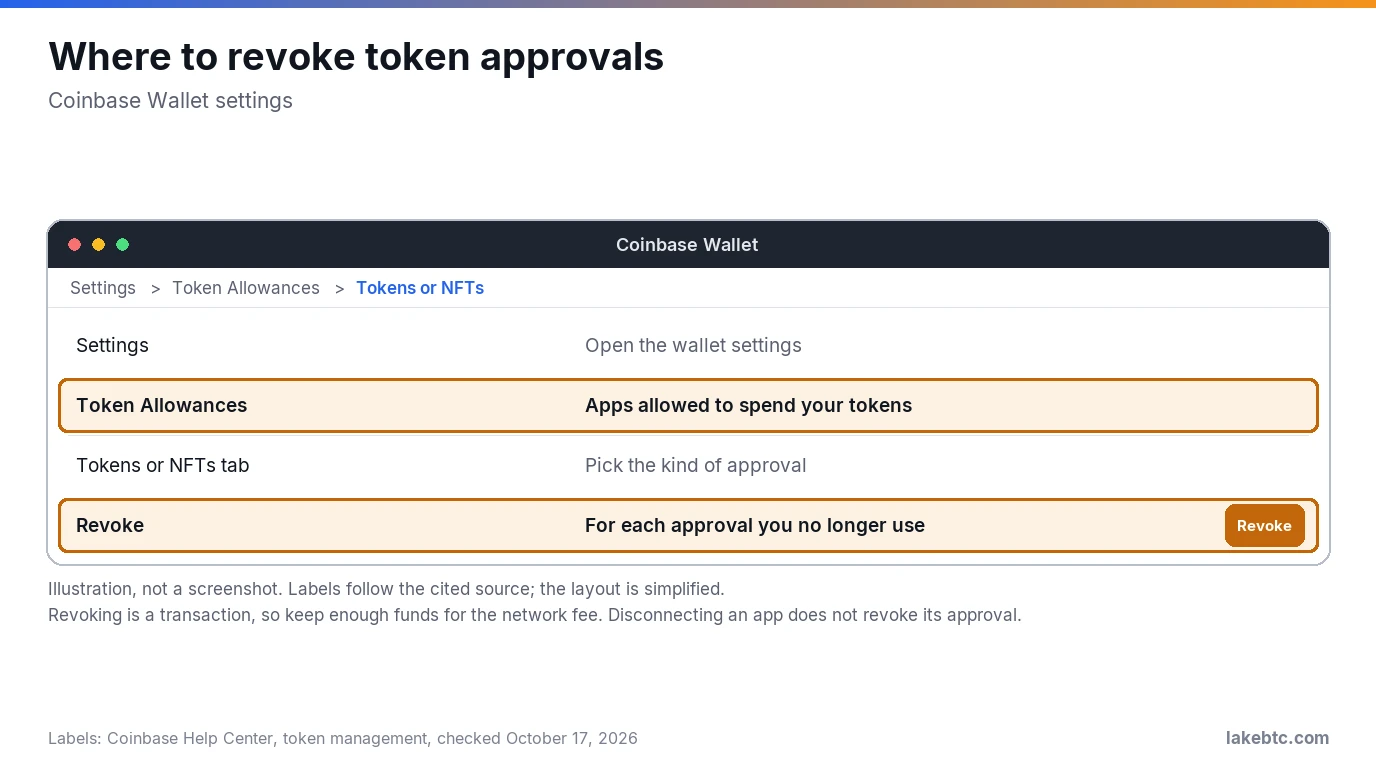
Smart wallets, which Coinbase now also calls Base accounts, add one more kind: spend permissions, which let an app withdraw and spend your tokens up to an amount and schedule you agree to. You manage those on the web at account.base.app: from Settings, choose Settings for your Base Account, then Manage permissions, pick the app and the permission, select Revoke and sign with your passkey.
If you’ve connected a Ledger to the extension, watch for a blind signing warning on the device. It means the Ledger can’t decode the contract call and shows only a raw hash. Ledger’s own checklist starts with keeping app activity in a separate wallet from your long-term holdings.
How to set up Coinbase Wallet safely
- Install it from the official store link. Get the app from the App Store or Google Play, and the extension through Coinbase’s own download page. Cloned wallet apps exist: copies of MetaMask’s app, for one, are built to record your phrase.
- Give yourself a way back in. On a smart wallet, add an email or social sign-in, or create a recovery phrase while you still have the passkey. On a phrase wallet, the phrase is the only way back.
- Back up the phrase on paper. Write the words by hand, in order, keep the paper offline, and never screenshot them. Coinbase also offers an encrypted Google Drive or iCloud backup, locked with a password you create, and recommends it alongside the written copy. That copy lives online, and if you lose its password, the backup can’t get you back in. If you use it, give it a password you use nowhere else and keep that password apart from the paper.
- Turn on Security Lock. From the Assets tab, open Settings, then Security Lock under Security. Pick biometrics or a passcode, and require unlock when Opening the app and when Making a transaction.
- Keep savings off your phone. A hardware wallet stores the private keys offline, and it’s considered the most secure way to hold them. In the Coinbase Wallet extension, choose I already have a wallet, then Connect Ledger wallet. The Ledger’s 24 words stay on paper and on the device. Never type them into Coinbase Wallet.
- Use a second wallet for apps. You can hold several wallets under one account. Use one for apps, airdrops and experiments, and keep your main balance in another. Before you connect it anywhere, check that the site’s address is the app’s real one, as Coinbase’s scam guide advises.
- Check the network before every send. Send only on a network Coinbase Wallet supports, listed in the classic wallet section below, because crypto sent on any other network can be lost. Copy the address fresh from the receiving wallet, never from your transaction history, and check its start, middle and end: address poisoning scams plant look-alike addresses there that match only the start and end. Send a small test amount first when the sum matters.
If your recovery phrase was seen, or you lost it
Someone saw it. Anyone with your phrase can take the funds, and neither Coinbase nor anyone else can stop them. Create a fresh wallet and send your balance there right away. Treat the old phrase as burned for good. If someone got into the email, Google or Apple account behind an email wallet, secure that account and move the funds the same way.
You lost it, but the app still opens. Your coins are fine for now, but you’re one lost phone away from losing them. If the paper is simply gone, open Settings, pick the wallet, choose Show Recovery Phrase and write the words down again. If it could turn up in someone else’s hands, make a fresh wallet instead and move the funds.
You lost it, and you’re locked out. Work through the chart at the top: an attached sign-in, then a passkey, then a cloud backup. If none of those exist, Coinbase can’t bring the wallet back. Be wary of anyone who offers to recover it for a fee: fake recovery services target people who’ve already lost money.
Using the old Coinbase Wallet? Here’s what changed in 2026
Coinbase set August 15, 2026 as the closing date for the classic wallet, and some networks it supported aren’t in Coinbase Wallet. The dropped ones are:
- Dogecoin (DOGE) and Litecoin (LTC)
- Bitcoin Cash (BCH), Ethereum Classic (ETC), Stellar (XLM) and XRP
- Blast, Celo, Core DAO, Flare, Fantom Opera, Gnosis, NEAR, Plasma, Ronin, Sei, Sonic, Story, Unichain, VeChain and zkSync Era
- Networks you added yourself
Coins on those networks are still yours, at the same addresses, and your recovery phrase keeps working with no deadline. To reach them, import the phrase into another wallet that supports the network. Don’t send or receive anything on them inside Coinbase Wallet, since that can result in loss. If you still have wallets in legacy mode, go to Settings and choose Sync My Wallets.
The networks Coinbase Wallet sets up for you are Arbitrum, Avalanche C-Chain, Base, Bitcoin, BNB Chain, Ethereum, Monad, Optimism, Polygon, Robinhood Chain, Solana and Zora. Smart wallets don’t support Bitcoin or Solana, and the networks Coinbase’s smart wallet page lists are Base, Ethereum, Optimism, Arbitrum, Polygon and Avalanche C-Chain. On a smart wallet, check before you receive on any other network: open the Send/Receive tab, select Receive and search for the asset, as Coinbase suggests.
How it compares with MetaMask, Trust Wallet and hardware wallets
With each of these wallets, keeping a way back in is up to you. What differs is its form, and whether anyone can help when it’s gone.
| Wallet | What brings it back | Can the company recover it? |
|---|---|---|
| Coinbase Wallet | An email or Google/Apple sign-in, a passkey, or a recovery phrase, depending on the wallet type | Only through a sign-in you attached; otherwise no |
| MetaMask | A 12-word Secret Recovery Phrase, or a Google, Apple or Telegram login plus your MetaMask password | No |
| Trust Wallet | A 12-word recovery phrase, or on a SWIFT wallet, a passkey linked to your iCloud or Google account | No: the phrase or your cloud account brings it back |
| Ledger | 24 words, never typed into a computer or phone | Only with Ledger Recover, an optional paid subscription |
| Trezor | A 12-, 20- or 24-word backup, entered on the device on newer models | No |
| Any other self-custody wallet | Usually a recovery phrase of 12 or 24 words | Usually no: lose it, and no one can help you recover access |
Frequently Asked Questions
What happened to Coinbase Wallet?
The app carried the Base app name for a while, then went back to Coinbase Wallet in September 2026, and people who had it installed didn’t need a different app. The bigger change hit older wallets: the classic wallet closed on August 15, 2026, and coins on the networks it dropped, such as Dogecoin, Litecoin and zkSync Era, no longer show in the app. They’re still yours, and you reach them by importing your recovery phrase into a wallet that supports them.
What is the downside of Coinbase Wallet?
You’re the safety net. There’s no password reset for a phrase wallet, no chargeback on a bad send, and nobody to call if you sign a malicious approval. Smart wallets also can’t hold Bitcoin or Solana.
Is Coinbase Wallet a cold wallet?
No. A cold wallet creates and keeps its keys offline. Coinbase Wallet runs as a phone app and a browser extension, and an email wallet’s keys are created and used in a cloud enclave, so every type works online. That makes it a hot wallet. You can get offline signing for the extension by connecting a Ledger.
Can the IRS see my Coinbase Wallet?
Every Bitcoin transaction is public and permanently recorded, so an address’s history isn’t private. Broker reporting on Form 1099-DA, which began with 2025 transactions, covers platforms that take possession of your crypto, and Coinbase doesn’t hold what’s in your wallet. You still answer the yes-or-no digital asset question on your federal return, and wallet trades count toward it.
What is the safest crypto wallet to have?
There isn’t one answer for every amount. For money you can’t afford to lose, a hardware wallet such as a Ledger or Trezor keeps the keys offline and shows the transaction on its own screen, which phone malware can’t change. Read that screen before you approve: when a Ledger can’t decode a contract call, it shows a blind signing warning and only the raw hash. For spending money and onchain apps, a phone wallet like Coinbase Wallet is fine once its backup is in order.
Is Coinbase Wallet safe from hackers?
Coinbase never has your recovery phrase, so a breach at Coinbase can’t hand it out, and Coinbase’s 2025 support-data theft didn’t touch private keys. Attackers come after you instead, through phishing sites, fake support and approvals. On an email or social wallet, that email, Google or Apple account is part of the way in, so guard it as closely as the wallet.
What to do next
Open Coinbase Wallet and check the wallet type on its settings page. Then close the gap that type leaves: attach an email or social sign-in to a smart wallet, or check a phrase wallet’s words against your written copy. Look at Token Allowances while you’re there.
If the balance would hurt to lose, follow our steps to move crypto from Coinbase to a cold wallet. Our guide to what a seed phrase is explains why those words are the wallet itself. And if a message “from Coinbase” tells you to act fast, check it against these signs of a fake Coinbase email.
Drafted with AI by the LakeBTC Editorial Team, then edited and fact-checked against the sources linked in the text. How we use AI · Report an error
Update history 1
- Rewritten and re-checked against primary sources.