How to Move Crypto from Coinbase to a Cold Wallet

In this article
- Quick Answer: Moving Crypto From Coinbase to Cold Storage in Brief
- Coinbase Exchange vs. Coinbase Wallet vs. Cold Wallet, Know the Difference
- Before You Start: Pre-Transfer Checklist
- How to Move Crypto From Coinbase to a Cold Wallet, Step-by-Step
- How to Transfer Crypto From Coinbase to Coinbase Wallet (Alternate Route)
- Understanding Network Fees When You Move Bitcoin (or Other Crypto) Off Coinbase
- Choosing the Right Cold Wallet for What You’re Moving
- Common Pitfalls When Sending Crypto From Coinbase to Cold Storage
- Post-Transfer Security Checklist
- Tax and Record-Keeping Considerations When Moving Crypto Off an Exchange
- FAQ
Quick Answer: Moving Crypto From Coinbase to Cold Storage in Brief
Moving crypto from Coinbase into a hardware wallet is an on-chain send: you generate a receive address on your cold wallet, select the matching network on Coinbase, and broadcast the transaction to the blockchain rather than to another Coinbase account. According to Coinbase’s own help documentation, on-chain sends move funds off the platform to an external address and are irreversible once confirmed, and they incur network fees, whereas transfers between two Coinbase users are processed off-chain, are instant, and carry no transaction fee.1 Because on-chain sends cannot be undone, most experienced self-custody users send a small test amount first and confirm it on a block explorer before moving the rest of the balance.
- A cold wallet (hardware device) that is already set up, with its seed phrase backed up and a PIN configured
- Enough of the native asset left in your Coinbase balance to cover the network fee, if the fee is deducted separately from the send amount
- Two-factor authentication enabled on your Coinbase account
- The correct network selected on both ends of the transfer
Coinbase Exchange vs. Coinbase Wallet vs. Cold Wallet, Know the Difference
These three terms get used interchangeably in casual conversation, but they describe different custody arrangements, and the difference determines who actually controls the private keys to your crypto.
Coinbase.com (custodial exchange) explained
Coinbase.com is the exchange product most US users open an account with to buy, sell, and hold crypto. It is operated by Coinbase Global, Inc., which is publicly traded on Nasdaq under the ticker COIN and files periodic reports with the SEC.2 On this platform, Coinbase holds the private keys on your behalf, in the same way a bank holds custody of deposited funds. For company licensing details specific to your state, see the company’s investor-relations and legal pages, since coverage and license status can change.
Coinbase Wallet (self-custody hot wallet) explained
Coinbase Wallet is a separate, self-custody application. Coinbase’s educational materials draw a distinction between an exchange, which manages a user’s private keys, and a self-custody wallet, where keys are generated and stored on the user’s own device. Coinbase Wallet falls into the self-custody category, meaning the private keys never touch Coinbase’s servers, though the wallet remains connected to the internet (“hot”), which carries different risk trade-offs than fully offline storage.
Cold wallet / hardware wallet (Ledger, Trezor, Tangem, etc.) explained
A cold wallet is a physical device, or in some cases a metal card, that generates and stores private keys offline. Transactions are signed on the device itself and only the signed transaction, not the key, ever touches an internet-connected computer or phone. This is the storage method most commonly recommended for long-term holdings that a user does not plan to trade actively.
Why moving off an exchange matters (“not your keys, not your coins”)
The phrase “not your keys, not your coins” reflects a basic custody reality: funds held on any exchange, including Coinbase, are ultimately controlled by that platform’s systems and policies until they are withdrawn to a wallet where the user alone holds the private key. Moving funds to cold storage removes exchange-level custody risk, though it shifts responsibility for key management entirely onto the user.
Before You Start: Pre-Transfer Checklist
Set up and back up your cold wallet (seed phrase, PIN)
Initialize the device according to the manufacturer’s instructions, write down the recovery seed phrase on paper or a metal backup, and set a PIN. Do this before any funds are sent, since a wallet that is not properly backed up offers no advantage over leaving assets on an exchange.
Confirm which networks/chains your cold wallet supports
Check the wallet manufacturer’s asset list to confirm it supports the specific network you intend to use, for example native Bitcoin, Ethereum mainnet, an Ethereum layer-2, or Solana. Sending an asset on a network the wallet’s companion app does not recognize can make the funds difficult to access even though they remain on-chain.
Enable 2FA and withdrawal allowlisting on Coinbase
Coinbase requires two-factor authentication for certain higher-valued crypto sends, though not necessarily for every routine transaction.1 On Coinbase Exchange, an address-book whitelisting feature can restrict withdrawals to pre-approved addresses; per Coinbase’s help center, newly whitelisted addresses are subject to a holding period before withdrawals to them are permitted, though the exact behavior in the standard consumer app may differ, so check current settings in your own account before relying on it.
Check current network fees
Network fees fluctuate with congestion. For Ethereum-based sends, live gas prices can be checked at Etherscan’s gas tracker; for Bitcoin, current mempool conditions and fee estimates are visible at mempool.space. Bitcoin fees in particular have historically fluctuated widely depending on how congested the network is at the time, so checking a live fee estimator before sending is more reliable than relying on a fixed figure.
How to Move Crypto From Coinbase to a Cold Wallet, Step-by-Step
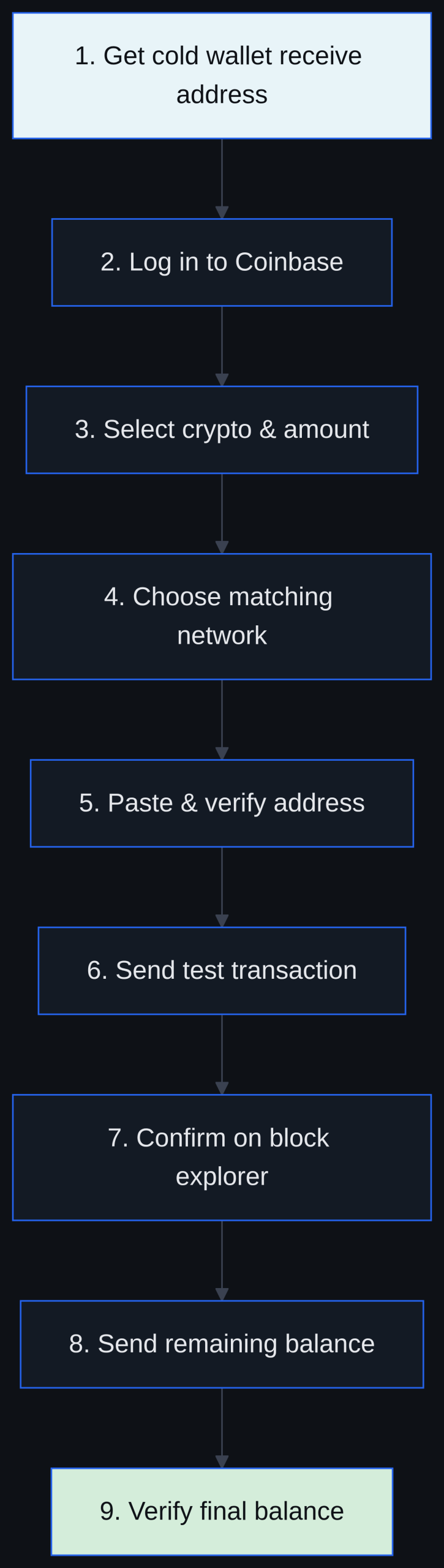
- Get your cold wallet’s receive address. Open the hardware wallet’s companion app, select the exact asset and network you plan to receive (for example, “Bitcoin” or “Ethereum, ERC-20”), and generate a fresh receive address on the device screen.
- Log in to Coinbase and open Send/Receive. From the Coinbase dashboard, choose the option to send crypto.
- Select the crypto and enter the amount. Choose the exact asset you want to move and specify how much to send; consider leaving a small amount aside for the initial test transfer.
- Choose the matching network/protocol. Many assets, including USDC and other tokens, exist on multiple networks. Select the network on Coinbase that exactly matches the network selected on your cold wallet in Step 1. This is the single most consequential choice in the entire process.
- Paste and double-check the receiving address. Paste the address rather than typing it, copied fresh from the cold wallet’s receive screen and never from your transaction history. Then compare the beginning, the middle and the end: address poisoning scams use look-alike addresses that match only the first and last characters. Scanning the cold wallet’s QR code also works if the interface supports it.
- Send a small test transaction first. Send a minimal amount before moving the full balance, particularly the first time you use a new address or network combination.
- Confirm receipt on the cold wallet and a block explorer. Wait for the test transaction to appear both in the hardware wallet’s companion app and on a public block explorer before proceeding.
- Send the remaining balance. Once the test transaction is confirmed, repeat the send process for the rest of the funds using the same verified address and network.
- Verify the final balance and power off the device. Confirm the total balance shown in the cold wallet app matches expectations, then disconnect or power down the hardware wallet for offline storage.
How to Transfer Crypto From Coinbase to Coinbase Wallet (Alternate Route)
Linking Coinbase Wallet to your Coinbase account
Coinbase allows users to link their Coinbase.com account to the Coinbase Wallet app, after which available balances can be moved between the two with a few taps rather than a full on-chain send, according to Coinbase’s help documentation.
Using the “Add crypto” / transfer-between-accounts flow
Inside the linked Coinbase Wallet app, an option to add or transfer crypto pulls available balances from the connected Coinbase.com account. Funds that are on hold on Coinbase.com, such as recently purchased assets subject to a holding period, are not eligible for this transfer until the hold clears.
When to route through Coinbase Wallet before moving to hardware cold storage
Some users move funds into Coinbase Wallet first as an intermediate step, particularly when interacting with decentralized applications, before eventually consolidating long-term holdings into a hardware wallet for offline storage. This adds a step but keeps day-to-day funds separate from long-term cold storage.
Understanding Network Fees When You Move Bitcoin (or Other Crypto) Off Coinbase
On-chain fees vs. off-chain/internal transfers
As Coinbase’s own help center explains, on-chain sends to an external blockchain address incur network fees and are irreversible, while transfers between two Coinbase accounts are processed instantly off-chain and carry no transaction fee.1 A move to a cold wallet is always an on-chain send, so a network fee should be expected.
Current fee levels vary by network and congestion
Ethereum gas prices are highly volatile; live tracking from Etherscan showed average gas in the very low range in the days before this article was checked, which reflects lower relative costs compared with historical peaks, though this can change block-to-block, so live conditions should always be checked before sending.3 Bitcoin fees are set through a real-time auction for block space and have historically fluctuated significantly between quiet periods and heavy congestion, according to research on Bitcoin mempool economics.
How Coinbase’s fee/spread differs from the pure network fee
The network fee compensates miners or validators for including the transaction in a block; it is separate from any spread or service fee Coinbase itself may apply to certain conversions or purchases. When withdrawing directly to an external wallet, the network fee is the primary cost involved.
Tips to reduce fees
Sending during periods of lower network activity, batching withdrawals into a single transaction rather than several small ones, and using a layer-2 network where the cold wallet and the asset both support it can reduce the network fee paid on a transfer.
Choosing the Right Cold Wallet for What You’re Moving
Single-coin vs. multi-chain hardware wallets
Some hardware wallets are built primarily around Bitcoin, while others support a broad range of chains, including Ethereum, its layer-2s, and Solana. The right choice depends on how many different assets currently sit in the Coinbase account being emptied.
Matching wallet support to your Coinbase holdings
Before transferring, confirm that every asset in the Coinbase balance, whether that is BTC, ETH, an ERC-20 token, or SOL, is explicitly supported by the destination wallet’s companion app on the correct network. An asset that is technically compatible with a chain but unrecognized by the wallet’s interface can still create practical difficulties later.
Where to compare specific hardware wallet models
For a closer look at one widely used cold storage option, LakeBTC’s Arculus Wallet review covers the tap-to-sign card format as an alternative to traditional hardware devices. Readers comparing custodial platforms before deciding how much to move off-exchange may also find our broader best crypto exchanges comparison useful for context on how Coinbase stacks up against alternatives.
Common Pitfalls When Sending Crypto From Coinbase to Cold Storage
Sending on the wrong network
Selecting, for example, an ERC-20 network on Coinbase while the cold wallet is only watching a different chain’s address format is one of the most common and costly mistakes in self-custody transfers. Coinbase’s help documentation notes that when an asset is supported on multiple networks, the sender is responsible for selecting the correct one.
Skipping the test transaction
Sending the full balance on the first attempt removes the safety margin a small test transfer provides. The extra confirmation time is minor compared with the risk of an irreversible error on a large balance.
Mistyping or clipboard-swapping malware
Some malware variants monitor the clipboard and silently replace a copied wallet address with an attacker-controlled one. Visually comparing the pasted address against the one shown on the hardware wallet’s own screen, not just the computer screen, helps catch this.
Forgetting the destination tag or memo
Certain assets, such as XRP or XLM, require an additional destination tag or memo alongside the address. This detail matters most when sending back into an exchange account rather than out to a hardware wallet, but it is worth confirming in either direction for tag-based assets.
Not accounting for network fees
Sending an entire balance without leaving room for the network fee can result in a failed transaction or an unexpectedly small amount arriving. Checking a live fee estimator before confirming the send avoids this.
Losing the seed phrase backup after the transfer completes
Once funds sit in cold storage, the seed phrase becomes the only path to recovery if the device is lost or damaged. Confirming the backup is legible and stored safely is just as important as the transfer itself.
Post-Transfer Security Checklist
Verify wallet balance independently via block explorer
After the transfer, look up the receiving address on a public block explorer to confirm the balance matches what the wallet app displays, rather than relying on a single source.
Store seed phrase offline
Keep the recovery phrase on paper or a metal backup plate, stored in a physically secure location, and avoid photographing it or storing it in cloud storage or email.
Test the recovery process before storing large amounts
Some users test a full wallet recovery using the seed phrase on a spare or factory-reset device before committing significant funds, to confirm the backup actually works.
Consider a passphrase or multi-signature setup for larger holdings
An additional passphrase or a multi-signature arrangement can add a further layer of protection for holdings large enough to warrant the added operational complexity.
Tax and Record-Keeping Considerations When Moving Crypto Off an Exchange
Wallet-to-wallet transfers are typically non-taxable events
Moving crypto you already own from an exchange to a wallet you also control is generally treated as a transfer to self, not a sale or disposal, and so does not typically trigger a taxable event on its own. This is general information, not tax advice, and individual circumstances vary.
Keeping records for cost-basis tracking
Even though the transfer itself is not a sale, keeping a record of the transaction date, amount, and destination helps preserve accurate cost-basis information for whenever the asset is eventually sold or exchanged.
When to consult a tax professional
Anyone with a complex transaction history, multiple exchanges, or significant holdings should consult a qualified tax professional for guidance specific to their situation, as IRS guidance on digital assets continues to evolve.
FAQ
Is moving crypto from Coinbase to a cold wallet free?
No. Sending crypto from Coinbase to an external wallet address is an on-chain transaction and incurs a network fee, unlike transfers between two Coinbase accounts, which are instant and free of charge.
How long does a Coinbase-to-cold-wallet transfer take?
Confirmation time depends on the network and its current congestion level; some networks confirm within minutes under normal conditions, while others can take longer during periods of heavy activity. Checking a live network status page before sending gives a better estimate than a fixed number.
Can I reverse a transaction if I send to the wrong address or network?
On-chain transactions are irreversible once confirmed. Coinbase’s own documentation states that on-chain sends move funds off the platform permanently, which is why double-checking the address and network before confirming, and sending a small test amount first, matters so much.
Do I need to verify identity again to withdraw large amounts from Coinbase?
Coinbase may require additional two-factor authentication for certain higher-valued sends as a security measure, though routine, smaller transactions typically do not require extra verification steps beyond standard login security.
What’s the safest way to move Bitcoin off Coinbase for long-term storage?
The generally recommended approach is to set up and back up a hardware wallet first, confirm the correct network, send a small test transaction, verify it on a block explorer, and only then send the remaining balance. Readers new to the broader process of acquiring and storing crypto may also want to review LakeBTC’s how to buy crypto guide for foundational context.
Update history 1
- Updated the address check: compare the beginning, middle and end of the address, because address poisoning scams match only the first and last characters.