How to Enable and Send Bitcoin on Cash App

Cash App is one of the most widely used mobile payment apps in the United States, and its Bitcoin feature has made it a common entry point for people buying their first satoshis. Because Bitcoin held on Cash App sits in a custodial account controlled by Block, Inc. rather than in a wallet you control, understanding how enabling, verification, and fees actually work matters before you move funds. This guide walks through the process step by step and breaks down where the real costs live.
In this article
- At a Glance
- What Bitcoin on Cash App Actually Is
- Eligibility Requirements Before You Can Enable Bitcoin
- How to Enable Bitcoin on Cash App
- Verifying Your Identity for Bitcoin (KYC)
- Troubleshooting: Bitcoin Feature Not Showing or Not Working
- How to Buy Bitcoin on Cash App
- How to Send Bitcoin on Cash App
- Cash App Bitcoin Withdrawal to an External Wallet
- Cash App Bitcoin Fees Explained
- Security Considerations When Sending or Withdrawing Bitcoin
- Common Pitfalls
- Tax Implications of Buying, Selling, and Sending Bitcoin via Cash App
- What to Do If You’re Not Eligible: Alternatives
- FAQ
At a Glance
- Who can use it: Adult US residents with a verified Cash App account and a linked bank account or debit card, per Cash App’s eligibility requirements.
- Verification: Cash App may request your legal name, date of birth, and Social Security number before unlocking Bitcoin features, per its identity verification requirements.
- Approval time: Some accounts are approved quickly while others require manual review; Cash App does not publish a fixed guarantee for either path, so treat any specific timeframe you see elsewhere with caution.
- Where the fees hide: Cash App discloses a spread of between 0% and 0.75% on Bitcoin trades, plus a separate network fee on withdrawals, both shown on the confirmation screen before you complete a transaction, according to Cash App’s fee disclosures.
- Risk: Bitcoin transactions are irreversible. Sending to the wrong address, or to an address that isn’t Bitcoin-compatible, typically results in permanent loss of funds.
What Bitcoin on Cash App Actually Is
When you “buy Bitcoin” on Cash App, you are not immediately holding a self-custody wallet. Cash App is a custodial platform: Block, Inc. holds the private keys associated with your balance until you withdraw to an external address. This is different from a hardware wallet or a non-custodial software wallet, where you alone control the keys from the start.
Cash App’s own Bitcoin and Stablecoin Disclosures state that virtual currency is not legal tender in the United States and is not backed by the US government; in several states (including Maine, Minnesota, North Dakota, Rhode Island, and Vermont), the disclosures also commit to at least 30 days’ notice before changing the company’s fee schedule or related terms. Beyond those specific points, reserve and custody practices are best confirmed directly on that disclosures page rather than assumed from marketing language.
Sends can route two ways: as an on-chain Bitcoin transaction that gets confirmed on the blockchain, or, in some cases, over the Lightning Network, a payment layer built on top of Bitcoin designed for faster, lower-cost transfers. On-chain sends depend on network congestion and confirmation times; Lightning sends are typically near-instant but require Lightning-compatible addresses or invoices.
Bitcoin services on Cash App are provided by Block, Inc., which is licensed and regulated as a money transmitter, including virtual currency business activity authority from the New York State Department of Financial Services, and holds additional money transmitter licenses across numerous other states, according to Square’s public licensing disclosures. Block, Inc. also remains a publicly traded, SEC-reporting company; its Form 10-K for fiscal year 2025, filed under ticker XYZ, confirms this status, per Block, Inc.’s Annual Report filed with the SEC.
Eligibility Requirements Before You Can Enable Bitcoin
To enable Bitcoin, Cash App generally expects you to be an adult US resident with an account in good standing and no unresolved holds; Cash App’s own terms of service are the definitive source for its exact minimum age requirement. A linked bank account or debit card is typically required as well. Bitcoin has been reported as available across all 50 states in earlier rollout coverage tied to Cash App’s disclosures, but exact state-level carve-outs can shift, so it’s worth checking Cash App’s own legal disclosures pages for the current list rather than relying on older reporting.
If Bitcoin isn’t available to you, the most common causes are an unverified identity, a restricted account, or a location-based limitation. Cash App’s support channels are the authoritative place to resolve account-specific eligibility questions.
How to Enable Bitcoin on Cash App
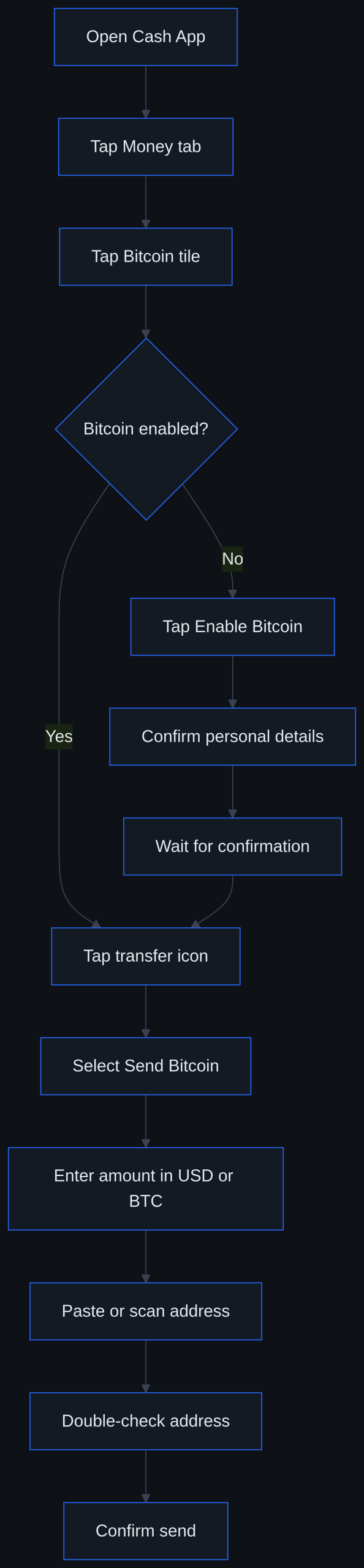
- Open Cash App and tap the Money tab on the home screen.
- Tap the Bitcoin tile.
- Tap Enable Bitcoin (or a similarly worded prompt) if the feature isn’t already active on your account.
- If prompted, confirm personal details such as your legal name, date of birth, and Social Security number.
- Wait for the confirmation screen indicating Bitcoin has been enabled on your account.
Exact wording and screen layout can shift between app versions and rollouts, so treat the steps above as a general path rather than a pixel-perfect match to what you see.
Verifying Your Identity for Bitcoin (KYC)
Cash App requests identifying information to satisfy know-your-customer and anti-money-laundering obligations tied to its money transmitter licensing. This typically includes your full legal name, date of birth, and Social Security number. Some accounts are approved automatically once this information is submitted; others are routed to manual review, which can extend the timeline. Cash App’s own identity verification support materials are the best reference if your verification is stuck or flagged.
There’s no single published timeframe that applies to every account when it comes to enabling the feature. Some users see Bitcoin enabled almost immediately after submitting their details, while others experience a delay tied to manual review, often triggered by mismatched personal information, a newly created account, or unusual account activity. If your enablement is taking noticeably longer than expected, checking Cash App’s support page or contacting support directly is more reliable than assuming a fixed processing window.
Troubleshooting: Bitcoin Feature Not Showing or Not Working
If the Bitcoin tile is missing or grayed out, start with the basics: confirm you’re running the latest version of the app, and check whether Cash App is reporting any service disruptions. Next, revisit the eligibility checklist, age, US residency, and identity verification status all affect whether the feature appears. Accounts with unresolved verification issues or flagged activity commonly lose access to Bitcoin until the underlying issue is resolved. If none of that explains the gap, Cash App’s in-app support chat is the most direct path to a resolution.
How to Buy Bitcoin on Cash App
Before you can send Bitcoin, you need some in your Cash App balance. From the Money tab, tap the Bitcoin tile, tap Buy, enter a dollar or BTC amount, and confirm. Cash App has also offered a recurring purchase option in the past, letting users schedule automatic buys on a set cadence; the exact name and mechanics of that feature are worth confirming in-app since recurring-purchase tools are periodically renamed or adjusted.
How to Send Bitcoin on Cash App
- Open the Money tab and tap the Bitcoin tile.
- Tap the arrows/transfer icon.
- Select Send Bitcoin.
- Enter the amount, denominated in either USD or BTC.
- Paste or scan the recipient’s Bitcoin address or Lightning invoice.
- Double-check the address carefully, then confirm the send.
Sending Bitcoin to another Cash App user via their $cashtag is a different flow than sending to an external address, cashtag transfers typically move within Cash App’s internal ledger, while external sends broadcast an actual on-chain (or Lightning) transaction. Confusing the two is one of the more common mistakes new users make.
Cash App Bitcoin Withdrawal to an External Wallet
“Sending” and “withdrawing” are closely related but distinct in practice: a withdrawal specifically moves Bitcoin out of Cash App’s custody into a wallet where you hold the private keys, ending Cash App’s control over those funds. To withdraw, follow the same Send Bitcoin flow but direct it to your external wallet’s receiving address.
Cash App requires a minimum withdrawal of 0.001 BTC when using Standard withdrawal speed, while Rush and Priority speeds carry a lower minimum of 0.00005 BTC, according to Cash App’s withdrawal instructions. Processing time depends on which speed tier you select and on general Bitcoin network conditions at the time, congestion can extend on-chain confirmation regardless of which app or wallet you use.
Cash App Bitcoin Fees Explained
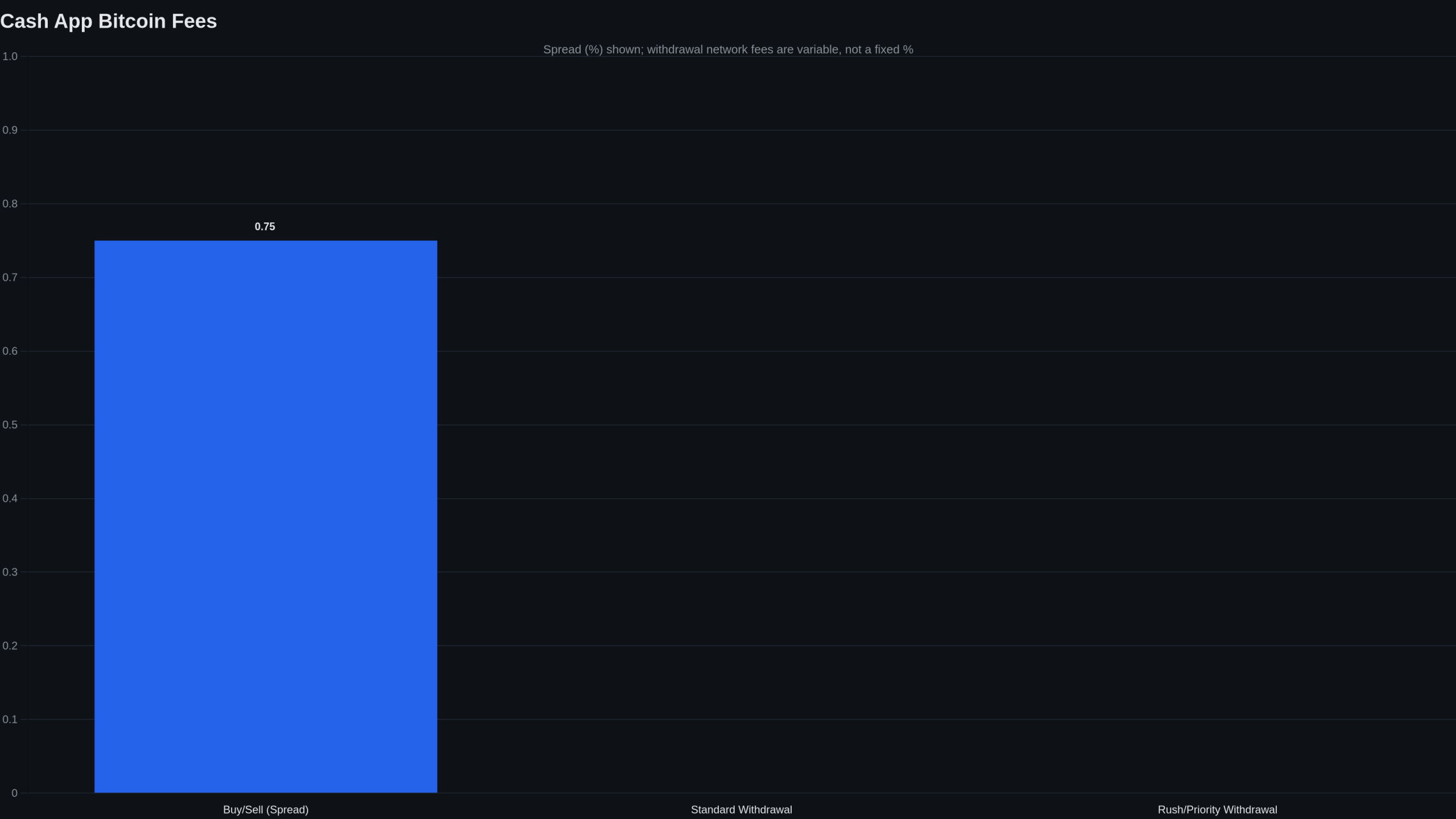
Cash App’s Bitcoin fees combine two elements: a spread built into the displayed price, and a separate fee for on-chain withdrawals. Both are disclosed on the confirmation screen before you finalize a transaction, but the spread in particular is easy to overlook because it doesn’t appear as a labeled line-item fee, it’s baked into the exchange rate you’re quoted.
| Transaction type | Fee structure | Notes |
|---|---|---|
| Buying or selling Bitcoin | Spread of 0%–0.75%, built into the quoted price | Displayed on the confirmation screen before the trade completes |
| On-chain withdrawal, Standard speed | Network fee disclosed pre-confirmation | Minimum withdrawal of 0.001 BTC |
| On-chain withdrawal, Rush or Priority speed | Higher network fee, disclosed pre-confirmation, for faster processing | Minimum withdrawal of 0.00005 BTC |
Fees verified as of 2026-08-17.
Because the spread can swing between 0% and 0.75% depending on market conditions, the “honest” way to evaluate cost is to compare the price shown in-app against a reference market price before confirming, not to assume a flat, advertised fee tells the whole story. Spreads and fee schedules are subject to change, so it’s worth checking the current figures in-app immediately before any trade.
Security Considerations When Sending or Withdrawing Bitcoin
Bitcoin transactions cannot be reversed once broadcast, so double- and triple-checking a recipient address is essential, a single mistyped character can send funds somewhere unrecoverable. Understand the custodial trade-off too: while your Bitcoin sits inside Cash App, the company controls the underlying keys; only after a successful withdrawal to a wallet you control do you hold self-custody.
Enable two-factor authentication and any available account lock features on your Cash App account. Watch for common scam patterns targeting Bitcoin users: fake “support” accounts direct-messaging you, QR codes swapped to redirect payments, and phishing links imitating Cash App’s login page. Cash App will not ask for your PIN or sign-in code through unsolicited messages.
It’s also worth noting that state financial regulators, in a coordinated action involving 48 states, reached an $80 million settlement with Block, Inc. over Bank Secrecy Act and anti-money-laundering compliance failures, according to the Conference of State Bank Supervisors. The settlement included required corrective actions and is a useful data point when weighing custodial platform risk generally.
Common Pitfalls
- Sending to an incompatible address: Pasting a non-Bitcoin address (from another blockchain) into the send field can result in lost funds.
- Confusing cashtag transfers with on-chain sends: Sending to a $cashtag moves funds within Cash App’s system; sending to an external address is a real blockchain transaction with different rules and fees.
- Underestimating fees on small withdrawals: Network fees can represent a larger percentage of very small withdrawal amounts.
- Trying to enable Bitcoin on a restricted or unverified account: Incomplete verification or state-level restrictions will block the feature regardless of how many times you retry.
- Ignoring minimum withdrawal thresholds: Attempting to withdraw below 0.001 BTC at Standard speed (or 0.00005 BTC at Rush/Priority) will fail.
Tax Implications of Buying, Selling, and Sending Bitcoin via Cash App
Selling Bitcoin for US dollars, or spending it, is generally a taxable event in the United States. The IRS’s guidance on virtual currency outlines how gains and losses on digital asset dispositions are treated. Cash App may issue tax reporting forms tied to Bitcoin activity depending on your transaction volume and applicable thresholds; review Cash App’s own tax documentation and the IRS resources above for specifics that apply to your situation. This section is informational only and not tax advice, consult a licensed tax professional for guidance specific to your circumstances.
What to Do If You’re Not Eligible: Alternatives
If your account can’t access Bitcoin on Cash App, several other regulated US platforms support buying Bitcoin and withdrawing to self-custody wallets. Our comparison of leading US crypto exchanges covers a range of options with different verification flows and fee structures, including a closer look at one popular option in our Coinbase review. For a broader walkthrough of the purchase process across platforms, see our guide on how to buy crypto, or if you’re exploring assets beyond Bitcoin, our how to buy XRP guide covers a similar step-by-step process. Regardless of which platform you use, moving Bitcoin to self-custody makes sense for anyone who wants to remove reliance on a custodial provider’s uptime, policies, or account restrictions.
FAQ
Why am I not eligible for Bitcoin on Cash App?
Common reasons include not meeting Cash App’s minimum age requirement, not being a US resident, having an unverified or flagged account, or living in a location where the feature is currently restricted. Reviewing your account status in-app or contacting Cash App support usually clarifies the specific reason.
How do I get my Cash App Bitcoin verified?
Submit the requested identity details, typically your legal name, date of birth, and Social Security number, when prompted. Some accounts clear automatically; others enter manual review, which can take longer, especially if submitted information doesn’t match official records.
How long does it take to enable Bitcoin on Cash App?
There is no fixed, universally published timeframe. Many accounts are approved quickly, while others requiring manual review take longer. If your enablement seems stalled, Cash App’s support channels are the best resource for a status update.
Why is Bitcoin not showing on my Cash App?
This is usually tied to an outdated app version, a temporary service issue, unmet eligibility criteria, or an account under review. Updating the app and confirming your verification status are the first troubleshooting steps.
Is there a minimum amount of Bitcoin I can send or withdraw on Cash App?
For external withdrawals, Cash App sets a minimum of 0.001 BTC at Standard speed and 0.00005 BTC at Rush or Priority speed. Sends to other Cash App users via $cashtag operate under a different flow and are not governed by these same on-chain minimums.