What Is a Hardware Wallet? What It Protects and What It Does Not
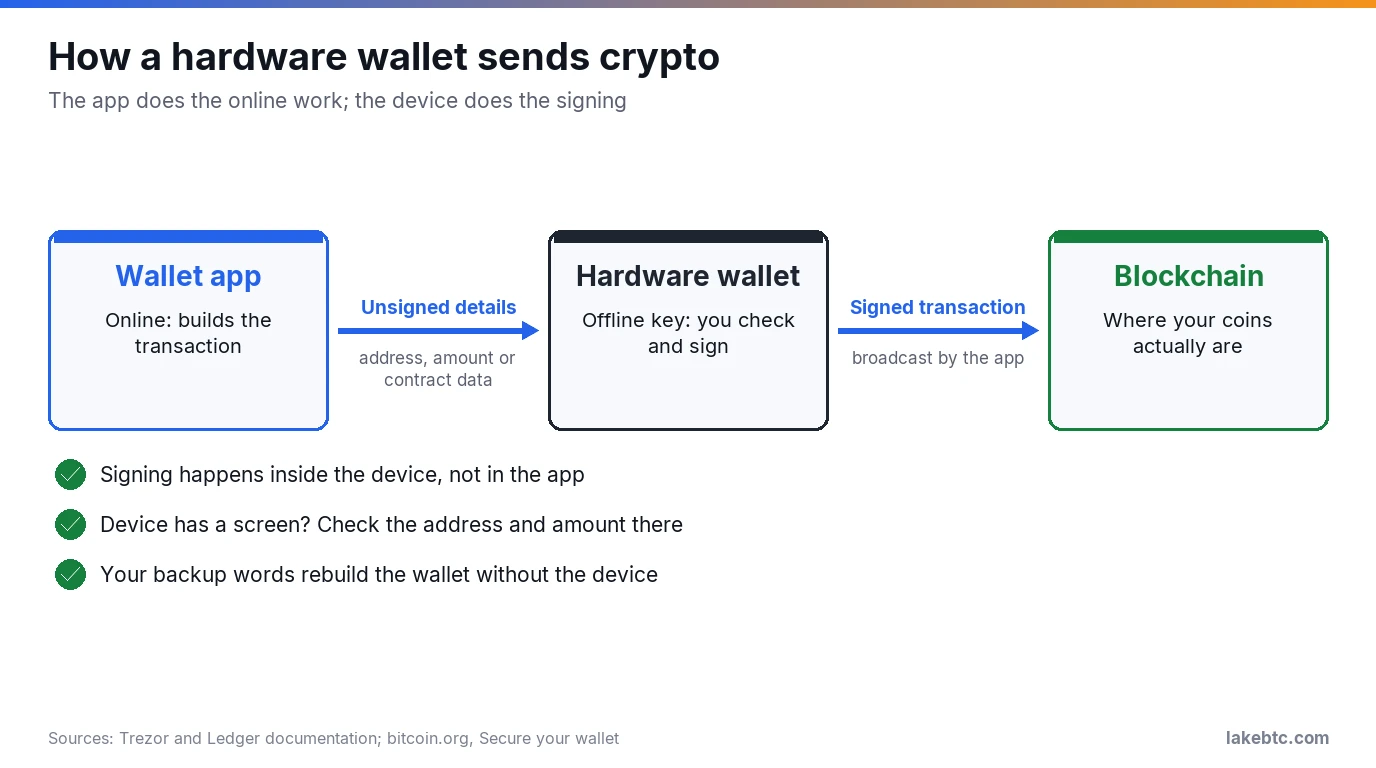
A hardware wallet is a small device that keeps your crypto’s private key offline and signs transactions inside itself. Your coins stay on the blockchain.
A hardware wallet is the usual next step when you move crypto off an exchange or out of a phone app. It’s a small device that connects to your phone or computer when you want to send.
What it protects is your private key: the secret that lets anyone move your coins. In a phone or browser wallet, that key lives on a device that’s online all day. In a hardware wallet, it stays on the device, which signs for you without exposing the key to the internet.
It doesn’t make you scam-proof, though. The device signs whatever you approve, and anyone who gets your backup words doesn’t need the device at all. Knowing those two limits matters as much as buying one.
The short list
- 🟢 Signing happens inside the device, so malware on your computer can’t copy the key.
- 🔴 Your backup words unlock the wallet without the device. A hardware wallet that takes the words on its own screen, such as a Ledger or a Trezor Safe, gets them only on the device itself, when it asks. A screenless card such as Arculus gets them only in the maker’s official app. Nowhere else: not a website, a form, a chat or an email, and not for anyone who asks, including “support”.
- 🟡 If your device has a screen, check the address and amount there before you approve. Don’t sign a contract approval you can’t read.
- 🟢 Lost or broken device? The backup words restore everything on a new one.
In this article
What a hardware wallet actually does
A hardware wallet, such as a Ledger or a Trezor, is a device built for one job: holding your private key and using it to sign. Your coins aren’t inside it. They’re recorded on the blockchain, and the key is what proves they’re yours.
A send works in five steps:
- You start the send in the wallet app on your phone or computer. The app is online and builds the transaction.
- Next, the app passes the unsigned transaction to the device. For a plain send, that’s the address and the amount. A smart-contract call, such as a token approval, carries contract data instead (more on that below).
- On a device with a screen, such as a Ledger or a Trezor, those details show up on the device itself. You check them and confirm on the device to approve.
- Once you approve, the device signs inside itself with your private key. The key isn’t sent to the app.
- The signed transaction goes back to the app, which broadcasts it to the network.
That split is the whole idea. The online part can’t sign, and the part that signs never goes online. bitcoin.org describes hardware wallets as little devices designed to be a wallet and nothing else, with no way to install software on them. That’s what keeps computer malware away from the key.
On a Ledger, the seed can leave the device in one case you choose yourself. Ledger Recover is a paid, optional subscription: once you confirm it on the device, the device encrypts a copy of your seed and splits it into three fragments held by Coincover, Ledger and Escrowtech. Without the subscription, those encrypted fragments don’t leave the device.
Card-style wallets such as Arculus skip the screen. With an Arculus card, you enter the address and amount in the phone app, then tap the card to your phone to sign. The key stays on the card, but the only screen showing what you sign is the phone’s, and malware on a phone can change what that screen shows. Ledger makes the same point about hardware wallets without a secure screen. That missing device screen is the protection a screenless card lacks.
Hot wallet, cold wallet, exchange: where your keys live
“Cold” just means the key is created and kept offline. A hardware wallet is the common way to do that. Here’s how it compares with the places your crypto usually sits.
| Where your crypto sits | Who holds the key | Main risk | Suits |
|---|---|---|---|
| Exchange account | The exchange | You rely on its security and honesty; exchanges can be hacked, fail or freeze withdrawals | Buying, selling, short-term balances |
| Hot wallet (phone app, browser extension) | You, on an internet-connected device | Malware or a hack of that device | Small amounts you use often |
| Hardware wallet (cold) | You, on an offline device | A leaked backup, a fake device, or approving the wrong transaction | Larger amounts and long-term holdings |
A lot of people use two. bitcoin.org suggests keeping only small amounts on your phone or computer for everyday use and the rest somewhere safer. That works like cash in your pocket and savings at home.
Holding your own keys doesn’t make sending free. Every send from the device still pays the network’s transaction fee.
Types of hardware wallets
Devices differ in how they talk to your phone or computer, whether they have a screen of their own, and how you back them up. Prices are list prices in each maker’s own store on October 14, 2026. They change often, and some models were on sale that day.
| Connection | Screen | How you back it up | Example makers | List price (USD) |
|---|---|---|---|---|
| USB cable | Yes | 12 to 24 recovery words you write down | Ledger (Nano S Plus), Trezor (Safe 3, Safe 5) | $59 to $129 |
| Bluetooth, plus USB | Yes | 12 to 24 recovery words you write down; Ledger’s Nano Gen5, Flex and Stax also include a Recovery Key card | Ledger (Nano X, Nano Gen5, Flex, Stax), Trezor (Safe 7) | $99 to $399 |
| NFC card you tap to your phone | No | 12 or 24 recovery words you write down | Arculus | $99 |
| Air-gapped: QR codes or a microSD card | Yes | Recovery words; COLDCARD can also save an encrypted backup to microSD | Keystone, COLDCARD | $149 to $369 |
Prices and specs come from the makers’ own pages: Ledger, Trezor, Arculus, Keystone and COLDCARD. The screen column is the one to weigh: a secure screen on the device, like the ones on Ledger and Trezor models, is where you can check a send that malware on your phone or computer can’t change.
What a hardware wallet does not protect against
The device guards the key. It can’t guard your backup, your purchase or your judgment, and those are the gaps scammers aim for.
Your backup words. When you set up the device, it gives you a list of backup words, also called a recovery phrase or seed phrase: 24 on a Ledger, and 12, 20 or 24 on a Trezor. Those words rebuild the wallet on any compatible device. Anyone who gets them can take everything without touching your hardware wallet.
So where the words go back in matters. A hardware wallet that takes the words on its own screen, such as a Ledger or a Trezor Safe, gets them only on the device itself, when the device asks for them. The older Trezor Model One, which is no longer sold, works differently: you type its words into Trezor Suite on your computer, in the order the device shows, and only after the device asks.
A screenless card such as Arculus gets them only on the restore screen of the maker’s official app, installed from the maker’s own site or its official app-store link.
Nowhere else. Not a website, a form, a chat or an email, and not for anyone who asks, including someone claiming to be support. Ledger, Trezor and Arculus all say they will never ask for them. Phishing emails that pretend to be from the maker and ask you to “verify” your backup online are a known tactic.
A fake or tampered device. Buy from the maker’s own store or its official resellers. That’s Ledger’s advice, and Trezor’s buying advice is blunt: never buy from an unauthorized third party, because you can’t know who had access to the device before you.
Your recovery words should come from the device, during your own setup. A genuine Ledger never ships with a recovery phrase or PIN already set, and the backup cards in a Trezor box are for writing down the words the device gives you. If a device arrives with words already on the recovery sheet, on a card or in the instructions, or shows words before you finish setup, treat it as compromised: don’t use those words or the device.
Trezor’s software also checks firmware authenticity when you connect, to flag counterfeit devices, and a Ledger runs a Genuine Check during setup that confirms its secure chip is real. Install firmware updates when the maker’s app offers them; Trezor calls updating essential for long-term security. Have your backup at hand first, because an update can sometimes wipe the device.
The wrong address. The device signs whatever you approve. If you paste a scammer’s address, it will sign a send to that address. Address poisoning works exactly this way: a scammer sends you a tiny, often zero-value transfer from a look-alike address, hoping you’ll copy it from your history next time. Funds sent there can’t be recovered.
Physical access and the PIN. If you set a PIN, someone holding your device still needs it. On a Trezor, the wait doubles after each wrong PIN and the device wipes itself after 16 failed attempts. That protects the key, and your backup words get you back in.
A contract approval you can’t read. Not every signature is a plain send. When you swap tokens or use an app, you may be signing a smart-contract call instead, such as a token approval, or a permit, which grants an approval through a signed message. On Ethereum, an approval lets a contract spend your tokens later. It can be used years after you grant it, and an unlimited one still works after you’ve withdrawn your funds from the app.
If the device can’t decode the call, a Ledger shows a blind signing warning and only a raw hash. Ledger keeps blind signing off by default and compares it to signing a blank check. Scammers actively trick people into approving contracts that drain entire wallets.
So before you approve, check whether the device shows a plain send or a contract approval, and don’t approve anything you can’t read. Use a separate wallet for app interactions, not the one that holds your long-term assets; that tops Ledger’s blind signing checklist. Clean up old approvals too: on Ethereum, Etherscan’s token approval checker lists the contracts allowed to spend an address’s tokens and lets you revoke them.
How to check a send before you approve it
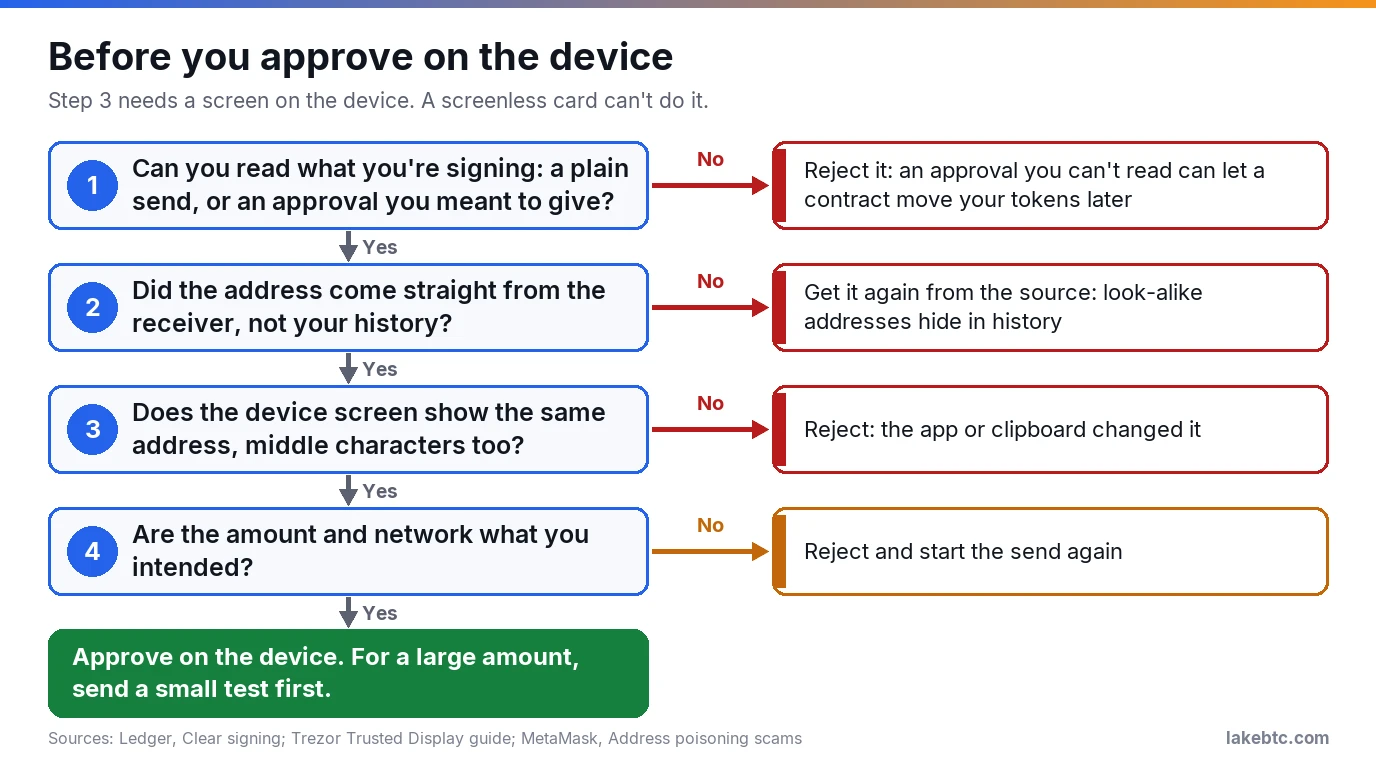
On a Ledger or a Trezor, the device screen is the one screen malware can’t change. Trezor’s Trusted Display guide explains why: clipboard malware can swap an address after you copy it, and a fake app can show an address that isn’t yours. Neither can change what the device itself displays.
So first make sure the device shows the send you meant, not an approval you didn’t expect or a blind signing warning. Then read the address on the device, character by character, against the one the receiver gave you. Check the middle characters too, not just the start and end; that’s exactly what look-alike addresses rely on. Then check the amount, and that you’re sending on the network the receiver asked for. If anything differs, reject it on the device and start over.
A screenless card has no device screen to check, so getting the address straight from the receiver carries all the weight. For a large amount, send a small test first and have the receiver confirm it arrived.
On a device with a screen, the same check works when you receive. Show your receiving address on the device and compare it with what the app displays before you hand it to an exchange or a friend.
When a hardware wallet is worth it
Trezor’s own rule of thumb is a fair one: consider a hardware wallet if losing your exchange balance or phone wallet to a hack would seriously hurt you. If you hold a small amount you trade often, the extra step on every send may not be worth it yet.
It makes the most sense when you plan to hold for a long time, when the amount would hurt to lose, or when you don’t want an exchange controlling your keys. It makes less sense if you’d struggle to keep a backup safe. A device without a safely stored backup is a single point of failure.
Our Arculus wallet review and D’CENT wallet review cover two specific devices. If you hold XRP, see our cold wallets for XRP compared.
Frequently Asked Questions
What happens if my hardware wallet breaks or gets lost?
Your coins aren’t on it, so they aren’t lost. Restore the wallet from your backup words on a new device and everything comes back. Without the backup, a lost device can mean lost funds.
Is a hardware wallet the same as a cold wallet?
A hardware wallet is the most common kind of cold wallet. Cold means the private key is generated and stored offline. bitcoin.org also describes an offline computer that holds the wallet and signs, paired with an online one that only creates and sends transactions, which means carrying each transaction between them on removable storage.
Can a hardware wallet be hacked?
Trezor itself says no device is entirely immune, but an attack on the device usually needs physical access, and the PIN makes even that hard. The bigger risk is phishing and social engineering aimed at your backup words.
Do I still need the backup words if I have the device?
Yes. Devices break, get lost or get wiped, and the backup is how you get back in. Keep it somewhere other than where the device lives.
What if the wallet maker goes out of business?
Your coins stay on the blockchain either way. A standard 12- or 24-word backup follows BIP39, which Trezor notes is supported by most crypto wallets, so you can restore it without the original device. A 20-word Trezor backup uses SLIP39 and needs a wallet that supports it.
Can I use one hardware wallet for all my coins?
Often, but not always. Each device supports a specific list of coins and networks, so check the maker’s supported list before you send anything to it.
What to do next
If your crypto is on an exchange now, follow our guide to move crypto from Coinbase to a cold wallet. Send a small test amount first and confirm it arrives before moving the rest.
Using a phone wallet in the meantime? Read whether Coinbase Wallet is safe and keep only what you spend there.
Drafted with AI by the LakeBTC Editorial Team, then edited and fact-checked against the sources linked in the text. How we use AI · Report an error