Coinbase Email Scam: How to Spot a Fake and What to Do If You Clicked
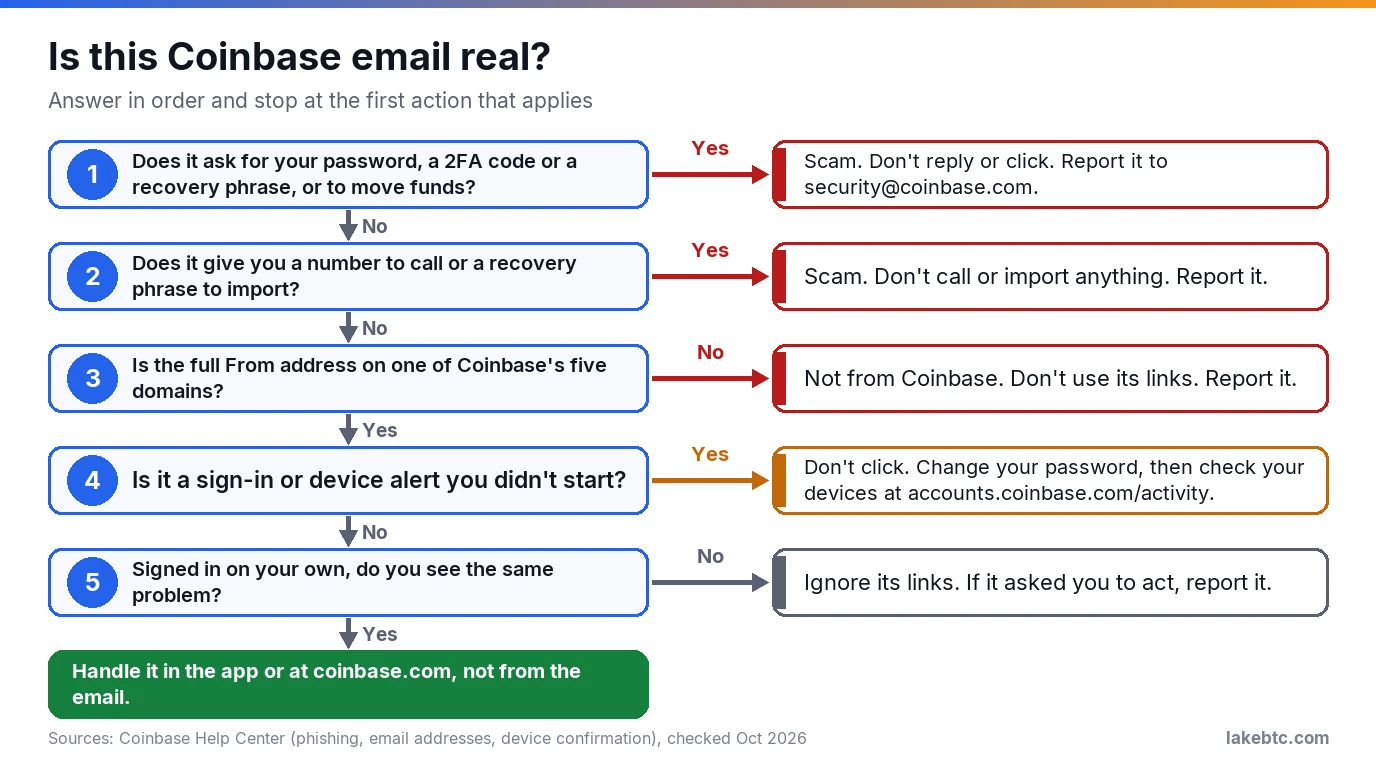
A real Coinbase email never asks for your password, 2FA code or recovery phrase, or for you to move funds to another wallet. One that does is a scam.
If an email that looks like Coinbase says someone tried to sign in, a withdrawal is waiting or your account is restricted, and it wants you to click, call or confirm something right now, don’t. Close it, then open the Coinbase app or type coinbase.com yourself.
Fake Coinbase emails copy the logo, the tone and sometimes even a Coinbase address in the From line. Some know your name and account details too. So the sender alone won’t settle it. What the email asks you to do will.
Already typed a password or a code, or sent crypto? Then speed matters more than diagnosis. Lock your Coinbase account first, using the steps in the damage-control section further down.
Before you click anything
- 🔴 Coinbase never asks for your password, 2FA code or recovery phrase, or for you to move funds to another address or wallet.
- 🟡 A Coinbase address in the From line isn’t proof. Judge the email by what it asks, then check your account on your own.
- 🟢 Forward a fake to [email protected] with its full headers.
- 🔴 Already typed a password or code, or sent crypto? Lock your Coinbase account first (steps below).
In this article
- What a real Coinbase email never asks for
- Check who really sent it
- How to check a Coinbase email in five steps
- Why a fake email can know your name and balance
- Where the money is actually lost
- If you clicked, called or paid: what to do first
- How to report a Coinbase phishing email
- Frequently Asked Questions
- What to do next
What a real Coinbase email never asks for
Start with the request, not the logo. Coinbase’s rule is plain: nobody there will ask for your password or 2FA codes, or ask you to move crypto to a specific address, account, vault or wallet. Its support agents also won’t hand you a recovery phrase or ask for yours. They won’t ask you to install software or take remote control of your device either.
Coinbase also won’t ask you to contact an unknown number to reach it. So if an email wants any of these things, you have your answer. It’s a scam, however real it looks.
| What the email says | What Coinbase actually does | What you do |
|---|---|---|
| “Unusual sign-in. If this wasn’t you, call support at this number.” | Doesn’t ask you to contact an unknown number. Scammers can also spoof real numbers on caller ID. | Don’t call. Check the account in the app, and lock it if anything looks off. |
| “Your funds are at risk. Move them to this secure vault or wallet.” | Staff don’t ask you to send crypto to outside addresses. | Don’t send anything. Report the email. |
Subject line Migrate to Coinbase Wallet, with a recovery phrase to import |
Doesn’t send you a recovery phrase. | Never import words someone else gave you. |
| A PayPal invoice in Coinbase’s name for something you didn’t buy, with a number to call | Not a Coinbase email. The invoice can come through PayPal’s real system. | Don’t pay or call. Sign in to PayPal yourself to check. |
| “Your account is restricted. Verify your identity here.” | Real restrictions happen. They typically show up inside your account as Sorry, account temporarily disabled. |
Sign in on your own. If your account shows no restriction, don’t act on the email. |
| A device confirmation you didn’t start | A real one means someone used your password and 2-step code to begin signing in. | Don’t click it. Change your password, then check your devices at accounts.coinbase.com/activity. |
| Anything else that wants you to act from the email | Points you to your account in the app or at coinbase.com. | Open Coinbase yourself and look there. |
The wallet-migration email is worth a closer look. In March 2025, emails with the subject line Migrate to Coinbase Wallet claimed customers had to switch to a self-custody wallet. They came with a recovery phrase that the attackers had generated in advance and controlled, as BleepingComputer reported at the time. Anyone who imported it and moved funds in was sending them straight to the attackers. Coinbase’s answer was direct: it will never send you a recovery phrase.
The PayPal version uses PayPal’s own system. Scam invoices and money requests sent through it can carry an alarmist note with a fake customer service number. Don’t call it, and don’t send money to a crypto wallet named in an invoice.
Check who really sent it
Coinbase publishes where its email comes from. Legitimate messages come from one of five domains: coinbase.com, mail.coinbase.com, updates.coinbase.com, info.coinbase.com and cb.mail.coinbase.com. Look at the full address after the @, not the display name. A display name like Coinbase Support can sit on top of any address, including a lookalike such as colnbase.com.
Scammers can still make a Coinbase address appear in the From field. A matching address passes one check. It doesn’t prove the email is real.
Your mail app can show a second check: whether the sending domain signed the message. In Gmail on a computer, click the down arrow under the sender’s name. An authenticated email shows Mailed by and Signed by with the sending domain. A question mark next to the sender means Gmail couldn’t authenticate it.
Authentication proves which domain signed the email, not who wrote it. BleepingComputer reported on March 14, 2025 that the migration emails passed SPF, DKIM and DMARC because they were sent through SendGrid, a real bulk-email service, from what appeared to be Akamai’s account. So read the domain under Signed by: it has to be a Coinbase one, not just any domain that passed.
| Mail app | See the full From address | See the authentication result |
|---|---|---|
| Gmail on a computer | Click the sender’s name or the ▾ arrow | Down arrow under the sender: Mailed by and Signed by |
| Gmail on Android | Tap the sender’s name or the ▾ arrow | View details, then View security details |
| Gmail on iPhone or iPad | Tap the sender’s name or the ▾ arrow | Not available in the app. Open the email in Gmail on a computer. |
| Outlook (new and web) | More actions, View, View message details, then the From field | Same window: find Authentication-Results and look for spf=pass or dkim=pass |
| Outlook classic on Windows | Open the email and look at the full From field | Open the email, then File, Properties, and read the Internet headers box |
| Apple Mail on a Mac | Hover over or click the sender’s name | View, Message, All Headers, then find Authentication-Results |
| Any other mail app | Open the full sender details | The same Authentication-Results header, where the app can show headers |
A report needs the full headers, and in Gmail they aren’t under the down arrow. On a computer, open the email, click More next to Reply, then Show original and Copy to clipboard. In Outlook and Apple Mail, the header views in this table show them.
How to check a Coinbase email in five steps
The chart under the title runs the same checks as yes or no questions. In words, in order:
- Don’t use anything in the email. No links, buttons, attachments, QR codes, phone numbers or replies. A link can open a lookalike sign-in page built to collect your password and code.
- Read what it asks. A password, a 2FA code, a recovery phrase, a call to a number or a transfer to a so-called safe wallet: any one of these makes it a scam.
- Check the sender and the signature. The full From address has to be on one of Coinbase’s five domains. Where your app shows Signed by, that has to be a Coinbase domain too.
- Open Coinbase yourself. Use the app or a bookmark you made, then look for the same alert, restriction or transaction. If the problem the email describes isn’t there, don’t act on the email.
- Report it. The reporting section below has the addresses and what to include.
One alert breaks step 4: a sign-in or device confirmation you didn’t start. Even if your account looks normal, change your password and check your devices at accounts.coinbase.com/activity, typed in yourself, not opened from the email.
Why a fake email can know your name and balance
Some fakes quote your real name, your address or your recent trades. That doesn’t make them Coinbase. In a May 2025 filing with the SEC, Coinbase said the attacker appears to have paid contractors or employees in support roles outside the US to copy customer data from internal systems. The attacker then demanded money to keep quiet, and Coinbase didn’t pay.
Per that filing, the stolen data included names, addresses, phone numbers and emails, the last 4 digits of Social Security numbers, masked bank-account numbers and government ID images. Balance snapshots and transaction history were in it too. Passwords and private keys weren’t, and the people involved couldn’t reach customer funds. Coinbase’s own post about it put the affected group at less than 1% of its monthly transacting users.
The filing names the risk itself: the data could be used in social-engineering attempts. A caller who knows your balance sounds a lot like support. Coinbase said it would voluntarily reimburse eligible retail customers who had sent funds to the attacker as a direct result of this incident before May 15, 2025, the date of that post, after a review of the facts. That offer covers this incident and that period, not every scam that borrows Coinbase’s name.
Where the money is actually lost
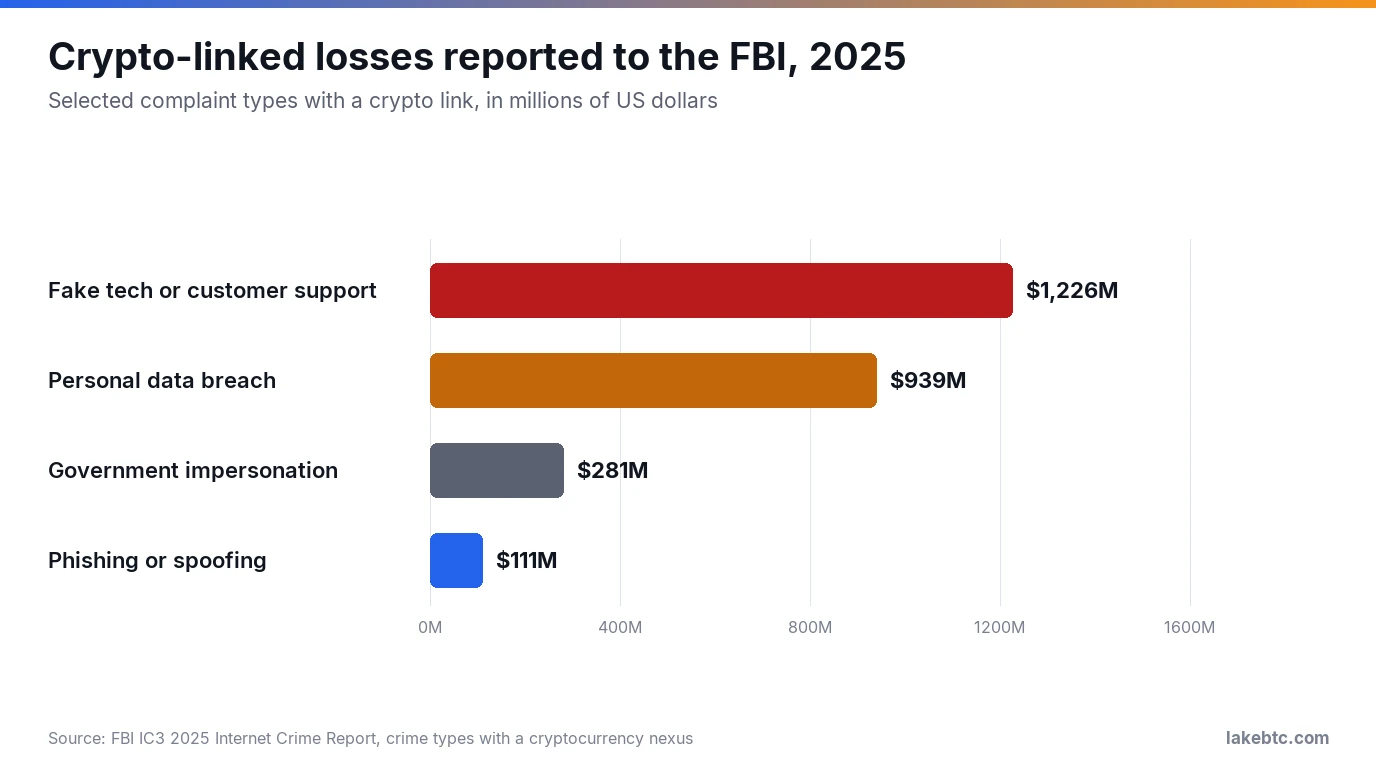
The email is often just the opener. The FBI’s numbers show where the bigger money goes: to fake support, which the IC3 counts as call center fraud. In 2025, crypto-linked complaints to the FBI’s IC3 about fake tech or customer support reported $1.23 billion in losses. Crypto-linked phishing and spoofing complaints reported $111 million, so support scams cost about 11 times as much.
Fake support numbers belong to the same trap. Coinbase has warned about phishing pages in search results that show an error once you enter your login details and push you to call support, a tactic it says is commonly paired with phishing. If you need to reach Coinbase by phone, take the number from its help center, never from an email, a search ad or a caller.
If someone calls you out of the blue saying they’re Coinbase, hang up: Coinbase staff don’t call you directly to handle account support or troubleshooting.
A second wave often follows a loss. In 2025 the IC3 logged 10,516 recovery-scam complaints and $1.4 billion in reported losses, a figure that can include the scam that came first. Fake law firms are part of that wave, and some know the exact amounts a victim lost. The real IC3 won’t ask for payment to recover lost funds, and it doesn’t work with law firms or crypto services to get money back.
If you clicked, called or paid: what to do first
Do these in order. Locking comes first because it stops anyone from moving crypto out of your Coinbase account while you fix the rest.
- Lock your Coinbase account. In the app, open the menu, then Account & settings, Security and Lock Account. In a browser, sign in, go to
accounts.coinbase.com/security, select Security, then Lock Account. Locking signs you out of all devices and blocks trading, crypto transfers and settings changes. Having trouble? The same page lists Coinbase’s toll-free US and Canada support line, +1 (888) 908-7930, open 24/7 as of October 2026. - Secure your email account before you unlock. Change its password and add a strong 2-step method. Then look for rules, filters or forwarding addresses you didn’t set up, which can redirect the emails Coinbase sends you, and for recovery emails or phone numbers you didn’t add.
- Unlock it and reset your password. Unlocking walks you through a password reset. Expect crypto sends to stay paused for 24 hours after you unlock.
- Remove what you don’t recognize. On your account activity page,
accounts.coinbase.com/activity, check your active sessions and confirmed devices, and select Sign out or Remove for any you don’t recognize. - Report any transaction you didn’t make to Coinbase Support and, if a card or bank account was charged, to your bank.
Then add the step that fits what happened.
| What happened | What to add |
|---|---|
| You clicked a link but typed nothing | Close the page. Find its address in your browser history and send the full URL to [email protected]. If it downloaded a file, update your security software and run a scan. |
| Someone on a call asked for a code, a transfer or remote access | Hang up and email [email protected] right away. If they had you install remote-access or remote-support software, uninstall it. |
| You gave an ID photo, Social Security number or bank details | Follow the steps for that kind of information at IdentityTheft.gov. |
| You sent crypto to an address they gave you | If you sent from an exchange, contact it at once and ask it to reverse the transaction. Crypto payments typically aren’t reversible, so report it to the IC3 with the receiving address too. |
| You connected Coinbase Wallet, the app or the browser extension, to a site and approved something | A malicious approval can let a contract withdraw the whole token balance it can reach. Revoke it in the wallet under Settings, Token Allowances, the Tokens or NFTs tab, then Revoke. Revoking is an on-chain transaction, so keep enough crypto for the network fee. |
| You typed a wallet’s recovery phrase into a site, a form or a chat, or read it to a caller | Treat that wallet as theirs. Set up a wallet with a different phrase and move the funds there before they do. |
How to report a Coinbase phishing email
Coinbase uses forwarded emails to go after the campaign behind them. The FBI uses complaints to track trends and, in some cases, freeze stolen funds, even when it can’t answer each one. Send yours to the places that fit:
- Coinbase: forward the email to [email protected] with its full email headers. For a fake site, send the full URL. For a text message, send a screenshot.
- Your US phone carrier: forward a scam text to
7726(SPAM). - The Anti-Phishing Working Group: forward the email to [email protected], the address the FTC gives for phishing emails.
- The FTC: file a report at ReportFraud.ftc.gov.
- PayPal: report an unwanted invoice or money request from inside your PayPal account, and forward a fake email that only looks like PayPal to [email protected].
- The FBI’s IC3, if you lost money: type
www.ic3.govinto the address bar yourself and skip sponsored search results, since spoofed IC3 sites exist.
For the IC3 complaint, have these ready: who contacted you and how, the phone numbers, emails and websites they used, and the date, amount and receiving crypto address of every payment.
Frequently Asked Questions
I got a text message from Coinbase. Is it a scam?
A text carrying a sign-in code you just asked for can be genuine, because Coinbase accounts can use SMS for 2-step verification. A text asking you to call, click or read that code back to someone isn’t, because Coinbase won’t call or text you to request account access.
What is Coinbase’s official email address?
Coinbase lists five sending domains, shown above, rather than one address to compare against. For reporting phishing, use [email protected]. For account help, start at Coinbase’s help center or in-app support, and use only the contact details listed there.
Is Coinbase itself legit or a scam?
Coinbase Global is a real company whose Class A shares trade on Nasdaq under COIN, and it files reports with the SEC, like the May 2025 filing above. The scam emails borrow its name and logo.
Why am I getting Coinbase emails when I don’t have an account?
Without an account there’s nothing for a Coinbase security alert to protect, so don’t call any number in it to cancel anything. One person on JustAnswer who had never opened a Coinbase account did call the number in such a message, and later found it was tied to known scams. If you fear someone opened an account in your name, start at IdentityTheft.gov.
I clicked the link but didn’t type anything. Am I OK?
Close the tab and don’t go back to it. The big question is whether you entered your sign-in details on a site that wasn’t Coinbase’s. If you can’t remember whether you typed a password or code there, assume you did and lock the account. If the page downloaded a file, update your security software, run a scan and remove what it finds.
Will Coinbase refund crypto sent to a scammer?
Coinbase’s published reimbursement offer covers eligible retail customers who, before May 15, 2025, sent funds as a direct result of the data theft it disclosed that month, after its review. Outside that, getting crypto back usually depends on the person you paid sending it back, so report the send quickly with the receiving address.
What to do next
Make the next fake easier to ignore. Switch your 2-step verification to a security key or passkey, which Coinbase recommends for your account. Turn on withdrawal allowlisting, so on-chain sends go only to wallets you know and trust. Then bookmark coinbase.com and sign in only from that bookmark.
If you also hold coins in Coinbase Wallet, the self-custody app that was called the Base app until September 2026, as its App Store release notes show, the rules change. If that wallet uses a recovery phrase, Coinbase never has access to it and can’t recover it for you. Read what a seed phrase is and where you may type it, and how safe Coinbase Wallet is before you connect it to anything.
Thinking about moving long-term holdings off the exchange after a scare? Do it on your own schedule, to an address your own wallet shows you, never one a caller reads out. Here’s how to move crypto from Coinbase to a cold wallet.
Drafted with AI by the LakeBTC Editorial Team, then edited and fact-checked against the sources linked in the text. How we use AI · Report an error
Update history 1
- Rewritten and re-checked against primary sources.