How to Buy Solana (SOL) in the US and Withdraw It Safely
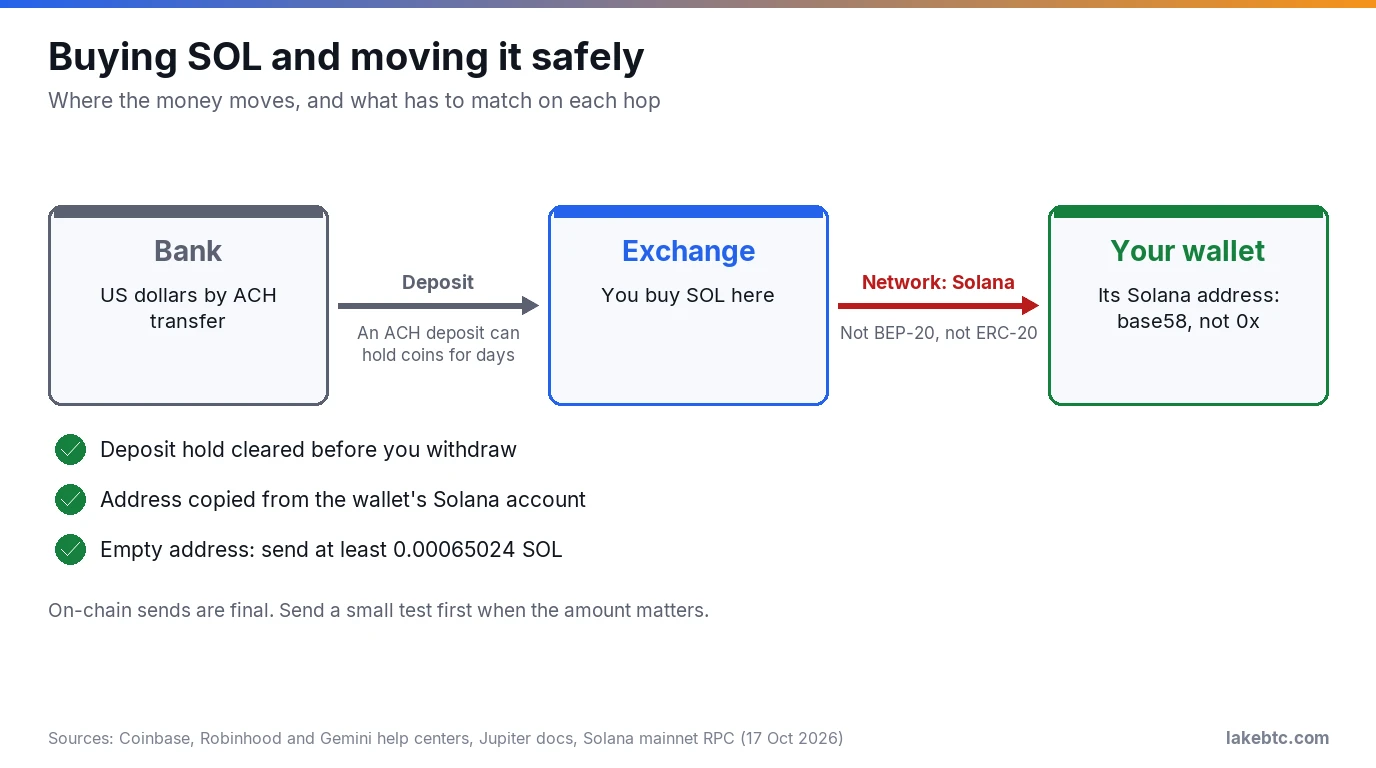
Buy SOL with dollars on a US exchange, a broker app or your wallet’s Buy button. To move it, withdraw on the Solana network to your Solana address.
Buying SOL on a US exchange takes a verified account and a way to pay. The part that costs people money comes later, on the withdrawal screen. That’s where a dropdown asks for a network and a box asks for an address.
Pick the wrong network and your SOL can end up on another blockchain as a different token. Paste the wrong address and you can’t pull it back, because Solana transactions can’t be reversed. While the SOL sits on the exchange, none of this matters. It matters the first time you withdraw.
Below are the routes you can buy through, what each costs as of October 2026, and the checks to run before that first withdrawal.
Before you buy SOL
- 🟢 Coinbase, Kraken, Robinhood and a wallet Buy button all get you real SOL. A spot ETF gets you fund shares, not coins.
- 🟡 On Kraken, an instant buy costs 1% plus a spread. Kraken Pro’s first tier charges 0.40% maker and 0.80% taker.
- 🔴 Withdraw on the Solana network to your Solana address. A send on the wrong network or to the wrong address can’t be reversed.
- 🟡 An empty Solana address needs at least 0.00065024 SOL (October 2026). A smaller test send to it fails.
In this article
Pick how you want to own SOL
Start with one question: do you want coins you can move, or only exposure to the price? Most routes give you real SOL in an account. A spot ETF gives you fund shares in a brokerage account instead.
| Route | Example | What you hold | Can you send it to a wallet? | What it costs (October 2026) |
|---|---|---|---|---|
| Exchange app, simple buy | Coinbase, Kraken app | SOL in your exchange account | Yes, once any deposit hold clears | Coinbase adds a spread to the quote and may charge a fee on top, both shown on the trade preview. Kraken charges 1% on instant buys, plus a spread. |
| Exchange trading screen | Kraken Pro | SOL in your exchange account | Yes | First tier: 0.40% maker, 0.80% taker. |
| Broker app | Robinhood | SOL in your Robinhood Crypto account | Yes, after you enable transfers | Default orders carry a spread, and Robinhood gets $0.95 of every $100 from it (June 2026). Exchange-routed orders pay a tier fee from 0.00% to 0.95% instead. |
| Wallet Buy button | Phantom | SOL at your own address | It’s already in your wallet | Outside providers quote their own price, and Phantom lists the live quotes by price. |
| Spot ETF | Bitwise BSOL | Fund shares in a brokerage account | No | 0.20% sponsor fee on BSOL. |
| Everything else | A swap from another coin, such as MetaMask’s Swap | SOL at your own address | It’s already in your wallet | The swap’s quoted cost. For taxes, the coin you give up counts as disposed of. |
For a first buy, the exchange or broker routes are the simplest. Phantom’s Buy button skips the withdrawal step, but the outside provider still checks your identity. If you live in New York or Maine, see the FAQ below before you open an account.
Buy SOL on a US exchange, step by step
The steps look much alike on the big US platforms. Mostly the button names change. Our guide on how to buy crypto covers the same flow for any coin.
- Open and verify an account. Sign up, then get verified. On Kraken, verification usually takes a few minutes.
- Turn on two-step verification before you add any money, and don’t stop at text messages. Text message (SMS) is Coinbase’s default method, and Coinbase calls it the least secure option. Add an authenticator app, a passkey or a security key.
- Add dollars. On Kraken, paying by card can add its own fee. A bank (ACH) transfer is the usual alternative, but it can lock your coins for days. Kraken lets you trade a Plaid ACH deposit at once, but cash or crypto equal to the deposit can’t be withdrawn for seven days. On Gemini, crypto bought with a pending ACH deposit can’t be withdrawn until the deposit clears, which Gemini puts at four to five business days.
- Find SOL and choose an order type. The simple Buy screen fills at once at a quoted price. A limit order on the trading screen waits for your price and can pay the lower maker fee.
- Read the preview before you confirm. Coinbase shows its fee on the trade preview screen. Check the SOL amount you’ll receive, not only the dollar total.
- Decide where the SOL stays. Keeping a small amount on the exchange is fine if you plan to sell there. To hold your own keys, withdraw it using the checks below.
What buying and moving SOL costs
You pay in up to three places: the trade, the deposit method and the withdrawal. The table above has each platform’s trading rate. Our page on crypto exchange fees explains spreads and maker/taker pricing in more depth.
Moving SOL is cheap on the network itself. Every Solana transaction pays its fee in SOL, and the base fee is 5,000 lamports per signature. That’s 0.000005 SOL, or about $0.0005 at $104.75 per SOL (CoinGecko, 17 October 2026).
Exchanges can add their own withdrawal fee on top, and Kraken shows its final fee when you confirm. Robinhood charges no transfer fee of its own. It adds the estimated network fee to the amount you send, unless you pick Send All. Since the fee is paid in SOL, keep a little SOL in a wallet that holds other Solana tokens, such as USDC. That’s what pays to move them.
Before you withdraw: the checks, in order
This is the step to slow down on. Coinbase’s help center warns that you must select the correct network or your funds will be lost, and it can’t retrieve a send to the wrong address or network. Run these checks every time you withdraw to a new address.
- Make sure the coins can move. A bank-funded buy may still be on hold. On Robinhood, you first have to verify it’s you, and enabling crypto transfers can take up to 5 business days.
- Pick Solana as the network. Some exchanges offer SOL on more than one network, such as BNB Smart Chain (BEP-20). When the screen offers Solana, ERC-20 or BEP-20, choose Solana. Any other choice sends a token on a different chain, not SOL to your Solana address.
- Paste your Solana address, not another one. A Solana address is a base58 string. Ethereum-style addresses start with
0xand don’t work for SOL. In MetaMask, one account holds several addresses, so open the address list and pick Solana before you copy. Sending from Robinhood? Its transfer page says it supports Solana addresses that are 44 characters long and start with a letter. - Send enough to an empty address. A new Solana account needs a minimum balance, and an account can’t be created below that threshold. On 17 October 2026, the network’s minimum for a plain wallet account was 0.00065024 SOL, about $0.07. A test send smaller than that to an empty address fails.
- Send a small test first. When the amount matters, send a little above that minimum, wait for it to land, then send the rest. The test also has to clear the exchange’s own floor: Kraken, for one, sets a minimum for each withdrawal. The second fee is tiny next to a mistake you can’t undo.
- Check it on a block explorer. Copy the transaction ID from your withdrawal history. On Solana it’s the transaction’s first signature. Paste it into a Solana explorer and confirm the address and amount.
Copy your address fresh from the wallet itself, from its Receive screen or address list, not from your transaction history. In an address poisoning scam, someone sends you a tiny transfer from a look-alike address so that it sits in your history, ready to be copied by mistake.
MetaMask’s guide to the scam says to check the middle characters of the pasted address too, not just the start and end, because those are what the fake is built to match. Compare it on the hardware wallet’s own screen if you have one. A seed phrase backup won’t help with a wrong address, because the coins are no longer at an address you control.
Which wallets can hold SOL
Not every wallet can. Check yours before the first withdrawal, especially if it’s an older hardware wallet.
| Wallet | Type | Holds SOL? | What’s different |
|---|---|---|---|
| Phantom | Software wallet | Yes | Built-in Buy button compares quotes from outside providers such as Coinbase Pay, Robinhood Connect and Stripe (list as of August 2024). |
| Solflare | Software wallet | Yes | Solflare can’t recover lost or stolen assets for you. |
| MetaMask | Software wallet | Yes | Each account gets a separate Solana address next to its Ethereum one. Ledger-based Solana accounts can’t be connected yet (October 2026). |
| Ledger | Hardware wallet | Yes, in a Solana account in the Ledger Wallet app | Clear Signing shows a simple SOL transfer on the device screen. It can pair with Phantom, but app transactions it can’t decode need blind signing. |
| Trezor Safe 7, Safe 5, Safe 3, Model T | Hardware wallet | Yes, in Trezor Suite | Trezor Suite can stake SOL through Everstake, from 1 SOL (October 2026). |
| Trezor Model One | Hardware wallet | No | Trezor has no plans to add SOL to the Model One. |
| Any other wallet | Any | Check first | Look for Solana on the maker’s supported-assets list before you send. |
Whichever you use, write the recovery phrase on paper and keep it offline. Phantom says its team will never ask you for it, so treat anyone who does as someone trying to take your SOL.
If your SOL doesn’t arrive
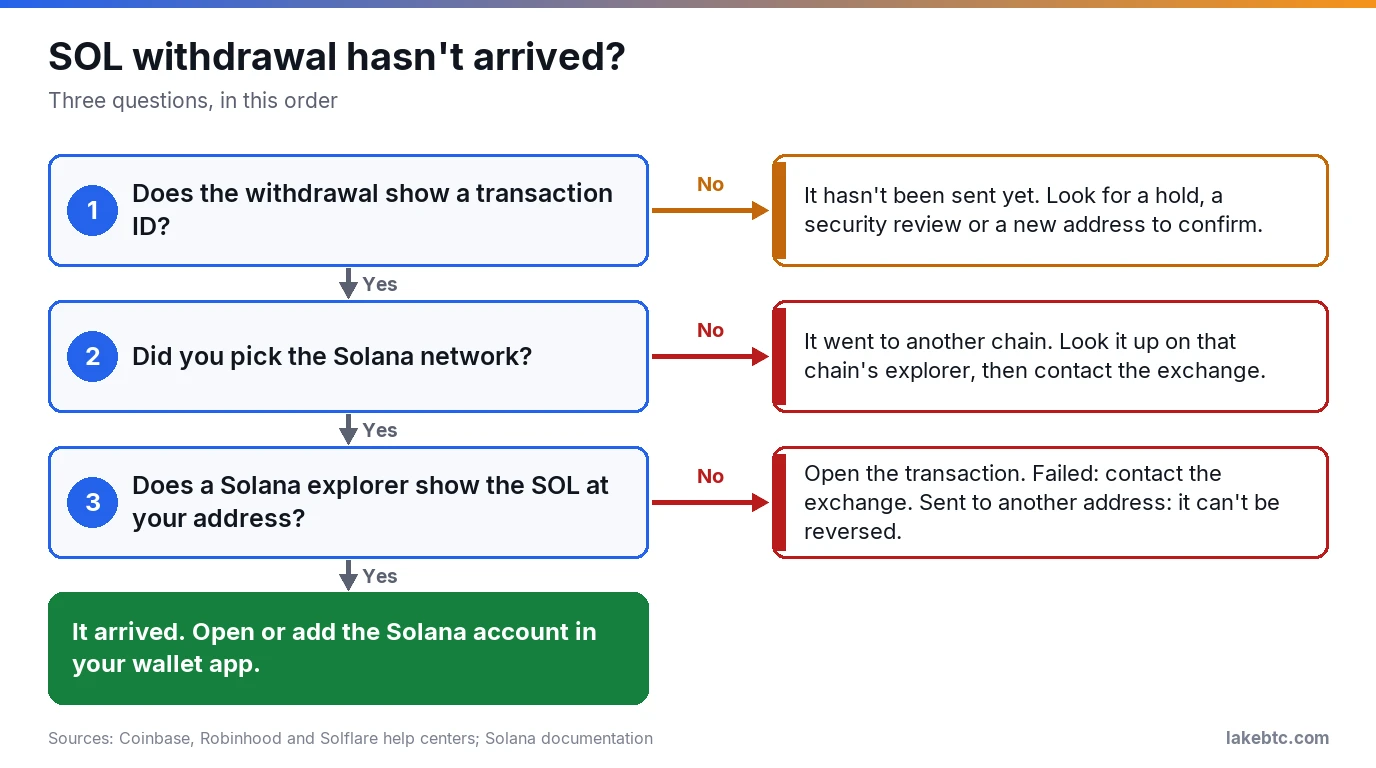
No transaction ID usually means the withdrawal hasn’t left the exchange yet. Look for a hold, a security review or a new address that still needs confirming.
A wrong network is harder. The coins sit on that other chain, at whatever address you entered. Look the transfer up on that chain’s explorer first, then contact the exchange you sent from.
In one case on Trezor’s forum in April 2024, a user’s SOL withdrawal went out over BNB Smart Chain to an Ethereum-format address on a Trezor Model One, which can’t hold SOL at all. That address was still the user’s own, so the fix suggested in the thread was to connect the Trezor to MetaMask or Rabby with BNB Smart Chain turned on, then send the tokens back to the exchange to swap for real SOL.
If you did pick Solana but the SOL isn’t at your address, open the transaction on the explorer. A failed transaction means the SOL didn’t move, so contact the exchange. A send to someone else’s address can’t be reversed. If the explorer shows the SOL at your address, it arrived, and your wallet app just needs its Solana account opened or added.
Scams aimed at new SOL buyers
Crypto complaints to the FBI’s Internet Crime Complaint Center reported $11.366 billion in losses in 2025. Crypto investment fraud alone made up $7.2 billion. It usually starts with a text, a social media message, an ad or a dating app match, then moves to a messaging app.
From there you’re steered to a fake trading platform that shows big profits. When you try to withdraw, it asks for taxes and fees first. The FTC’s advice fits in two lines: only scammers demand payment in crypto, and only scammers guarantee profits.
If you’ve already lost SOL, expect a second wave. The IC3 logged 10,516 recovery-scam complaints and $1.4 billion in losses in 2025, including fake law firms and people posing as officials. A confirmed transfer can’t be reversed, so a stranger offering to undo it for a fee is running this scam.
Taxes when you buy SOL
For federal taxes, digital assets are property, and buying SOL with dollars isn’t a sale. If all you did in a year was buy crypto with dollars, you check No on the digital asset question on Form 1040 (IRS guidance as of September 2026).
Moving SOL between your own wallets is a No only if you didn’t pay the transaction fee in crypto. The IRS counts a fee paid in crypto as a digital asset transaction, and every Solana fee is paid in SOL. So by our reading, a send you sign from your own wallet is a Yes, and so is an exchange withdrawal that takes its fee out of your SOL.
Staking rewards are a Yes as well, and you report them as income. Selling, swapping or spending SOL later gets reported. Brokers file Form 1099-DA for certain sales and exchanges from 1 January 2025, and add your cost basis on certain sales from 1 January 2026.
Frequently Asked Questions
How much Solana can I buy with $100?
At $104.75 per SOL on 17 October 2026, $100 buys about 0.9547 SOL before costs. After Kraken’s 1% instant-buy fee, you’d get roughly 0.9451 SOL, and the spread takes a little more. You don’t have to buy a whole coin: Coinbase’s minimum is 1 in your currency, so $1.
Can I buy SOL with a credit card?
Not on Coinbase, which doesn’t accept credit cards for SOL as of October 2026. Phantom’s Buy button listed debit and credit cards, Apple Pay and Google Pay among its payment options in August 2024. On Kraken, a card payment can add a fee on top of the trading fee.
Can I buy SOL in New York?
Your choices are narrower there. Kraken doesn’t serve New York or Maine residents, and MoonPay’s DeFi Buy for Solana tokens excludes New York. SOL isn’t on the NYDFS Greenlist either, so by our reading a licensed firm needs DFS approval, or a DFS-approved listing policy of its own, to offer it (October 2026). Robinhood, which holds a New York license, didn’t mark SOL as off-limits for New York on its crypto availability page on 17 October 2026. Confirm in the app before you fund an account.
Is a Solana ETF the same as owning SOL?
No. You own shares of a fund; BSOL, for example, trades on NYSE Arca. Bitwise states that an investment in BSOL is not the same as a direct investment in Solana. You can’t send the shares to a wallet or use them in Solana apps.
How long does a SOL withdrawal take?
The network part is fast: Robinhood, for example, credits a SOL deposit after 1 network confirmation, about 400 milliseconds. Kraken lists Solana among its near-instant withdrawals. The wait you notice usually comes from the exchange, such as a deposit hold, a new-address confirmation or a security review.
Can I cancel a SOL withdrawal?
Not once an exchange has sent it. Robinhood treats crypto transfers as final, and Coinbase calls on-chain sends irreversible. From your own wallet, a transaction that doesn’t make it into a block expires after about 60 to 90 seconds. You can then send it again without it going through twice.
Can I stake SOL after buying it?
Yes, in a wallet that supports staking or on some exchanges. In a wallet, you delegate a stake account to a validator, which keeps a commission from your rewards. Staked SOL isn’t free to sell at once: Trezor puts starting and unstaking at about two days each. Solana doesn’t slash stake today, though its docs leave that open. On Kraken, the SOL stays in your Kraken account and Kraken takes a commission. Kraken’s staking skips 13 states, including California, New York and Texas (October 2026). Rewards count as income.
What to do after your first buy
Write down where your SOL sits: in an exchange account, or at a wallet address you control. If you plan to hold it, set up and back up the wallet first, then withdraw with the checks above. Moving to a hardware wallet works the same way as in our guide to moving crypto from Coinbase to a cold wallet, with Solana as the network.
Keep the trade confirmation and the withdrawal’s transaction ID. You’ll want both to show what you paid when you sell, wherever you sell from.
Drafted with AI by the LakeBTC Editorial Team, then edited and fact-checked against the sources linked in the text. How we use AI · Report an error
Update history 3
- Rewritten and re-checked against primary sources.
- Rewritten and re-checked against primary sources.
- Rewritten and re-checked against primary sources.