Coinbase vs Robinhood: Fees, Coins, Transfers and Taxes
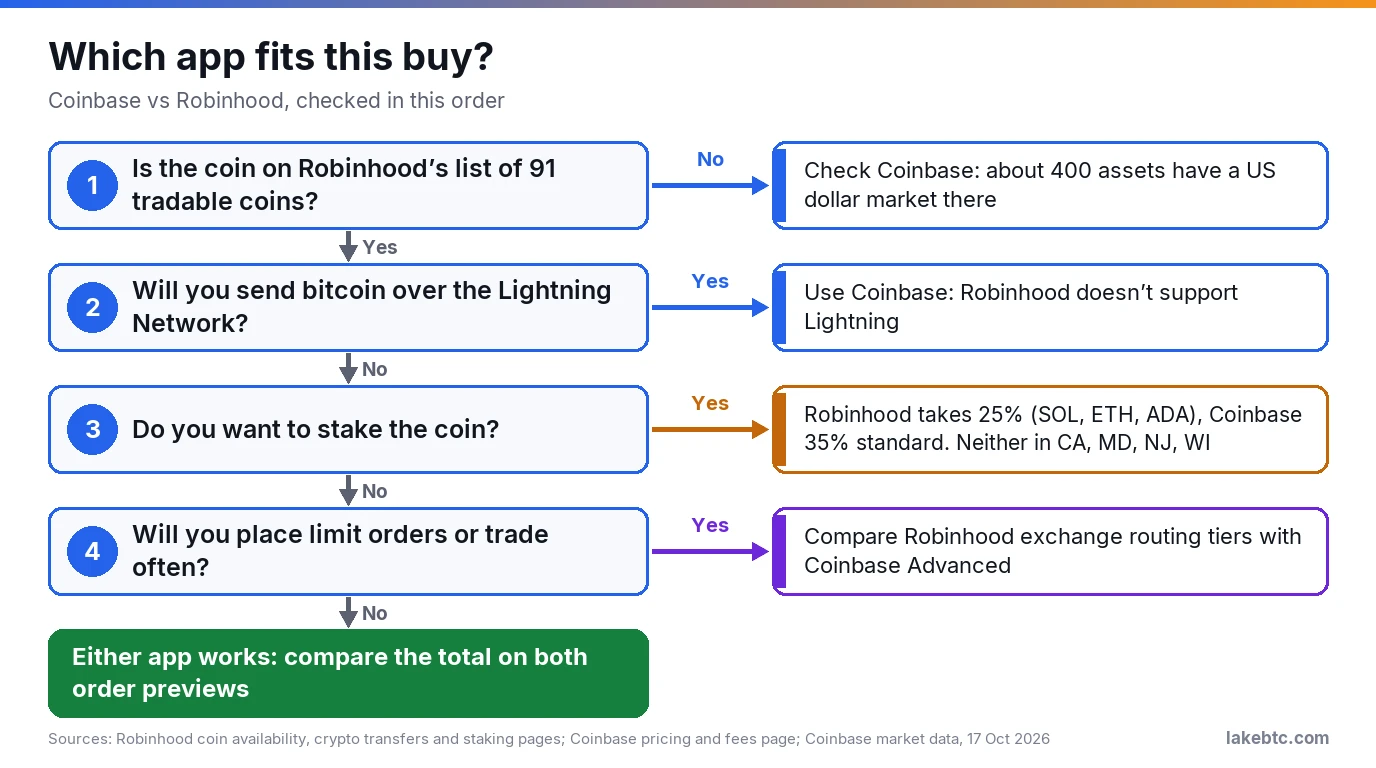
For a small buy of a common coin, either app works: compare the total on each order preview. Coinbase lists about 400 assets with a US dollar market, Robinhood 91 coins.
You’re about to buy crypto, and you already have Robinhood, Coinbase or both on your phone. On Robinhood you see no commission. On Coinbase you see a fee line on the preview. Neither line is the whole cost, and the bigger differences show up later, when you send the coins somewhere, stake them or file taxes.
Robinhood’s default price carries a spread, and part of that spread goes to Robinhood. Coinbase’s simple screen adds a spread and a Coinbase fee, both shown before you confirm. Each app also has an order-book route that charges a tiered maker or taker fee instead.
Start with the coin you want. If Robinhood doesn’t list it, check Coinbase. If both list it, put the same amount into both order previews and compare the totals before you press Buy.
Before you pick one
- 🟢 Both apps show the price and fees before you confirm: Robinhood on the order review screen, Coinbase on the trade preview.
- 🟡 Robinhood’s default route has no commission, but its spread includes $0.95 per $100 for Robinhood (as of June 15, 2026).
- 🟡 Robinhood sends bitcoin only to addresses starting with 1, 3 or bc1q. No bc1p, and no Lightning.
- 🔴 Your cost basis doesn’t move with your coins. Write down what you paid before you transfer between the apps.
In this article
- What you pay for a crypto buy on each app
- Which coins you can buy, and why your state matters
- Sending coins to your own wallet or to the other app
- Staking: the same four states, a different cut
- Is your crypto protected on either app?
- Taxes: the form you get and the transfer trap
- Stocks and the rest of the app
- The scam that copies both apps’ support lines
- Frequently Asked Questions
- Before your first buy
What you pay for a crypto buy on each app
Each app prices your order two ways. The simple route builds a spread into the price you see, and on Coinbase a separate fee line comes on top. The order-book route charges a percentage that drops as your tier goes up.
| Route | How you pay | Where you see the cost |
|---|---|---|
| Coinbase simple buy or sell | A spread in the quoted price, plus a Coinbase fee that depends on payment method, order size, market conditions, location and asset | Trade preview, before you submit |
| Coinbase simple limit order | A 1% limit order execution fee, and Coinbase may add a Coinbase fee (it names 1.875%, varying by payment method) | Order preview, history and receipts |
| Coinbase Advanced | A maker or taker fee set by your 30-day volume or a balance test, whichever gives you the better tier, as low as 0.0% maker; Coinbase adds no spread | The Coinbase Advanced fees page, once you sign in |
| Robinhood default (market maker routing) | No commission; you pay the spread between the chart’s mid price and the ask or bid | Order review screen |
| Robinhood exchange routing | 0.95% taker or 0.50% maker under $10K of 30-day volume, falling to 0.03% and 0.00% at $25M+ | Fee tier widget in the order type menu |
| Coinbase One subscription | Zero trading fees within any trading volume limit, but not on Coinbase Advanced; a spread can remain and the limit order fee still applies | Your membership settings |
Robinhood puts a number on its default route. As of June 15, 2026, it receives $0.95 from its market maker for every $100 you trade, and that money sits inside the spread. In its own example, a $100 buy with a 0.96% spread sends $0.95 of the $0.96 to Robinhood.
Exchange routing sends your order to EDX Markets or Bitstamp USA, and Robinhood takes no rebate there. You pay the tiered fee from its crypto fee schedule instead. In the app it covers 68 of Robinhood’s 91 coins, and its crypto availability page shows which.
It’s the only route on Robinhood Legend and the mobile ladder, web classic doesn’t offer it, and North Carolina residents can’t use it. Market and stop orders always pay the taker rate, and maker rates are still rolling out, so your account may not get them yet.
Coinbase doesn’t publish one percentage for a simple market buy. The fee moves with your payment method, order size, market conditions, location and the asset, so the trade preview is the number to trust.
Coinbase Advanced adds no spread of its own: you trade on the order book directly, and a market order pays the taker fee at the book’s price. Your tier comes from your 30-day trading volume or a balance test, whichever is better for you. Coinbase’s pages disagree on which balance (its fee help page says USDC, its Advanced Trade page your total balance in USD), so sign in to see the criteria that apply to you.
What does a $1,000 order cost?
Here’s what the published rates add up to on one $1,000 buy. Spreads move with the market, so read the spread figure as Robinhood’s example, not a quote.
| Route | Published cost on $1,000 | Also check |
|---|---|---|
| Robinhood default route | $9.50 to Robinhood inside the spread ($9.60 in total at Robinhood’s 0.96% example) | The ask price on the review screen |
| Robinhood exchange routing, under $10K of volume | $9.50 taker, $5.00 maker | The price you fill at |
| Robinhood exchange routing, $50K to $250K of volume | $2.50 taker, $1.25 maker | The price you fill at |
| Coinbase simple limit order | $10.00 execution fee, plus $18.75 if the 1.875% Coinbase fee applies | The fee breakdown on the preview |
| Coinbase simple market buy | Not published as a rate | The fee and spread on the trade preview |
On Robinhood, the default route’s share and the entry-tier taker fee are the same 0.95%, and Robinhood says neither route promises a better all-in price. On Coinbase, the simple limit order is the one route with a fixed published fee, and it’s a steep one at 1% before any Coinbase fee. If you want to set your own price there, look at your Coinbase Advanced tier first.
For how spreads, maker and taker fees and withdrawal fees work in general, see our crypto exchange fees breakdown.
Which coins you can buy, and why your state matters
Robinhood had 91 tradable coins on its crypto availability page on October 17, 2026. Some of them can’t be traded in New York, and USDC and Global Dollar (USDG) can’t be traded in Texas. Eighteen of them carry a footnote saying Robinhood received integration fees for supporting the coin, so a listing on its own tells you little about the coin.
Coinbase’s public market data showed 403 assets with an open US dollar market on the same day. Coinbase has state limits too: its staking list leaves out Sui (SUI) for New York. If the coin you want isn’t among Robinhood’s 91, Coinbase is the app to check.
Sending coins to your own wallet or to the other app
Both apps hold your coins in accounts they control, and both let you send them out. You can move coins between the two: Robinhood gives you a deposit address, and you paste it into Coinbase’s send screen like any other wallet address. Coins get lost when the network or the address is wrong, and a missing tag or memo can leave a deposit uncredited.
| What to check | Coinbase | Robinhood |
|---|---|---|
| Fee to send | A network fee based on Coinbase’s estimate; what Coinbase actually pays can differ, for example when it batches sends | No Robinhood fee; the network fee is added to your amount, and all of it goes to the network |
| Bitcoin over Lightning | Supported, with a 0.2% processing fee | Not supported |
| USDT | A 0.01% processing fee, capped at 20 USDT (about $19.97 on October 17, 2026), plus the network fee | Not on Robinhood’s transfer list |
| Coins bought with a bank deposit | You can send them once the funds have settled | Coins bought with instant funds move after normal settlement, unless your other holdings are worth more than the unsettled deposit |
| Everything else | Transfers are final on both apps, and a wrong network or address loses the coins | |
Robinhood limits which addresses it accepts. For bitcoin it supports addresses that start with 1, 3 or bc1q, and it doesn’t support bc1p (Taproot) addresses. For USDC it supports Arbitrum, Base, Ethereum, Optimism, Polygon and Solana. XRP needs a numeric tag, while HBAR and ATOM need a memo, as do standard Stellar addresses that start with G. The full list is on Robinhood’s crypto transfers page.
A few more Robinhood rules apply. When you send an ERC-20 token on Ethereum, the network fee comes out of the token itself, and you can’t pay it from your ETH balance. Bitcoin deposits are credited after 3 confirmations, about an hour, and ETH and most ERC-20 tokens after 30, about 5 minutes.
Moving everything out at once? Deposits are unlimited, but withdrawals have a limit that depends on your verification level and account history, and you can see it under Account, Menu, Crypto. Before any of this works, Robinhood has to verify it’s you, which can take up to 5 business days.
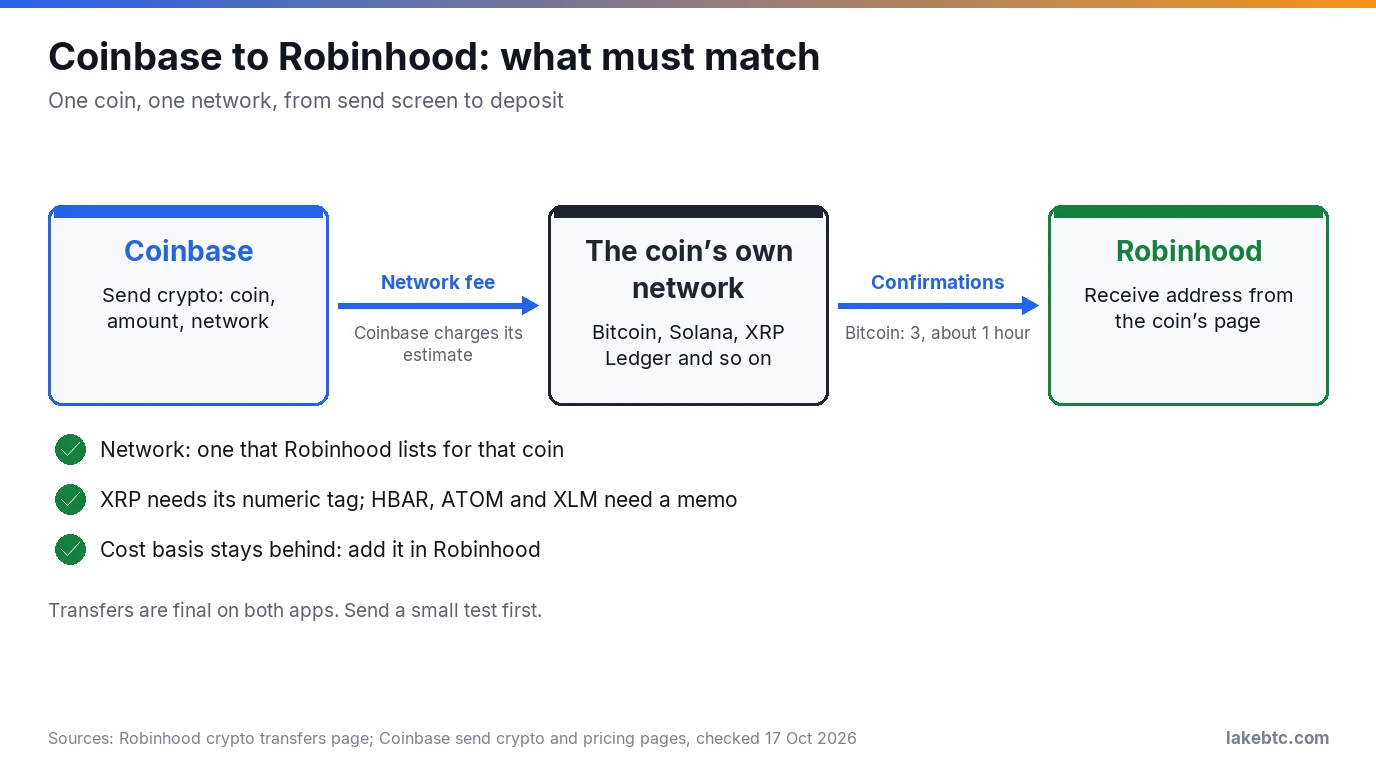
Here’s a test transfer from Coinbase to Robinhood, in order:
- In Robinhood, open the coin’s detail page, tap Receive and copy the address. Note any tag or memo it shows. Don’t use an address from your history or a block explorer.
- On Coinbase.com, choose Send crypto, then pick the same coin and a small amount.
- Choose the network Robinhood supports for that coin, paste the address, and add the tag or memo if Robinhood showed one.
- Check the pasted address against the Robinhood screen at the start, in the middle and at the end, then select Preview Send and Send now. Look-alike addresses are built to match only the start and end.
- Wait until Robinhood shows the deposit, then send the rest the same way. For bitcoin, Robinhood shows a new deposit address each time, which is normal.
- In Robinhood, select the deposit, choose View details and Add cost basis, and enter the purchase date, coin quantity and total cost including fees. Do it now: for 2025 sales, Robinhood took these entries only until January 14, 2026.
Going the other way, copy a fresh deposit address for that coin and network from Coinbase, not from your history, plus the destination tag or memo if Coinbase shows one. Robinhood’s steps are then the coin’s detail page, Send, the Coinbase address, the amount, then Review and Submit, with the same start, middle and end check before you submit.
If you’d rather hold the keys yourself, the same steps reach a self-custody wallet such as Robinhood Wallet or Coinbase Wallet (formerly the Base app), and our look at whether Coinbase Wallet is safe covers what Coinbase can and can’t recover there. Neither company can bring back a lost recovery phrase, so read how a seed phrase works first. For a hardware wallet, see moving crypto from Coinbase to a cold wallet.
Staking: the same four states, a different cut
| Staking | Coinbase | Robinhood |
|---|---|---|
| Coins you can stake | ADA, ATOM, AVAX, DOT, ETH, POL, SOL, SUI (not in New York), XTZ | SOL, ETH, ADA |
| Cut of your rewards | 35% standard (the fee page doesn’t list a rate for SUI); 31.75%, 28.5% or 25.25% on Coinbase One Basic, Preferred or Premium for ADA, ATOM, DOT, ETH, SOL and XTZ | 25%, which includes a staking partner fee of no more than 2.75% |
| No new staking in | California, Maryland, New Jersey, Wisconsin | California, Maryland, New Jersey, Wisconsin |
| Getting coins back | Coinbase estimates about 10 days for ETH, 5 for SOL and 2 for ADA | Up to the range shown in the app, which can be several weeks |
At standard rates, Robinhood’s 25% cut is lower than Coinbase’s 35% on the same coin, and only Coinbase One Premium comes close at 25.25%. Robinhood’s Ethereum terms carry a catch: validators need batches of 32 ETH, so Robinhood pays between 50% and 100% of the protocol rate. If you live in one of the four states, Coinbase’s staking eligibility rules still let you unstake at any time. The Coinbase staking guide covers its unbonding and risks.
Once you stake on Robinhood, you can’t sell those coins until they’re unstaked, and the wait can stretch to weeks. Neither app guarantees the rewards, and on some networks a penalty called slashing can take part of the staked coins. Rewards are income in the year you receive them, which matters at tax time.
Is your crypto protected on either app?
Neither app’s crypto has deposit insurance. Crypto held through Robinhood Crypto isn’t FDIC insured or SIPC protected. Coinbase’s user agreement excludes digital assets from FDIC insurance, and its stocks page adds that SIPC doesn’t apply to digital assets or cash in your Coinbase Inc. account. SIPC itself doesn’t protect a crypto asset that doesn’t qualify as a security.
Cash is treated differently. US dollar balances at Coinbase can be eligible for pass-through FDIC insurance up to the per-depositor limit, and Robinhood’s stock brokerage is a SIPC member. The crypto in either account still isn’t covered.
Both apps also hold the private keys for you. Robinhood doesn’t give customers the keys to its addresses, and on Coinbase the platform manages your keys too. On Coinbase, that’s why a forgotten password can be recovered. It’s also why your coins are only as safe as your login, which is exactly what scam calls go after.
Taxes: the form you get and the transfer trap
For federal taxes, crypto is property, so selling it on either app is a sale with a gain or loss. For 2026 sales, which you’ll file in spring 2027, brokers must report gross proceeds and, for covered coins, your cost basis on Form 1099-DA. For 2025 sales, basis reporting to the IRS was voluntary, and both apps sent the IRS proceeds only.
The trap is moving coins between the apps. Under the 2026 Form 1099-DA instructions, a coin transferred in to a broker is a noncovered security, so the receiving app doesn’t have to report its basis. Robinhood won’t know what you paid for coins bought elsewhere, and reporting the right basis is then your job.
Robinhood also closes your unknown or zero-basis lots first, before it applies first in, first out, whether you sell or send. As we read it, a transfer you never updated is the first thing sold, and with no basis on file you’d need your Coinbase records to avoid paying tax on the whole sale price.
The move itself isn’t a sale. Sending crypto between accounts you own isn’t taxable, except for any crypto used to pay the network fee. Since January 1, 2025, the IRS applies its basis rules wallet by wallet and account by account, so keep each app’s purchase records.
For 2025, Robinhood sent a Form 1099-MISC for rewards of $600 or more. From 2026, the IRS threshold for other income on that form is $2,000, and smaller reward totals are still income.
Selling on New Year’s Eve? Watch the clock. Robinhood’s tax FAQ puts its year-end cutoff for crypto trades at 11:59 PM UTC on December 31, which is 6:59 PM Eastern. A tax professional can confirm how this applies to your return.
Stocks and the rest of the app
As of October 2026, both apps sell US stocks without commission. Coinbase’s brokerage, Coinbase Capital Markets, is open to all US traders, with 24/5 trading on eligible symbols. Robinhood’s brokerage charges $0 commission on US listed stocks, ETFs and their options. If your stocks already sit on Robinhood, one app for both is a real convenience, but check the crypto limits above before you make it your default.
The scam that copies both apps’ support lines
The pattern the FBI describes goes like this. Someone calls or messages you, claims to work for your exchange and says your account has a problem or is under attack. Then they ask for your login, a click on their link or your ID, and they drain the account once they’re in.
Coinbase will never ask you to secure, move or access your funds, never asks for your password or 2-step verification code, and never calls or texts with a new wallet address for your coins. Robinhood warns that scammers impersonate it by email and text to steal logins. The money involved is large: crypto complaints to the FBI’s IC3 reached 181,565 in 2025, with $11.366 billion lost.
If a call or text says your account is at risk, hang up. Open the app yourself or call the exchange’s official number, never one the caller gives you. The same script arrives by email, and our guide to Coinbase email scams shows what the fakes look like.
Set up one defense before you need it: limit withdrawals to addresses you’ve approved. On Robinhood, that’s Account, Menu, Crypto, Advanced security, and any new address then waits 48 hours before you can send to it, which gives you time to react if someone gets into your account. Coinbase’s scam guidance tells you to turn on withdrawal allow-listing too, and to use strong two-factor authentication, with a hardware key as the best option.
Frequently Asked Questions
What is the downside of Coinbase?
Its simple buy screen has no fixed published fee, so you learn the cost only on the preview, and a simple limit order adds 1% on top. Its standard staking cut of 35% is also higher than Robinhood’s 25% on the three coins both apps stake.
Why do some buyers avoid Robinhood for crypto?
The documented limits are 91 tradable coins, three stakeable ones, no Lightning or Taproot bitcoin addresses, and some coins blocked in New York or Texas. Its “no commission” price also pays Robinhood through the spread.
What is the best platform to buy crypto?
There isn’t one for everyone. For a given coin, amount and payment method, the cheapest is the one whose preview shows the lowest total, and the right one also has to send, stake and report the way you need. For other US options, see our list of the best crypto exchanges.
Which is cheaper for an instant cash-out?
An instant bank withdrawal from Robinhood costs up to 1.75%, with a $1 minimum and a $150 cap, under its brokerage fee schedule. Coinbase’s fee depends on the cash-out method you pick, so check that screen for your amount before you compare.
Can I send crypto from Robinhood to Coinbase?
Yes. Copy the deposit address for that coin and network from Coinbase, with its tag or memo if it shows one, then use Send on the coin’s page in Robinhood. Robinhood adds the network fee to your amount, unless you pick Send All, which takes the fee out of the total.
Before your first buy
- Find your coin on Robinhood’s crypto availability page. If it isn’t there, check Coinbase.
- Enter the same amount on both order previews and compare the totals, fee and spread included.
- If you’ll place limit orders or trade often, compare Robinhood’s exchange routing tier with your Coinbase Advanced tier.
- Planning to stake? Check that your state isn’t California, Maryland, New Jersey or Wisconsin.
- If you might move coins later, save the purchase date, quantity and total cost of each buy now.
Drafted with AI by the LakeBTC Editorial Team, then edited and fact-checked against the sources linked in the text. How we use AI · Report an error
Update history 3
- Rewritten and re-checked against primary sources.
- Rechecked the full fee table against Coinbase and Robinhood fee pages and narrowed the Coinbase cash-out row to what Coinbase states.
- Corrected how Robinhood routes and prices crypto orders, and updated Coinbase staking rates, stakeable assets and Advanced Trade pair count.