Coinbase Withdrawal Code Text: Why You Got It and What to Do
A text with a Coinbase withdrawal code and a number to call is a scam. Coinbase doesn’t text to verify transactions. Don’t call. Check your account in the app yourself.
The text says a withdrawal is waiting and gives you a code, then asks you to call a number if that wasn’t you. That last line is the whole trick. The text itself doesn’t move any money, and the danger only starts if you call.
Coinbase doesn’t send out texts to verify transactions, and its staff will never ask for your password or your 2-step codes. So a message that wants you to call about a withdrawal isn’t Coinbase, whatever name it shows.
If you only got the text, you’re fine. Don’t reply, report it, and open the Coinbase app you already use if you want to check. If you called, read out a code or sent crypto, go straight to the steps by situation further down, because the order matters there.
Before you do anything else
- 🔴 Don’t call the number or reply. Coinbase doesn’t send texts to verify transactions.
- 🟢 Check your account by opening the Coinbase app or typing coinbase.com yourself.
- 🔴 Never read a code, password or recovery phrase to anyone. Coinbase staff won’t ask for your password or codes.
- 🟡 Already called, shared a code or sent crypto? Jump to the steps by situation below.
In this article
- What the Coinbase withdrawal code text looks like
- Can it ever be a real Coinbase code?
- What happens if you call the number
- What to do now, based on what you did
- How to lock and secure your Coinbase account
- How to report the text
- Make the next code text harmless
- Watch for the second scam: fake recovery help
- Frequently Asked Questions
- What to do next
What the Coinbase withdrawal code text looks like
The Washoe County Sheriff’s Office in Nevada published a real one on May 6, 2025. It read like this, with the scam’s phone number left out here:
(COINBASE) The OTP code for your withdrawal is 736191. If this was not you please call us on followed by a phone number, then Ref CB97405.
OTP means one-time password, and both the code and the reference number are there to look official. What matters is the phone number, because it connects you to the scammers.
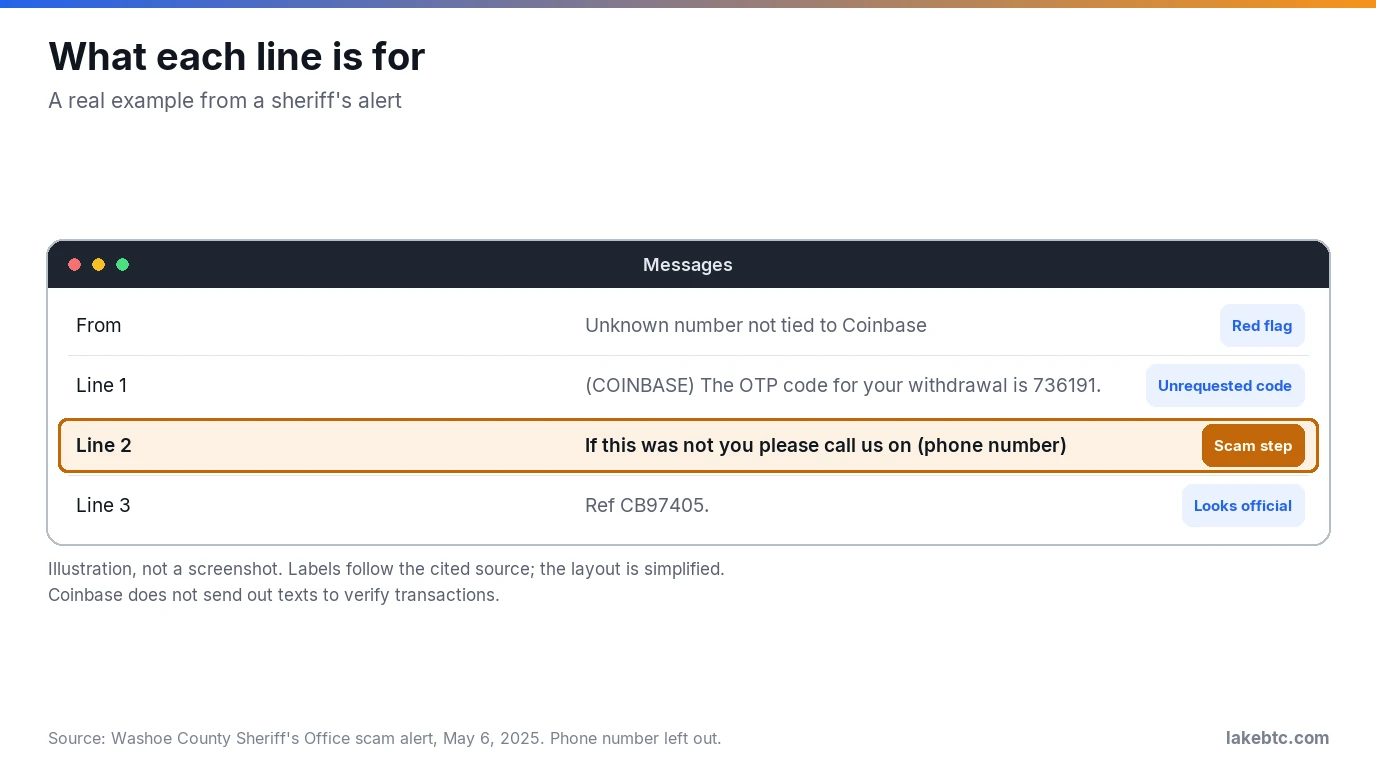
The sheriff’s office listed four signs, and you’ll usually spot more than one in the same message:
- It comes from an unknown number that isn’t tied to Coinbase.
- A one-time code or withdrawal notice arrives that you didn’t ask for.
- It asks you to call a number to verify account activity.
- The wording is oddly formatted or urgent.
You may get this text without ever having opened a Coinbase account. That alone tells you the code can’t be real.
Can it ever be a real Coinbase code?
Yes, but not in this form. If text message is your 2-step method, Coinbase sends your 2-step codes by SMS. It doesn’t deliver them by voice call. A real code is something you type into Coinbase yourself, not something anyone asks you to read out.
| What you see | Real Coinbase 2-step code | Withdrawal code scam text |
|---|---|---|
| When it arrives | Right after a sign-in or action on your account | Out of the blue |
| What it asks | Nothing. You enter the code on Coinbase. | Call a number if it wasn’t you |
| Who wants the code | Only the Coinbase screen you’re using | A person on the phone |
| If you have no Coinbase account | Can’t happen | Can still arrive |
What if a real code shows up and you didn’t sign in? Treat it as a password problem, not a withdrawal. An unexpected Coinbase device confirmation means someone used your password and 2-step code to start signing in. A real code you didn’t ask for most likely means the same thing: someone started a sign-in with your details. Change your Coinbase and email passwords, then review your active sessions and devices.
What happens if you call the number
A friendly “support agent” answers and says your account is under attack and a big withdrawal is pending. Then they’ll ask for something that hands them control, usually one of these:
- the code that just arrived, or your password
- moving your crypto to a “safe” wallet or vault they name
- a recovery phrase they give you, or yours
- installing an app so they can “help” on your screen
None of that is how Coinbase works. Its staff won’t ask you to send crypto to external addresses, and they won’t ask for your password, your 2-step codes or for you to install remote support software. Your recovery phrase is in a class of its own: anyone who has it has the crypto in that wallet, so it’s never something to read out. If a caller asks for any of it, hang up.
The FTC puts it just as bluntly. Anyone who asks for your verification code is a scammer. And someone who says you have to move your money to protect it is a scammer too.
The code is what they need most. In a November 25, 2025 alert, the FBI described this exact move: criminals posing as support talk people out of their one-time passcodes, sign in, and reset the password. From January 2025 to that alert, the IC3 received more than 5,100 account takeover fraud complaints, with losses over $262 million. Stolen funds often go to accounts linked to crypto wallets, which makes them hard to trace.
A caller who knows your name, address or balance proves nothing either. In a May 2025 SEC filing, Coinbase disclosed that a threat actor got customer data by paying contractors or employees in support roles outside the US. The stolen data included names, addresses, phone numbers, emails and balance snapshots, the kind of detail that makes a social-engineering call sound real.
Don’t trust caller ID either. Scammers can spoof real phone numbers, so a call that seems to come from Coinbase proves nothing. And Coinbase staff won’t call you directly to handle account support.
What to do now, based on what you did
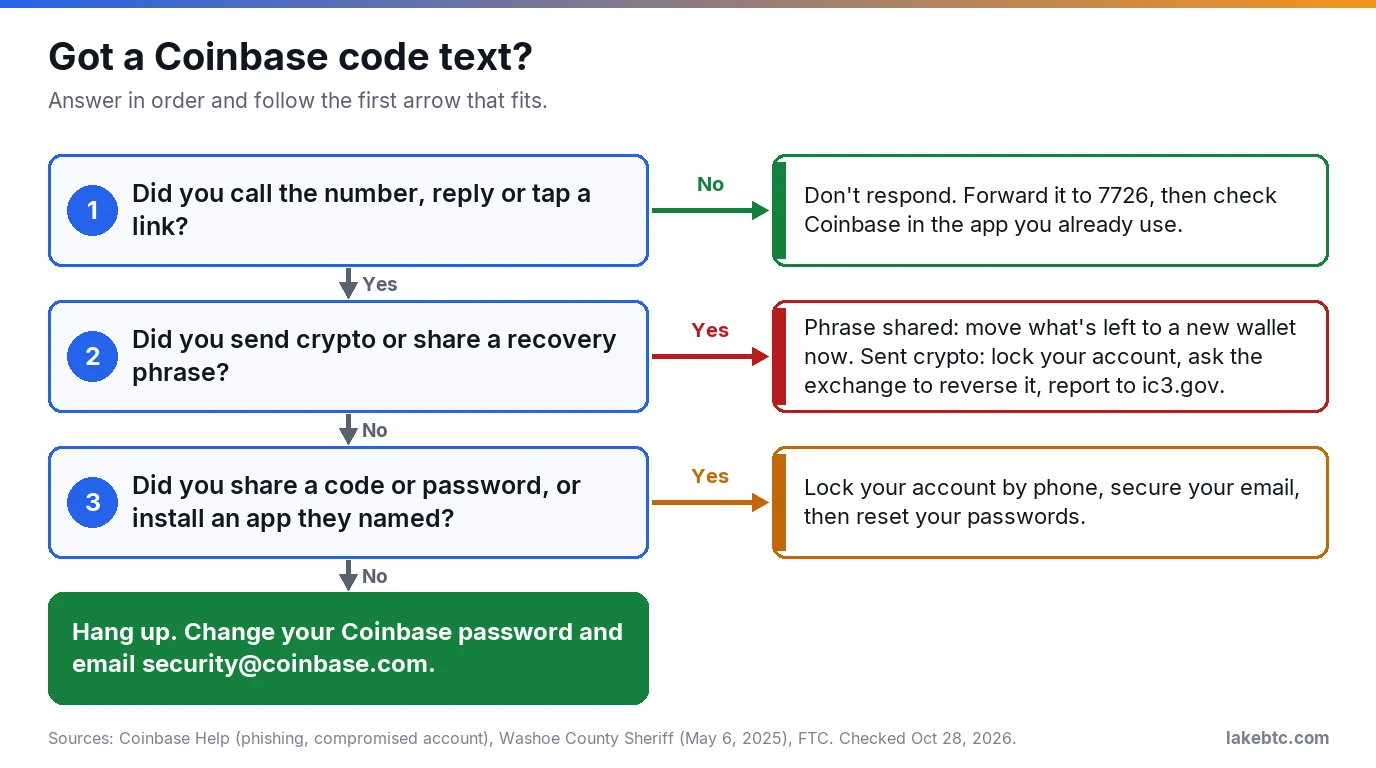
Find the row that matches you, do the first step right away, then the rest. The chart under the title asks the same questions as yes or no.
| What happened | Do this first | Then |
|---|---|---|
| You only got the text | Don’t reply or call. Forward it to 7726. | Delete it. Check Coinbase in the app if you’re unsure. |
| You sent crypto to them | Lock your account, then ask the exchange you sent from to reverse it. | Report it to Coinbase, the IC3 and your local police, with the receiving address. |
| You shared a wallet’s recovery phrase | Move what’s left to a new wallet with a different phrase. | Report it to the IC3, and to Coinbase if it was a Coinbase wallet. |
| You read out a code or password | Lock your account by phone (steps below). | Secure your email, then change your passwords and check devices. Gave bank details too? Call your bank. |
| You installed an app they named | Lock your account by phone. | Uninstall that app, especially remote-access tools, and run a security scan. |
| You called but shared nothing | Hang up. Change your Coinbase password. | Email [email protected] with a screenshot of the text. |
A leaked recovery phrase works differently from a leaked password. Anyone with your phrase has the crypto in that wallet, so there’s no “changing” it and the fix is a new wallet. Our guide to what a seed phrase does explains why.
Sent crypto? Be realistic, because crypto payments typically can’t be reversed. Ask anyway, quickly, and report it so there’s a record.
How to lock and secure your Coinbase account
Do this if you shared a code, a password, or access to your device. Coinbase’s compromised-account page, checked on October 28, 2026, gives this order:
- Lock the account by phone. Call Coinbase’s automated US line,
+1 (888) 908-7930. The lock stops funds from leaving and blocks access. It’s automated, so you won’t reach an agent. Type the number from this page or Coinbase’s help center, never from a text. - Contact Coinbase Support through its Support Form to tell them what happened.
- Secure your email. Reset its password. Look for rules, filters, forwarding addresses or recovery emails you didn’t add.
- Clean your device. Run an anti-virus scan and install the latest software updates.
- Get back in safely. Follow Coinbase’s account access steps.
One catch: a phone lock blocks sign-in but doesn’t sign out a session that’s already open. The lock still stops funds from leaving, but once you’re back in, review your active sessions and devices and revoke any you don’t recognize. If money was taken without your permission, file a police report too.
How to report the text
Reporting takes a couple of minutes and leaves a record. Send it to the places that fit:
- Your carrier: forward the text to
7726(SPAM) if you’re with a US carrier. - Coinbase: email a screenshot of the text to
[email protected]. - The FTC: file a report at ReportFraud.ftc.gov.
- The FBI’s IC3, if you lost money: type
www.ic3.govinto the address bar yourself. Skip sponsored search results, since fake IC3 sites exist.
Keep the text until you’ve taken the screenshot, then block the number and delete it.
Make the next code text harmless
These texts work best on accounts that use SMS for 2-step codes. SIM-swap attacks, where someone moves your number to their phone, threaten every account using SMS 2-step verification. Coinbase strongly recommends a security key instead, with an authenticator app such as Google Authenticator or Duo as the next option.
Turn on address allowlisting too. With it on, crypto withdrawals can only go to addresses already saved in your Address Book. Set it up while your account is still yours.
With a security key or an authenticator app instead of SMS, a stolen phone number gets a scammer much less. Switch before the next text arrives, not after.
Watch for the second scam: fake recovery help
If you lost money, expect more contact. Someone may claim to be a lawyer or a recovery firm and offer to get your crypto back for a fee. In 2025 the IC3 logged 10,516 recovery-scam complaints with $1.4 billion in losses, a figure that can include the scam that came first, per its 2025 annual report.
The rule is simple: the IC3 never asks for payment to recover funds, and it doesn’t work with law firms or crypto services to get money back. Treat anyone who charges a fee to recover your crypto as the next scam.
Frequently Asked Questions
Is it safe to receive a Coinbase withdrawal code by text?
Getting the text can’t hurt you on its own. The risk only begins if you call, reply, tap a link or share a code, so leave it alone and report it.
Will Coinbase send me text messages?
Coinbase texts 2-step codes if SMS is your 2-step method. It doesn’t send texts to verify transactions, and its staff won’t ask you for those codes.
Why am I getting a Coinbase verification code I didn’t request?
If it came with a callback number, it’s the scam. If it’s a bare code with no number to call and you weren’t signing in, someone may have your password, so change it now.
What is Coinbase’s customer service number?
Coinbase’s compromised-account page listed +1 (888) 908-7930 as its automated US lock line on October 28, 2026. It only locks your account; you won’t reach an agent there. Take any number from Coinbase’s help center, never from a text, a search ad or a caller.
How do I spot a fake Coinbase transaction?
Open the Coinbase app on your own and look at your transaction history. If the withdrawal or deposit in the message isn’t there, the message is fake.
How do I change the phone number on my Coinbase account?
If you still have the old number, sign in on your own, verify the new one in your 2-step settings and set it as primary. Lost the old number? Pick Try another way, then Update your phone number at the code prompt, then upload your photo ID and take a live selfie on the website. Either way, Coinbase says the change takes 48 to 72 hours.
What to do next
If you only got the text, forward it to 7726, send the screenshot to Coinbase and get on with your day. Then spend five minutes swapping SMS for a security key or an authenticator app.
Did the same scam reach your inbox? Our guide to spotting a fake Coinbase email covers the sender checks for email. If you hold crypto in a self-custody app too, read whether Coinbase Wallet is safe and how its recovery phrase is protected.
Drafted with AI by the LakeBTC Editorial Team, then edited and fact-checked against the sources linked in the text. How we use AI · Report an error