D’CENT Wallet Review: Biometric Cold Storage Examined

Yes, D’CENT is a legitimate, non-custodial hardware wallet with Common Criteria-certified secure elements (EAL5+ on the Biometric Wallet, EAL6+ on the DCENT S) and no publicly disclosed breach identified during this review. It suits buyers who want fingerprint-based unlock and broad multi-chain support, but it is a weaker fit for anyone who specifically wants open-source firmware or the broadest possible track record and community scrutiny. Ledger and Trezor are often cited as more open-source and more widely community-audited, though that specific comparison was not independently reverified in this review.
In this article
- Is D’CENT Wallet Safe? Full Review
- At a Glance: D’CENT Wallet Snapshot
- What Is D’CENT Wallet?
- Unboxing and Setup: What to Expect
- Biometric Security Deep Dive
- Mobile App Walkthrough
- Supported Assets and Compatibility
- Fee Table
- Recovery and Inheritance: What Happens If You Lose Access?
- Security Track Record
- User Sentiment: What Reviewers Say
- Total Cost of Ownership vs. Competitors
- Pros and Cons
- Is D’CENT Safe? Verdict
- FAQ
Is D’CENT Wallet Safe? Full Review
D’CENT delivers a differentiated biometric unlock experience backed by Common Criteria-certified secure elements, but per independent technical reviews its firmware appears closed-source, and combined with mixed app store ratings and smaller mindshare relative to Ledger or Trezor, that means it suits a specific buyer, someone who values fingerprint convenience and multi-chain reach over an open-source audit trail. The rest of this review breaks down the hardware, the mobile app, the biometric security claims, backup and recovery mechanics, and coin support, drawing on the company’s own documentation, app store listings, and third-party review data.
At a Glance: D’CENT Wallet Snapshot
- Manufacturer: IoTrust Co., Ltd., a registered South Korean corporation based in Seoul (Company Registration No. 219-86-00705).
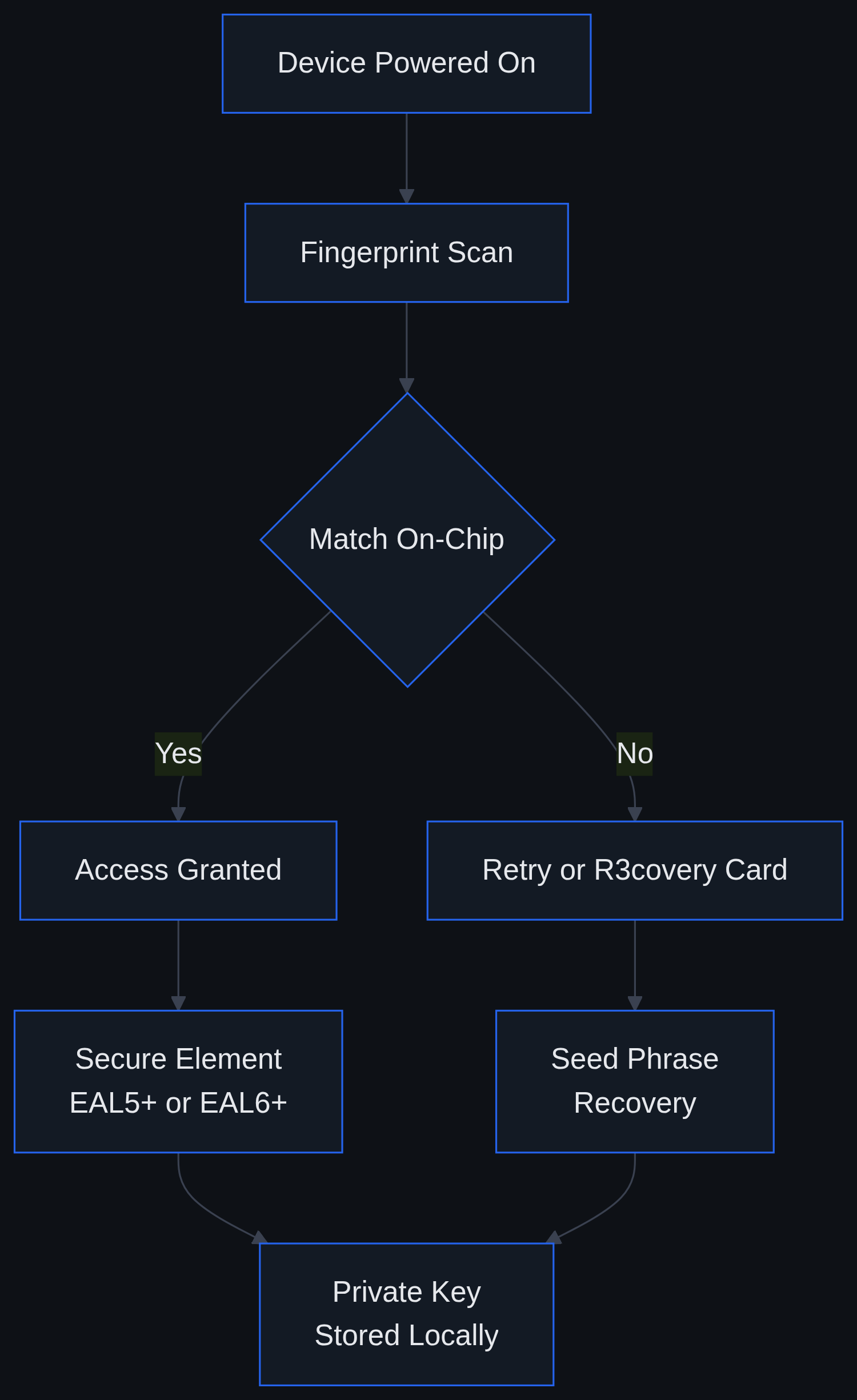
- Wallet types: Biometric hardware wallet (fingerprint sensor), DCENT S card-format cold wallet with R3covery backup card, and a standalone mobile app.
- Custody model: Non-custodial, private keys are generated and stored on-device, not held by IoTrust.
- Secure element certification: Common Criteria EAL5+ on the Biometric Wallet; Common Criteria EAL6+ on the newer DCENT S card.
- In-app swap economics: No swap fee charged by D’CENT itself; minimum swap size is $1, with only third-party liquidity-provider and network fees applying.
- Platforms: iOS and Android companion apps, plus a Bluetooth/QR pairing workflow between device and phone.
- Jurisdiction: Republic of Korea (company registration); products are distributed internationally through the official store and third-party retailers such as Amazon.
What Is D’CENT Wallet?
D’CENT is developed by IoTrust Co., Ltd., a South Korean company that markets its flagship device as a biometric-first alternative to the PIN-and-seed-phrase model used by most cold wallets. The product lineup spans three tiers: the original Biometric Wallet, which pairs a fingerprint sensor with an EAL5+ certified secure chip; the newer DCENT S, a card-format cold wallet bundled with an R3covery backup card and built around an EAL6+ certified secure element; and a mobile-only app that can function as a software wallet independent of any hardware device.
Within the broader hardware wallet category, where Ledger and Trezor remain the most widely recognized names, D’CENT differentiates primarily through fingerprint authentication and a card-sized form factor, rather than competing purely on brand recognition or open-source firmware. Readers comparing self-custody options more broadly may also find our Arculus wallet review useful, since Arculus takes a similar card-format approach with a different security architecture.
Unboxing and Setup: What to Expect
Initial setup on either the Biometric Wallet or the DCENT S follows a similar sequence, though card-format hardware skips the fingerprint enrollment step found on the original device.
- Unbox the device, backup card(s), and any included cable, then confirm tamper-evident packaging is intact before connecting anything.
- Power on the device and allow it to complete a firmware integrity check before proceeding.
- On the Biometric Wallet, enroll one or more fingerprints directly on the device’s sensor; this step is skipped on the card-format DCENT S.
- Generate the wallet’s private key on-device and record the R3covery backup card and/or seed phrase exactly as prompted, never through a screenshot or cloud note.
- Pair the device with the D’CENT mobile app via Bluetooth or QR code to view balances and initiate transactions.
- Send a small test transaction before moving significant balances onto the device.
Common friction points reported by users and reviewers include small on-screen text that can be harder to read during seed or address verification, a confirm button some testers describe as overly sensitive during backup verification, and occasional firmware update delays. Fingerprint enrollment failures also surface periodically in app store reviews, typically resolved by re-cleaning the sensor and re-enrolling in better lighting.
Biometric Security Deep Dive
The fingerprint-first approach is D’CENT’s core differentiator, so it warrants closer scrutiny than a typical PIN-based cold wallet review.
How Fingerprint Matching Works On-Device
D’CENT’s design intent is for fingerprint matching to occur locally, on the secure chip itself, rather than being transmitted to a server or stored as a raw biometric template outside the device. This “match-on-chip” approach is common across biometric hardware wallets and payment cards generally, since it avoids centralizing fingerprint data in a way that could be exfiltrated in bulk. Buyers who want a definitive statement on whether any biometric data ever leaves the device should consult D’CENT’s own privacy documentation directly, since that level of technical detail is best confirmed at the source rather than through secondary summaries.
What EAL5+ and EAL6+ Actually Certify
Common Criteria Evaluation Assurance Levels (EAL) are an internationally recognized framework for rating the rigor of a security evaluation, not a guarantee against all attacks. D’CENT’s original Biometric Wallet uses a secure element certified to EAL5+, while the newer DCENT S card uses a chip certified to EAL6+, a higher assurance level typically associated with smart-card-grade secure elements used in payment cards and government ID chips. Higher EAL numbers indicate a more formal, more thoroughly tested development and verification process, but they do not certify that a fingerprint sensor itself is unspoofable, since the sensor and the secure element are distinct components.
Biometrics vs. PIN-Only Cold Wallets
PIN-only devices like Ledger and Trezor models rely on knowledge-based authentication: something the user knows. Biometric devices add something the user is. Each has trade-offs. A PIN can be changed if compromised; a fingerprint cannot. Capacitive fingerprint sensors, as a class of technology, have documented spoofing research in the broader biometrics literature, though practical attacks generally require the attacker to already have physical access to the device and a copy of the owner’s fingerprint, a materially higher bar than guessing a short PIN. For self-custody specifically, the more relevant question is usually physical device security and backup-card storage, not sensor-level spoofing risk in isolation.
Mobile App Walkthrough
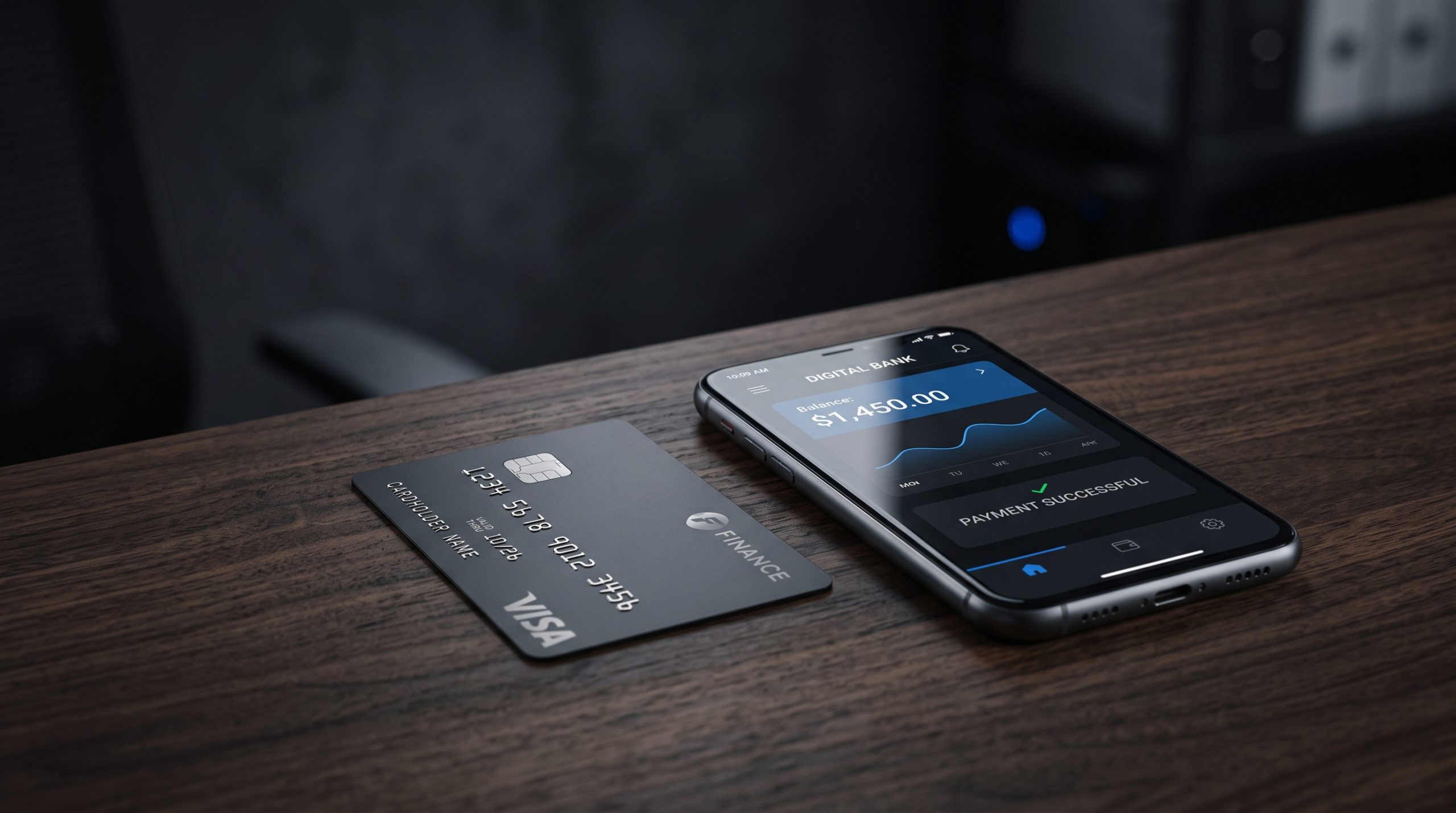
The D’CENT app functions as the command center for the hardware, and also runs independently in a software-only mode.
- Portfolio dashboard: Aggregates balances and market data across connected accounts.
- Swap and bridge: In-app token swaps carry no D’CENT-imposed fee; only third-party liquidity-provider spreads and network gas apply, and the minimum swap size is $1, according to the app’s listing on the Apple App Store.
- Blockaid integration: Multiple industry outlets reported in 2025 that D’CENT integrated Blockaid’s real-time phishing and scam-transaction detection into its app; a first-party press page confirming the exact rollout date was not located, so this integration should be treated as reported rather than confirmed in full.
- dApp browser and NFT management: Built into the app for interacting with decentralized applications without leaving the wallet interface.
- Software-only mode: The app can operate without the hardware device attached. This is more convenient but shifts private-key exposure back onto the phone’s operating system, which is a materially different risk profile than air-gapped or Bluetooth-paired hardware signing.
Supported Assets and Compatibility
According to D’CENT’s own supported-assets page, checked in August 2026, the wallet lists support for roughly 100 blockchain networks and close to 5,000 coins and tokens; the company states this figure updates on a rolling basis, so it should be read as a snapshot rather than a fixed number. That breadth places D’CENT among the wider-reaching wallets in its category, though exact head-to-head coin counts against Ledger or Trezor can shift as each vendor adds network support.
D’CENT also maintains ties to the XRP Ledger ecosystem through its XRPL wallet page, positioning itself within the broader XRP Alliance partner network for XRPL-native features. Readers new to buying assets like XRP directly may find our guide on how to buy XRP in the US useful as a companion piece before moving holdings into any self-custody wallet.
Fee Table
| Item | Cost / Structure |
|---|---|
| In-app token swap fee (D’CENT) | $0, D’CENT does not charge its own swap fee |
| Minimum swap amount | $1 |
| Blockchain network (gas) fees | Pass-through cost set by the underlying network, not by D’CENT |
Fees verified as of 2026-08-09; availability not independently confirmed.
Hardware pricing sits outside this table because storefront prices change frequently. As one data point, the official D’CENT store lists the DCENT S card wallet with its R3covery backup card at $59, with no active discount and the listing showing as sold out at the time this review was checked; pricing and stock availability change frequently and buyers should treat this as a snapshot rather than a live quote.
Recovery and Inheritance: What Happens If You Lose Access?
Self-custody wallets place the entire recovery burden on the owner, and D’CENT’s biometric layer adds a wrinkle beyond the standard seed-phrase model.
The R3covery Dual-Card Backup
The R3covery system is built around a physical backup card generated during initial setup, intended to let an owner restore wallet access on a replacement device without re-entering a full seed phrase manually. The underlying seed phrase remains available as a fallback recovery method if the card itself is lost or damaged, which is why D’CENT, like other hardware wallet makers, recommends storing the backup card and seed record in physically separate, secure locations.
Losing a Fingerprint or the Device Itself
Because biometric matching authenticates access to the device rather than replacing the underlying cryptographic seed, an injury or enrollment failure does not destroy the wallet’s funds: recovery still runs through the R3covery card or seed phrase on a new device. The practical risk is not a lost fingerprint, it is a lost or destroyed backup card with no seed-phrase copy anywhere else.
Estate Planning Considerations
Biometric-locked hardware raises a real question for estate planning: a fingerprint sensor cannot authenticate someone other than the original owner, so any inheritance plan must route through the R3covery card or seed phrase rather than the device’s biometric unlock. This is a legal and financial planning question, not a product feature, and owners with meaningful holdings should work with an estate planning professional to document backup-card access alongside a will or trust.
Security Track Record
D’CENT’s certification profile, EAL5+ on the Biometric Wallet and EAL6+ on the DCENT S, reflects third-party Common Criteria evaluation of the secure element hardware itself. No publicly disclosed breach or exploited vulnerability affecting D’CENT devices was identified during this review’s research window; absence of a known incident is not the same as a formal independent audit report, and readers should treat this as a research finding rather than a certification of flawlessness.
On transparency, multiple third-party technical reviews describe D’CENT’s firmware and app source code as closed, despite the company maintaining a public GitHub presence. Ledger and Trezor are commonly cited as publishing more of their firmware source for community audit, though that specific comparison was not independently reverified in this review. It remains a reasonable point of comparison for buyers who weigh code transparency heavily in their security calculus.
User Sentiment: What Reviewers Say
App store data shows a mixed but generally middling reception. The Android app carries a 3.6-star rating across roughly 1,700 reviews with over 100,000 downloads on Google Play, while the iOS app sits at 3.5 out of 5 based on 163 ratings on the Apple App Store, a smaller sample that can shift more with each new review.
Recurring praise themes center on the novelty and convenience of fingerprint unlock and the card-format DCENT S’s portability. Recurring complaints echo the setup friction noted earlier: small screen text during verification steps, a sensitive confirm button, and occasional firmware update delays.
Total Cost of Ownership vs. Competitors
Budget-tier hardware wallets typically compete on price for a single PIN-secured device, while D’CENT’s card-format DCENT S bundles a backup card into its launch pricing. The more durable comparison is structural rather than price-based: D’CENT’s bundled backup-card model spreads recovery infrastructure into the base purchase, whereas some competing devices sell backup accessories separately. Buyers should weigh that bundling against the marginal cost of purchasing a metal seed-backup plate or second device separately.
Pros and Cons
Pros
- Fingerprint authentication adds a convenience layer beyond PIN-only entry, matched locally on-device.
- EAL5+ (Biometric Wallet) and EAL6+ (DCENT S) Common Criteria-certified secure elements.
- R3covery dual-card backup system paired with a traditional seed-phrase fallback.
- Broad multi-chain and token support, updated on a rolling basis by the company.
- No D’CENT-imposed swap fee; only third-party and network costs apply.
- Reported Blockaid phishing-detection integration inside the mobile app.
Cons
- Mixed app store ratings, particularly on Android, relative to category leaders.
- User reports of small screen text and an overly sensitive confirm button during setup.
- Closed-source firmware and app code, per independent technical reviews, despite a public GitHub presence.
- Smaller brand recognition than Ledger or Trezor; a direct comparison of community audit history was not independently reverified in this review.
- Biometric data handling questions that some privacy-conscious users may want answered directly by the company before purchase.
Is D’CENT Safe? Verdict
On the narrow question of “is D’CENT safe,” the available evidence points to a device built on independently certified secure element hardware, with no publicly disclosed breach identified in this review’s research. That is a meaningfully positive signal, but it sits alongside inherent risks common to any hardware wallet: physical theft of the device or backup card, supply-chain tampering before purchase, and the ordinary risk of user error during backup. Per independent technical reviews, D’CENT’s firmware also appears closed-source, which means buyers are trusting the company’s internal security process rather than an openly auditable public codebase, a trade-off some security-focused users weigh heavily.
Buyers drawn to D’CENT tend to share a few traits: comfort with fingerprint unlock as a daily-use convenience, holdings spread across a wide range of networks rather than one or two chains, and willingness to rely on a backup-card recovery model instead of an open-source audit trail. It is a weaker fit for budget-conscious buyers who prioritize the lowest-cost PIN-only device, for users who specifically want fully open-source firmware they can audit themselves, and for anyone uncomfortable storing biometric authentication on a device tied to financial assets. As with any self-custody product, loss of both the device and its backup material generally means permanent loss of funds, a risk inherent to non-custodial wallets generally, not specific to D’CENT. Readers new to self-custody overall may want to start with our broader primer on how to buy crypto before selecting hardware.
FAQ
Is D’CENT wallet safe to use for large crypto holdings?
D’CENT’s secure elements carry Common Criteria EAL5+ (Biometric Wallet) and EAL6+ (DCENT S) certifications, and no publicly disclosed breach was identified during this review. Users holding significant value on any hardware wallet, D’CENT included, should still follow standard practices: verify the device’s tamper-evident packaging on arrival, store backup cards and seed phrases in separate secure locations, and avoid entering recovery information into any online form.
What happens if my fingerprint doesn’t work or I lose the device?
Fingerprint matching authenticates access to the device rather than replacing the wallet’s underlying private key. If a fingerprint fails to enroll or the device is lost, recovery runs through the R3covery backup card or the seed phrase generated during setup, provided that backup material was stored safely and separately from the original device.
Is D’CENT a custodial or non-custodial wallet?
D’CENT is non-custodial. Private keys are generated and stored on the hardware device (or locally on the phone in software-only mode), and IoTrust does not hold user funds or private keys on its own servers.
How does D’CENT compare to Ledger or Trezor?
The core difference is authentication method: D’CENT leads with fingerprint-based unlock on its Biometric Wallet, while Ledger and Trezor devices rely on PIN entry. D’CENT’s secure elements carry EAL5+/EAL6+ certification depending on the model, and per independent technical reviews its firmware appears closed-source. Ledger and Trezor are often cited as offering more open-source, community-auditable firmware, though that specific comparison was not independently reverified in this review.
Can I use D’CENT wallet without the hardware device (software-only)?
Yes. The D’CENT mobile app can run in a software-only mode without a paired hardware device. This trades the isolation of hardware-based key storage for convenience, since private keys in software-only mode are exposed to the phone’s operating system rather than an isolated secure element, a materially different risk profile than using the paired hardware wallet.